Enterprise process automation gets complicated when a workflow crosses modern SaaS applications, internal databases, email, documents and a legacy ERP that was never designed to integrate with any of them.
The mistake is looking for one automation platform to solve the entire problem.
For most enterprises, the stronger architecture is layered:
- Use iPaaS or direct API integration when reliable APIs exist.
- Use RPA or computer-use automation when a necessary system can only be operated through its user interface.
- Use BPM or workflow orchestration when the business needs to manage the end-to-end process, state, approvals, exceptions and SLAs.
- Use AI agents selectively for work requiring interpretation, reasoning or flexible decisions.
- Keep deterministic rules, permissions and high-risk actions outside the agent’s unrestricted control.
The question, therefore, is not iPaaS vs RPA vs BPM: which technology wins? It is which automation layer should own each part of the process? This distinction becomes particularly important when automating legacy systems.
What Is Enterprise Process Automation in a Legacy Environment?
Enterprise process automation is the coordination of work across the applications, people, data and decisions required to complete a business process.
That might include a CRM creating an order, an ERP confirming inventory, a manager approving a credit exception, an employee reviewing a contract and an accounting system issuing an invoice.
Modern applications often expose APIs that make those connections relatively straightforward. IBM defines iPaaS as cloud-based tooling for integrating applications, systems and data across different IT environments. Legacy estates are different.
A critical application may offer:
- no usable API;
- limited database access;
- proprietary file formats;
- desktop-only interfaces;
- batch exports;
- manual approval screens;
- custom functionality built years ago that the business cannot simply replace.
This is why legacy system automation is primarily an architecture problem rather than a bot-building problem. An enterprise needs to decide how each system can be accessed, where process state should live, which interactions must remain deterministic and which parts genuinely benefit from AI.
iPaaS vs RPA vs BPM: Enterprise Automation Comparison
| Layer | iPaaS / API Integration | RPA / Computer Use | BPM / Workflow Orchestration |
| Primary purpose | Connect systems and exchange structured data | Operate software through its user interface | Control an end-to-end business process |
| Best interface | APIs, webhooks, events, databases | GUI, desktop app, browser, terminal | APIs, workers, RPA, humans and AI |
| Best use case | CRM-to-ERP sync, SaaS integrations, event processing | Legacy ERP entry, old desktop software, portals without APIs | Approvals, cases, multi-stage workflows, long-running processes |
| Process state | Usually integration-specific | Usually task-specific | Central part of the architecture |
| Human approvals | Possible, but not usually the core strength | Possible, but cumbersome as the primary control layer | Core capability |
| Legacy compatibility | Strong when an API, database or connector exists | Strong where only the UI is accessible | Strong as the layer coordinating legacy and modern endpoints |
| Resilience to UI changes | High because integration happens below the UI | Lower because UI changes can break automation | Depends on the underlying task implementation |
| AI role | Invoke AI services or expose tools to agents | AI may improve screen interaction | Coordinate agentic and deterministic steps |
| Ideal architectural role | Integration layer | Last-mile compatibility layer | Process control layer |
The most important distinction is ownership. An API connector should not become the master record of a six-week claims process. An RPA bot should not be responsible for remembering which manager approved a transaction three days earlier. And an AI agent should not have to reconstruct critical business state from conversation history whenever it runs. Each layer should do the job it is structurally suited to do.
Why Legacy Systems Change the Automation Architecture
Legacy applications force businesses to deal with constraints that modern automation diagrams often ignore.
A workflow might appear simple on a whiteboard:
CRM → ERP → Approval → Invoice
But the actual implementation may look more like this:
CRM API → custom mapping → legacy ERP screen → approval email → spreadsheet → finance application → customer email
Employees become the integration layer. They copy customer numbers from one application into another, download files, rename them, check fields, send approval requests and then return later to continue processing the transaction.
RPA is useful precisely because it can bridge some of these gaps. Zoho’s documentation, for example, describes RPA interacting with legacy software through screens, keyboard input and mouse actions where backend APIs are unavailable.
But this creates another architectural consideration: a user interface is usually a weaker automation contract than an API.
Buttons move. IDs change. Login flows change. Pop-ups appear. Screen resolution changes. UiPath’s own documentation discusses selectors failing when application attributes, generated IDs or layouts change.
That does not make RPA a bad technology. It means RPA should normally be treated as an adapter around an unavoidable UI, rather than the foundation of the entire enterprise process.
AIMEC Reference Architecture for Legacy Process Automation
The following is an illustrative architecture for a cross-system enterprise workflow. It is not based on a specific client implementation.
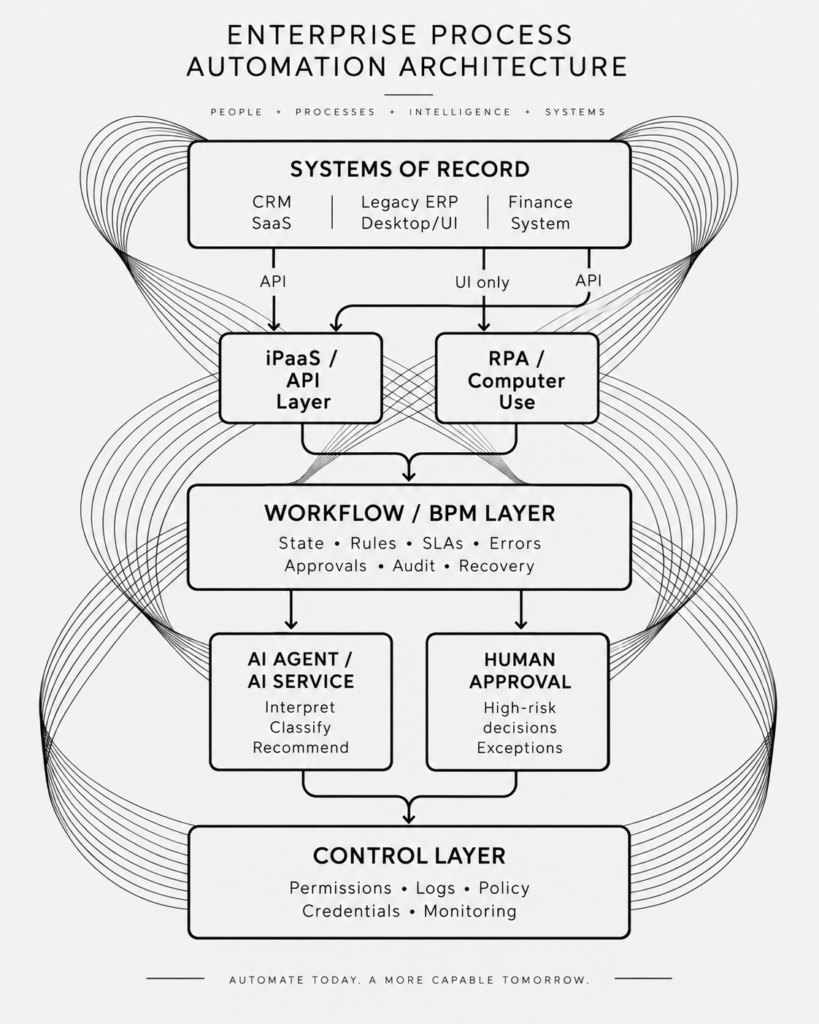
The critical feature of this architecture is separation of responsibility. The workflow layer knows where the process is. The integration layer knows how systems communicate. RPA knows how to operate an otherwise inaccessible interface. AI handles bounded judgment. Humans remain responsible for decisions that require explicit authorization.
When iPaaS or API Integration Should Be the Default
If a system exposes a stable and supported API, start there.
API-based integration gives the automation a machine-readable contract rather than forcing software to imitate a person clicking through an interface.
Typical iPaaS workloads include synchronizing customers between CRM and ERP systems, updating order statuses, creating tickets, moving structured data, responding to webhooks and connecting SaaS applications to internal services.
Current iPaaS platforms increasingly span application integration, APIs, data flows, event-driven processing and workflow capabilities. Workato describes modern iPaaS use cases across application, data, B2B, process and API integration.
The architectural rule should nevertheless remain simple:
If you can reliably call the system, do not automate the screen unnecessarily.
APIs generally make retries, testing, monitoring, authentication and structured error handling easier to manage than visual interaction. This is particularly important at scale.
An RPA flow that saves five minutes once per day may work perfectly well. The same pattern used for thousands of transactions across dozens of changing interfaces can become a significant maintenance burden.
Businesses evaluating where lightweight platforms stop being sufficient can also read Signs Your Business Has Outgrown No-Code Automation.
When RPA or Computer Use Is Appropriate
RPA becomes valuable when the enterprise reaches the edge of what APIs can access.
Consider an old desktop ERP containing inventory information. The system is business-critical, replacing it would be disruptive, and there is no supported API for updating a particular screen.
An RPA worker could:
- receive a structured job from the workflow engine;
- open the legacy application;
- authenticate using controlled credentials;
- locate the relevant account;
- enter the approved transaction;
- capture the confirmation number;
- return the result to the workflow.
That is a strong use of RPA. The bot performs a bounded action and returns control. Problems appear when organizations continually extend that bot until it becomes responsible for the entire business process.
Soon the automation is deciding what to do, tracking status, sending emails, handling approvals and maintaining its own duplicate version of process state.
At that point, the enterprise has accidentally built a workflow engine inside an RPA script. Use RPA as the hands, not necessarily the brain.
When BPM or Workflow Orchestration Is Required
BPM becomes important when the automation is no longer a task but a process.
For example: A sales order arrives today. Inventory is checked immediately. A credit approval may take four hours. A customer document might arrive tomorrow. A finance manager may approve an exception two days later. The transaction then continues.
Something must remember what happened. Modern orchestration engines are designed for this problem. Camunda describes process orchestration as coordinating people, systems and other endpoints across a business process and supports APIs, human tasks and AI agents within the same process model.
This layer can own:
- process state;
- retries;
- timeouts;
- escalations;
- approval tasks;
- exception paths;
- business rules;
- audit history;
- compensation logic;
- manual intervention.
A human approval is not merely another API call. The process may need to stop, persist its state and continue only after an authorized person acts. Workflow engines explicitly support this pattern: a process instance can wait at a human task and resume once that work has been completed. This is one of the key differences between automating tasks and orchestrating a business process.
Where AI Agents Fit Into Enterprise Process Automation
AI agents add something that traditional automation has historically struggled with: flexible interpretation. A deterministic integration can check whether invoice_total > 100000.
An AI system can interpret an email saying:
“We can approve the order, but only if delivery moves to the second week of October and the revised PO is received beforehand.”
That makes AI valuable for tasks such as:
- email classification;
- document interpretation;
- extracting intent from free-form text;
- summarization;
- researching an exception;
- selecting from approved tools;
- drafting responses;
- recommending a next step.
It does not follow that the entire workflow should become agentic. Processes containing financial transactions, regulatory obligations, customer permissions or irreversible actions still benefit from deterministic control points. Current process-orchestration architectures increasingly treat AI agents as participants inside a larger stateful process. Camunda, for example, describes handing an ambiguous step to an AI agent and then returning control to fixed process steps, with role-based controls and human checkpoints available around it.
That is a useful enterprise pattern:
Deterministic where the answer must be predictable. Agentic where judgment creates value. Human-controlled where authority matters.
For a deeper comparison, see AI Agents vs Traditional Automation.
Worked Example: Automating a Legacy Order-to-Cash Process
Consider a manufacturer with four core systems:
- Salesforce as its CRM;
- a 15-year-old ERP accessible primarily through a desktop interface;
- Microsoft 365 for documents and email;
- a modern cloud finance platform.
Today, a salesperson closes an opportunity and sends the order to operations. Operations manually enters the order into the ERP. If the customer’s credit limit is exceeded, someone emails a manager for approval. Once approved, operations returns to the ERP. Finance later creates the corresponding record in its accounting platform, while another employee sends confirmation documents to the customer. There are several automation technologies available, but forcing the whole process into one is unnecessary.
Step 1: CRM event
Salesforce generates an event when the deal reaches the appropriate stage.
Technology: API/iPaaS.
Structured data is retrieved and validated.
Step 2: Process instance
The orchestration engine creates an order-to-cash process instance.
Technology: BPM/workflow orchestration.
This becomes the authoritative process state.
Step 3: Legacy ERP entry
The ERP lacks the API needed for order creation.
Technology: RPA.
The workflow sends the approved data to a bot, which enters it into the ERP and returns the ERP order number.
Step 4: Document interpretation
A customer has attached a purchase order as a PDF.
Technology: document processing or AI.
The system extracts relevant details and checks them against the CRM order. If confidence is insufficient or a discrepancy is found, the workflow creates a human review task.
Step 5: Credit decision
A deterministic rule checks the customer’s available credit. Orders inside policy continue automatically. Exceptions are routed to the responsible manager.
Technology: BPM + human approval.
The AI may summarize the account or prepare the information needed for the manager, but it does not grant itself authority to bypass the approval.
Step 6: Finance integration
The accounting platform has a supported API.
Technology: iPaaS/API integration.
There is no reason to launch another screen bot simply because RPA was required earlier in the process.
Step 7: Customer communication
The process generates the correct documents and sends confirmation. If something fails, the workflow retains the order state and routes the exception instead of silently losing the transaction. This is enterprise process automation as an architecture rather than a collection of scripts.
Governance, Security and Observability
Automation increases operational leverage. Poorly governed automation increases operational risk just as quickly.
Every production process should make it possible to answer four questions:
Who can perform the action? What system did they act on? Why did the process allow it? What happened afterward?
That requires thinking beyond workflow design. Credentials should not be embedded in scripts. RPA workers should receive only the access required for their tasks. APIs should use controlled service identities and credential rotation. AI agents should receive an explicit set of tools and permissions instead of unrestricted access to internal systems.
High-risk actions should support approval boundaries. Execution should be observable from the business-process level rather than requiring operators to inspect five disconnected automation products to determine what happened.
Ownership matters too. Every automation needs a responsible business owner and a technical owner. Without this, the organization eventually accumulates workflows that nobody wants to change because nobody knows what else they might break.
Cost and Maintenance: Look Beyond the Initial Build
Automation projects are often compared based on implementation cost. That is only part of the equation. The more useful metric is total cost of ownership across the life of the process.
An RPA bot can sometimes be deployed quickly because it avoids changing the underlying application. But every UI dependency potentially becomes something that must be monitored and maintained.
An API integration may require more engineering upfront but provide a cleaner long-term interface.
A workflow engine introduces another architectural component but can remove duplicated state, ad hoc approval logic and recovery code scattered across individual integrations.
AI introduces model usage and evaluation costs as well as new requirements around permissions, output validation and monitoring.
The cheapest first implementation is therefore not automatically the cheapest architecture.
This is also why the decision between packaged automation and engineering should be made process by process. AIMEC covers that trade-off in No-Code vs Custom Business Automation and Custom Automation vs Zapier.
A Migration Roadmap for Fragile Manual Processes
Organizations do not need to replace their entire application estate before they can improve automation. A practical migration can happen incrementally.
1. Map the real process
Do not start with the automation tool. Document the current process from trigger to final outcome, including spreadsheets, email approvals, copy-and-paste work and exception handling.
2. Identify systems of record
Determine which application is authoritative for customers, orders, invoices, approvals and other critical entities. This helps prevent duplicate state.
3. Inventory interfaces
For every system, determine whether the required action can be performed through:
API → database → event → file exchange → UI
Prefer the most stable supported interface available.
4. Separate process logic from system interaction
The rule deciding that an order requires approval should not be buried inside the bot that types the order into an ERP screen. Keep business-process logic at the orchestration layer.
5. Replace manual handoffs incrementally
Automate one well-bounded section at a time and ensure failures are visible.
6. Introduce AI only where uncertainty exists
Do not replace reliable rules with an LLM merely because AI is available. Use AI where the input or decision genuinely requires interpretation.
7. Establish ownership before scaling
Determine who owns integrations, process definitions, bots, models, permissions and incident response.
8. Revisit legacy bridges over time
RPA may be the correct interface today. If the ERP later exposes a reliable API, replace the UI interaction without redesigning the entire business process. That is one of the primary benefits of a layered architecture.
Enterprise Process Automation Decision Checklist
Before choosing an automation platform, ask:
| Question | Architectural implication |
| Does the target system expose a supported API? | Prefer API/iPaaS integration |
| Is the required functionality available only through a UI? | Consider RPA/computer use |
| Does the process run across several systems or teams? | Introduce orchestration |
| Can the process wait hours or days for external events? | Use durable workflow state |
| Are approvals required? | Model explicit human tasks |
| Does the step require interpretation of documents or natural language? | Consider AI |
| Must the result always be predictable? | Keep the step deterministic |
| Can the action create financial, regulatory or customer risk? | Apply permissions and approval boundaries |
| Will application UIs change regularly? | Minimize dependence on RPA |
| Who owns failures at 2 AM? | Define operational ownership before launch |
| Can every decision and system action be audited? | Add centralized observability |
| Could the underlying system be replaced later? | Keep process logic independent from connectors |
If your architecture cannot answer these questions clearly, choosing a vendor is premature. You may also want to compare broader platform categories in AIMEC’s guide to Business Automation Platforms.
The Best Enterprise Automation Architecture Is Usually a Combination
The debate around iPaaS vs RPA vs BPM creates a false choice. These technologies solve different problems. iPaaS connects systems. RPA interacts with systems that cannot be connected cleanly. BPM coordinates the process across those systems. AI handles selected steps where rigid rules are insufficient. Human approvals retain authority where the business requires them.
For legacy-heavy enterprises, the goal should not be to hide every old application behind a growing collection of bots. Nor should the organization wait for a multi-year modernization program before automating anything.
The stronger approach is to isolate legacy constraints behind the correct integration layer while establishing a durable orchestration layer above them.
Then the underlying technology can change without rebuilding the business process every time.
That is the difference between automating work and building an enterprise automation architecture.
Map the Architecture Before You Buy the Platform
AIMEC helps businesses map existing processes, identify legacy and integration constraints, determine the correct automation layer for each step and establish governance and ownership before committing to tooling.
Instead of beginning with “Which automation platform should we buy?”, the assessment begins with a more useful question:
“How should this process actually work?”
From there, the right mix of APIs, iPaaS, RPA, orchestration, AI and human approval becomes much easier to define.
Talk to AIMEC about an enterprise automation architecture and discovery assessment.
Frequently Asked Questions
What is enterprise process automation?
Enterprise process automation is the use of integration, workflow, RPA, AI and related technologies to execute and coordinate business processes across multiple systems and human participants.
What is the difference between iPaaS and RPA?
iPaaS generally connects systems through APIs and other machine-readable interfaces. RPA generally interacts with applications through the user interface, making it particularly useful when legacy applications do not expose suitable APIs.
Is RPA good for legacy system automation?
Yes. RPA can be effective when a legacy system exposes only a graphical or desktop interface. It should generally be treated as a controlled integration adapter rather than automatically becoming the orchestration layer for the entire business process.
What is the difference between BPM and RPA?
RPA automates interactions and tasks. BPM or workflow orchestration manages the broader business process, including state, branching, approvals, waiting, failures and coordination between people and systems.
Can iPaaS replace BPM?
Sometimes lightweight workflows can be handled entirely inside an integration platform. Complex or long-running processes may still benefit from a dedicated orchestration layer, particularly when process state, human tasks, SLAs and exception handling are important.
Can AI agents replace RPA?
Not universally. AI-powered computer use may make UI automation more flexible, but it does not remove the underlying architectural weakness of relying on a graphical interface. Where a stable API exists, deterministic system integration will often remain preferable.
Should AI agents control enterprise workflows?
Agents can control bounded portions of a workflow where flexible reasoning adds value. Critical business rules, permissions, process state and high-risk actions should still be explicitly governed.
Do we need to replace legacy systems before automating them?
No. A layered architecture can use APIs where available and RPA where necessary while keeping orchestration independent from the legacy application. This can improve the current process while leaving room for gradual modernization.

Steven Walgenbach is an AI Engineer specializing in AI agents, large language models, retrieval-augmented generation and business process automation. He designs and builds practical AI systems that connect with existing tools, data sources and workflows to help businesses reduce manual work, improve decision-making and scale more efficiently.
His work includes developing multi-agent systems, private and locally hosted AI solutions, custom knowledge assistants, SEO automation pipelines and LLM-powered applications using Python, LangGraph, CrewAI, the OpenAI Agents SDK and other modern AI frameworks.
Through AIMEC, Steven helps businesses move beyond AI experimentation and identify practical opportunities where artificial intelligence can deliver measurable operational and commercial value.