A business automation system is not a single piece of software.
It is the architecture that connects the systems where your business stores information, the workflows that move work forward, the integrations that transfer data, and increasingly, the AI agents that interpret situations and decide what should happen next. This distinction matters.
A CRM might contain your customer data. An ERP may hold orders, invoices and inventory. A workflow engine can coordinate a process across both. APIs move information between them. RPA can operate software that does not have a usable API. AI agents can interpret unstructured information or make context-dependent decisions.
But none of those components should automatically become responsible for everything. The most effective business automation systems give each layer a clearly defined job.
What Is a Business Automation System?
A business automation system is a connected set of technologies used to execute, coordinate and monitor business processes with less manual intervention.
A modern automation stack will typically contain several layers:
- CRM and ERP systems that own authoritative business data.
- Workflow engines that control process logic and state.
- APIs or iPaaS platforms that transfer data between systems.
- RPA or computer-use tools that interact with systems lacking suitable APIs.
- AI agents that interpret context, reason about exceptions and perform approved actions.
- Human approval controls for decisions that require oversight.
- Audit and observability systems that record what happened and why.
The important point is that automation does not replace these systems with one giant platform. It coordinates them. That is why comparing individual automation tools without understanding the underlying architecture can be misleading. A workflow platform, CRM, AI agent and ERP may all be described as “automation software,” but they solve very different problems.
For a broader comparison of available technology categories, see AIMEC’s guide to business automation platforms.
Business Automation Architecture
A useful way to think about the architecture is to separate data ownership, process ownership, integration and decision-making.
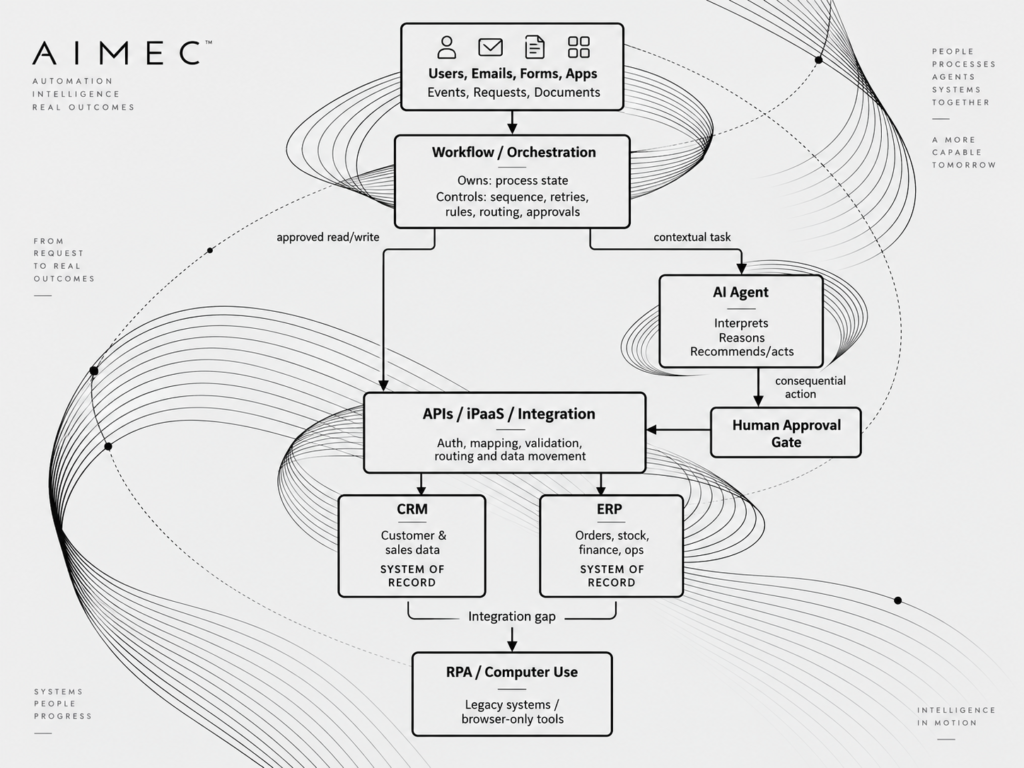
All actions → audit logs, permissions, monitoring and observability
The boundaries are as important as the connections.
Your CRM should normally remain authoritative for customer and sales records. Your ERP should remain authoritative for financial, inventory and operational records. The workflow layer should know where a process currently is, without becoming an unnecessary duplicate database. An AI agent should usually operate through controlled interfaces instead of receiving unrestricted permission to modify every connected system.
By doing that, the architecture is easier to secure, debug and scale.
CRM and ERP: Your Systems of Record
CRM and ERP platforms sit at the foundation of many business process automation systems because they contain the data the rest of the automation stack depends on.
A CRM might own:
- Contacts
- Accounts
- Leads
- Opportunities
- Sales activities
- Customer interactions
An ERP might own:
- Products
- Inventory
- Purchase orders
- Sales orders
- Invoices
- Supplier records
- Accounting information
The key word is own.
If Salesforce is the authoritative source for an opportunity, your workflow platform should not maintain a competing version of that opportunity unless there is a specific architectural reason to do so. Duplicating state across several automation platforms creates one of the most common problems in business automation: nobody knows which version of the data is correct. Automation should move and act on business data without destroying clear ownership.
Workflow Engines: The Orchestration Layer
If CRM and ERP systems tell you what the business knows, the workflow engine tells you what should happen next.
A workflow might say:
- A qualified opportunity reaches a specific sales stage.
- Check whether the customer already exists in the ERP.
- Create the account if necessary.
- Validate product availability.
- Request approval if the discount exceeds 15%.
- Create the sales order.
- Notify the account manager.
- Schedule an onboarding task.
The workflow engine owns the process state. It knows whether a task is waiting, completed, rejected, retried or escalated. This is where deterministic business rules belong.
For example:
If an invoice is above R100,000, require finance approval.
That is predictable logic. It does not require an AI model. A common mistake in AI business automation systems is giving AI responsibility for deterministic rules that traditional workflow software can execute more reliably. Use AI where interpretation is valuable. Use workflows where predictability is valuable.
APIs and iPaaS: The Integration Layer
A workflow is only useful if it can reach the systems involved. That is the job of APIs and integration platforms.
An API allows one application to request information or perform an operation in another application. An integration platform as a service, or iPaaS, adds capabilities such as authentication, transformation, routing, connectors and monitoring.
For example:
Workflow

   ↓

Integration layer

   ├── GET customer from CRM

   ├── GET inventory from ERP

   ├── POST approved sales order

   └── POST notification to communications platform
Separating orchestration from integration also makes systems easier to maintain.
If an ERP API changes, the integration layer can be updated without redesigning the entire business process.
AI agents should generally use these controlled interfaces too. You can learn more in AIMEC’s guide to how AI agents connect to business software.
RPA and Computer Use: Bridging the Gaps
Not every business system has a good API. Some older platforms expose limited integrations. Others may only be accessible through a desktop interface or web portal. This is where robotic process automation and computer-use systems remain useful.
An automation could, for example:
- Receive a task from the workflow engine.
- Open a legacy supplier portal.
- Log in using controlled credentials.
- Enter the required information.
- Retrieve a reference number.
- Return the result to the workflow.
RPA should generally be treated as a bridge rather than your default integration strategy. User interfaces change. Buttons move. Pages load differently. Sessions expire. API integration is normally more robust when one exists.
AI Agents: The Contextual Decision and Action Layer
AI becomes most useful when a process cannot be reduced to a simple set of predefined rules.
Imagine a customer emails:
We received 18 of the 20 units we ordered and three of those were damaged. We urgently need enough replacements for a customer installation on Monday.
Traditional automation can detect an incoming email. An AI agent can go further. It can extract the order reference, understand the shortage, identify the damaged quantity, determine the urgency and decide which systems need to be queried.
The agent might then:
- Retrieve the order from the ERP.
- Check current inventory.
- Review the customer’s CRM record.
- Identify previous support cases.
- Prepare a replacement recommendation.
- Trigger the appropriate workflow.
- Ask for human approval if the replacement exceeds a threshold.
The AI provides interpretation and flexible reasoning. It does not need to become the system of record. This architectural distinction is one of the most important principles when adding agents to existing business systems. For additional practical use cases, see AIMEC’s AI automation examples.
Human Approval, Permissions and Auditability
Automation becomes more valuable as it gains permission to act. It also becomes more dangerous. A system that summarizes an invoice carries relatively little operational risk. A system allowed to approve it, release payment and update accounting records has a very different risk profile. For consequential actions, businesses need clearly defined controls.
These can include:
- Role-based access.
- Per-tool permissions.
- Approval thresholds.
- Read-only versus write access.
- Transaction limits.
- Escalation rules.
- Full action logs.
- Identity tracking.
- Before-and-after state capture.
AI agents can be allowed to propose an action without automatically receiving permission to execute it.
For example:
AI detects unusual invoice

        ↓

AI gathers supporting context

        ↓

AI recommends "hold payment"

        ↓

Finance manager approves

        ↓

Workflow performs ERP update

        ↓

Action recorded in audit log
This is often a better design than allowing the model to write directly into the ERP. See AIMEC’s guide to human-in-the-loop approval for safer AI for a deeper look at this control pattern.
Example 1: Lead-to-Order Automation
Consider a business selling equipment to corporate customers. A prospect submits an enquiry through the website.
Step 1: CRM
The prospect is created as a lead in the CRM. The CRM remains the authoritative source for the lead, account and opportunity.
Step 2: AI qualification
An AI agent reviews the enquiry and extracts information such as:
- Requested products
- Company
- Quantity
- Location
- Deadline
- Buying intent
The agent can enrich the workflow without taking ownership of the customer record.
Step 3: Workflow orchestration
The workflow engine decides what happens next. A high-value opportunity might be routed to an account executive while a smaller standard request could continue through an automated quoting process.
Step 4: ERP lookup
The integration layer checks:
- Product availability
- Pricing
- Customer credit status
- Lead times
The ERP remains authoritative for this data.
Step 5: Approval
If the requested discount is above the permitted threshold, the workflow pauses for human approval.
Step 6: Order creation
Once the customer accepts the quote, the workflow creates the order in the ERP and updates the opportunity in the CRM. The result is not “an AI sales tool.” It is a connected CRM ERP workflow automation architecture in which each system performs the function it is best suited to handle.
Example 2: Invoice Exception Handling
Invoice processing demonstrates why deterministic automation and AI often work best together. A supplier invoice enters the system. Standard invoices can follow a deterministic process:
Invoice received

      ↓

Supplier found?

      ↓

Purchase order found?

      ↓

Amounts match?

      ↓

Approval available?

      ↓

Post to ERP
But exceptions are harder. Suppose the invoice total is 8% above the purchase order because the supplier added an unexpected freight charge.
An AI agent could:
- Interpret the invoice.
- Compare it with the purchase order.
- Identify the freight discrepancy.
- Retrieve previous invoices from the supplier.
- Review relevant purchasing information.
- Prepare an explanation.
The workflow engine then applies company policy. If the difference is within an approved tolerance, processing can continue. If it exceeds that tolerance, a finance employee receives the AI-generated explanation and approves or rejects the exception. The workflow controls the process. The AI helps understand the exception. The ERP owns the financial record.
Example 3: Customer Support Escalation
Customer support provides another useful example.
A customer submits:
This is the third time the replacement unit has failed. Production is now stopped.
An ordinary ticketing workflow could detect the words “replacement” and “failed.” An AI agent can understand something more important: this is potentially a serious customer escalation.
The system could:
- Retrieve the customer’s previous support tickets.
- Read the account record from the CRM.
- Check the affected orders in the ERP.
- Determine whether previous replacements were shipped.
- Assess severity.
- Prepare an incident summary.
- Recommend escalation to an account manager.
- Start the appropriate support workflow.
If issuing a refund or replacement requires authorization, the system inserts an approval step. Again, AI handles interpretation. The workflow handles process state. The CRM and ERP remain authoritative.
Build vs Buy vs Integrate
Businesses do not necessarily need to build an entire automation platform themselves.
The better question is which parts should be purchased, which should be integrated and which genuinely require custom engineering.
| Approach | Best suited to | Main limitation |
| Buy | Common processes with well-supported SaaS tools | May force the business into the vendor’s workflow |
| No-code/low-code | Straightforward integrations and departmental automation | Complexity can become difficult to manage at scale |
| Integrate | Businesses with established CRM, ERP and operational platforms | Requires disciplined architecture |
| Custom build | Unique workflows, advanced AI, proprietary processes or strict control requirements | Greater engineering responsibility |
| Hybrid | Most established businesses | Requires clear boundaries between components |
In practice, a hybrid approach is often the most sensible.
A company might keep its existing CRM and ERP, introduce a workflow platform, build several API integrations and add a custom AI layer only where it creates meaningful value.
AIMEC covers this choice in more detail in No-Code vs Custom Business Automation.
Common Business Automation Failure Modes
Connecting more systems does not automatically create better automation. Several architectural mistakes repeatedly cause problems.
1. Duplicate data
Multiple platforms maintain their own copy of the same customer, order or process information. Eventually, they disagree.
Better approach: Define the authoritative system for every important business entity.
2. Conflicting state
The CRM says an opportunity is complete while the workflow thinks it is still processing and the ERP says no order exists.
Better approach: Separate business data ownership from workflow state and explicitly define synchronization events.
3. Brittle automations
A workflow depends on dozens of fragile UI actions or undocumented dependencies. One application change breaks the process.
Better approach: Prefer stable APIs and isolated integration layers where possible.
4. Uncontrolled AI writes
An AI agent receives broad write access to CRM, ERP, email, finance and operational systems. A reasoning error can therefore become an operational error.
Better approach: Give agents the minimum permissions required and route consequential actions through validation or approval.
5. Automating a broken process
Automation can make a bad process run faster. It does not necessarily make it better. Before automating a workflow, determine whether each existing step is actually necessary.
A Practical Rollout Sequence
Businesses do not need to implement the entire architecture at once. A safer approach is to build the automation stack incrementally.
Phase 1: Map your systems of record
Identify where the authoritative version of each major data object lives.
For example:
- Customers → CRM
- Opportunities → CRM
- Inventory → ERP
- Invoices → ERP
- Support tickets → helpdesk
Phase 2: Map the workflow
Document one process from start to finish. Include human decisions, exceptions, approvals and handoffs.
Phase 3: Connect the systems
Build API or iPaaS integrations between the systems involved. Avoid unnecessary duplication of data.
Phase 4: Automate deterministic steps
Add workflow rules for predictable actions. These might include routing, notifications, status transitions, validations and scheduled tasks.
Phase 5: Add human approval gates
Identify actions that can create financial, operational, security or customer risk. Require approval where appropriate.
Phase 6: Introduce AI
Now look for steps that require:
- Reading documents
- Understanding emails
- Classifying ambiguous requests
- Combining context from several systems
- Generating recommendations
- Handling exceptions
Those are strong candidates for AI.
Phase 7: Expand agent permissions carefully
Start with read access. Then allow recommendations. Then low-risk writes. Only expand autonomy once you have the monitoring, permissions and audit trail required to control it.
Business Automation System Decision Checklist
Before selecting or redesigning a business automation solution, ask:
- What system owns each important data object?
- Which platform owns workflow state?
- Which steps are deterministic?
- Which steps genuinely require interpretation or reasoning?
- Are APIs available for the systems involved?
- Where would RPA be required?
- What information can an AI agent read?
- What can it modify?
- Which actions require approval?
- How are credentials and permissions managed?
- Can every automated action be audited?
- What happens when an integration fails?
- How are retries handled?
- How are duplicate transactions prevented?
- Can a human recover the process manually?
- Will the architecture still make sense when more workflows are added?
If those questions do not have clear answers, selecting another automation platform may not solve the underlying problem. The architecture needs to come first.
Build the Automation System, Not Another Automation Silo
The next generation of business automation is not simply about adding more AI. It is about combining existing business systems intelligently. CRM and ERP platforms continue to hold authoritative data.
Workflow engines control processes. APIs connect systems. RPA fills integration gaps. AI agents handle interpretation, reasoning and flexible action. Humans remain involved where judgement, accountability or risk requires them.
When these layers are designed separately but connected deliberately, businesses can automate increasingly complex operations without surrendering control of their data or processes.
That is the difference between deploying another automation tool and building an automation system.
AIMEC helps businesses map their existing CRM, ERP, workflow and integration stack, identify automation gaps, and determine where conventional workflows, integrations or AI agents should be introduced.
If your organisation already has several business systems but they still depend on manual handoffs between them, the first step is not necessarily replacing them. It is understanding how they should work together.
Frequently Asked Questions
What is a business automation system?
A business automation system is a combination of software, integrations and process controls used to execute business workflows automatically. It can include CRM, ERP, workflow engines, APIs, integration platforms, RPA and AI agents.
Is CRM a business automation system?
A CRM can automate parts of sales and customer management, but it is usually one component of a wider automation architecture. In many businesses, the CRM acts primarily as the system of record for customer and sales information.
What is the difference between ERP and workflow automation?
An ERP stores and manages operational business data such as inventory, orders and finance. A workflow engine coordinates the sequence of actions involved in a process. The ERP owns the business record, while the workflow engine typically owns the process state.
Where do AI agents fit into business automation?
AI agents are most useful where a workflow requires contextual understanding, flexible reasoning or interpretation of unstructured information. They should usually interact with existing business systems through controlled tools, APIs and workflow processes rather than replacing the systems of record.
Can AI replace workflow automation?
Usually not. Traditional workflows are better for predictable, deterministic rules. AI is more valuable for ambiguous or context-dependent tasks. A mature architecture uses both.
Do businesses still need RPA if they have AI agents?
Sometimes. RPA or computer-use technology remains useful when a system does not provide a usable API. AI can make these interactions more flexible, but UI-based automation is generally more fragile than direct system integration.
Should AI agents be allowed to update CRM and ERP systems?
They can be, but permissions should be deliberately constrained. Low-risk changes may be automated. Financial, destructive, security-sensitive or otherwise consequential actions may require deterministic validation or human approval before they are committed.

Steven Walgenbach is an AI Engineer specializing in AI agents, large language models, retrieval-augmented generation and business process automation. He designs and builds practical AI systems that connect with existing tools, data sources and workflows to help businesses reduce manual work, improve decision-making and scale more efficiently.
His work includes developing multi-agent systems, private and locally hosted AI solutions, custom knowledge assistants, SEO automation pipelines and LLM-powered applications using Python, LangGraph, CrewAI, the OpenAI Agents SDK and other modern AI frameworks.
Through AIMEC, Steven helps businesses move beyond AI experimentation and identify practical opportunities where artificial intelligence can deliver measurable operational and commercial value.