So, what is n8n? n8n is a fair-code, source-available workflow automation platform for connecting apps, APIs, databases and AI models in visual workflows. Teams can use n8n Cloud or self-host it, combine no-code nodes with JavaScript or Python, and build everything from simple business automations to multi-step AI-agent workflows.
Its main appeal is control. Instead of limiting a workflow to fixed trigger-action recipes, n8n lets you branch, transform data, call arbitrary APIs, run code and choose where the platform is hosted. That flexibility makes it particularly useful for technical teams and businesses treating automation as part of their operating infrastructure.
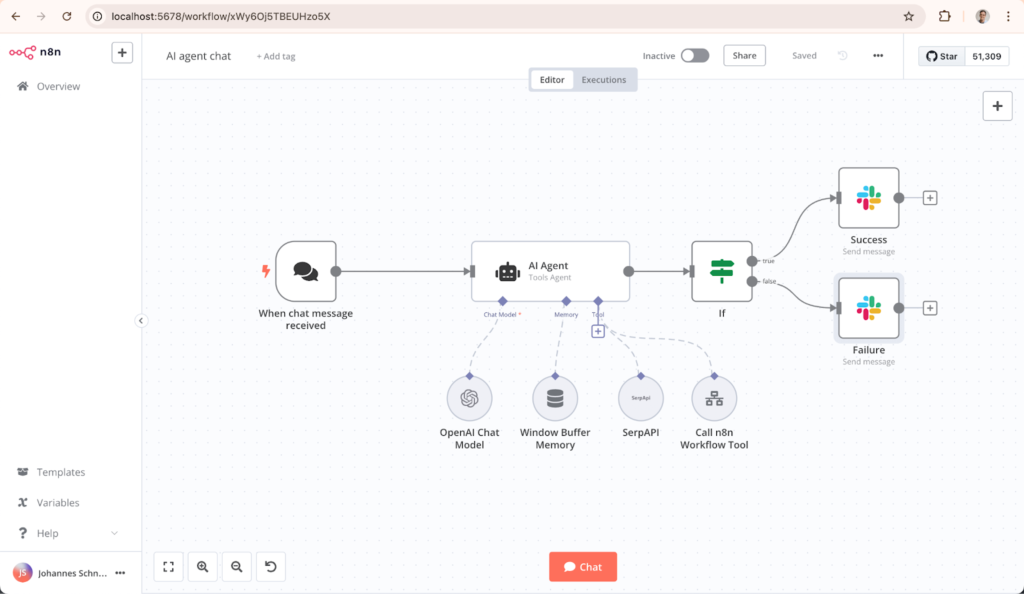
n8n visual workflow editor. Source: n8n.
What Does n8n Stand For and How Do You Pronounce It?
n8n is pronounced “n-eight-n.” The name comes from “nodemation,” a combination of “node” and “automation.” The “8” represents the eight letters between the first and last “n.” The name reflects the product’s core model: connect nodes together to automate a process.
How n8n Works
An n8n workflow is a connected sequence of nodes. A node can start the workflow, fetch data, transform it, apply logic, call an API, run code, invoke an AI model or take an action in another system. Data moves from node to node until the workflow finishes.
A typical workflow follows a pattern such as trigger → data transformation → decision or enrichment → action → logging or follow-up. For example, a new website lead could trigger a workflow that validates the data, enriches the company record, routes the lead by territory, creates or updates a CRM record and alerts the right salesperson.
- Trigger nodes start a workflow from an event such as a webhook, schedule, new record or app event.
- Action nodes perform work such as sending a message, updating a CRM, writing to a database or calling an API.
- Data transformation steps reshape, filter, merge or map information between systems.
- Logic can branch a workflow, loop over records, wait for an event or route items based on conditions.
- Code nodes let technical teams add JavaScript or Python when visual nodes are not enough.
- AI nodes can call models, use tools, retrieve context or let an agent decide which action to take next.
n8n’s official integrations directory currently lists more than 2,000 integrations, and its community library contains more than 12,000 workflow templates. The exact counts change frequently, so the official directories are a better reference than a static number in a buying decision.
What Is a Workflow Execution?
A workflow execution is one complete run of an n8n workflow. This matters because n8n’s paid plans are priced primarily around executions rather than charging for every individual step in a workflow.
If a 20-node workflow runs once, n8n counts that as one execution. If the same workflow runs 1,000 times in a month, that is 1,000 executions. This is different from platforms that meter each successful action, operation or module separately.
For a business evaluating cost, the useful question is therefore not only “How many steps are in the automation?” but also “How often will this workflow run?” A daily report might use roughly 30 executions a month, while a webhook-driven support or ecommerce workflow could run thousands of times.
n8n Cloud vs Self-Hosted
n8n can be used as a managed cloud service or deployed on infrastructure controlled by your business. The core workflow-building experience is similar, but the operational responsibility is very different.
| Factor | n8n Cloud | Self-hosted n8n |
|---|---|---|
| Infrastructure | Managed by n8n | Managed by your team or hosting provider |
| Setup | Fastest route to production | Requires deployment and configuration |
| Maintenance | Updates and platform operations are handled for you | You own upgrades, backups, security, monitoring and capacity |
| Data/control | Less infrastructure control | Greater control over hosting, network placement and data paths |
| Custom infrastructure | Limited to the managed environment | Can fit private networks, custom databases and internal services |
| Best fit | Teams that want n8n without operating it | Technical teams that need control or private deployment |
Self-hosting is attractive when privacy, network access, infrastructure policy or local model deployment matters. It also creates real operational work: credential security, backups, upgrades, database management, observability, scaling and disaster recovery become your responsibility.
If you are evaluating self-hosted automation as part of a wider architecture, see AIMEC’s guide to business automation systems.
n8n Pricing
As of September 26, 2026, n8n’s official pricing page shows the following headline plans when billed annually. Pricing and included usage can change, so confirm the live figures on n8n’s pricing page before purchasing.
| Plan | Deployment | Headline annual-billing price | Included monthly executions | Selected current details |
|---|---|---|---|---|
| Starter | n8n Cloud | €20/month | 2,500 | Unlimited users; 5 concurrent executions; 2,300 AI Assistant credits/month |
| Pro | n8n Cloud | €50/month | 10,000 | 3 shared projects; 20 concurrent executions; up to 13,700 AI Assistant credits/month |
| Business | Self-hosted | €667/month | 40,000 | 6 shared projects; SSO/SAML/LDAP; environments; Git version control; scaling options |
| Enterprise | Cloud or self-hosted | Contact sales | Custom | Enterprise governance, higher concurrency, longer insights history, external secrets and dedicated support |
n8n also provides a standard self-hosted Community Edition. The Community Edition can be appropriate for internal use when its feature set and licensing terms fit the use case, but self-hosting is not the same as “free operations”: you still pay for the infrastructure and engineering effort required to run it.
n8n’s AI Assistant uses a separate credit allowance on supported Cloud plans. Self-hosted AI functionality can also use provider credentials or local models, so model/API costs should be considered separately from workflow-execution pricing.
n8n and AI Agents
n8n now goes beyond deterministic workflow automation. Its AI tooling includes model nodes, memory and retrieval components, agent nodes, tools, vector-store integrations and human-in-the-loop patterns. This lets a workflow combine predictable business logic with model-based reasoning.
A useful distinction is that a normal automation follows logic you define in advance, while an AI agent can choose which tool or action to use based on the task and context. In production, the strongest designs often combine both approaches: let the model handle interpretation or ambiguous decisions, then hand important actions back to deterministic workflow steps and approval gates.
For example, an inbound support workflow could classify a request with an LLM, retrieve account context, let an agent decide whether it needs billing or technical data, then require human approval before a high-impact action such as a refund or account change. n8n supports human review steps for AI tool calls in compatible nodes.
n8n can also work with locally hosted models such as Ollama. AIMEC’s practical guide on using n8n workflows as tools for Ollama shows how this pattern can connect private models to real business actions. For the architectural trade-off, see AI agents vs automation.
Common Business Use Cases
n8n is broad enough to sit behind many different business processes. The best use cases are usually processes that cross multiple systems, need logic between steps or benefit from a mix of APIs, code and AI.
- Lead routing: capture leads, validate and enrich them, score them, update a CRM and notify the correct salesperson.
- Document processing: ingest invoices, contracts or forms; extract structured data; validate it; route exceptions; and write results into ERP or finance systems.
- CRM and ERP synchronization: move or reconcile records across sales, finance, support and operational systems.
- Customer support: classify tickets, retrieve account context, draft responses, escalate exceptions and create follow-up tasks.
- Reporting: collect data from multiple sources, transform it, generate summaries and distribute scheduled reports.
- AI content and research: coordinate search, retrieval, model calls, approvals and publishing steps while keeping deterministic controls around the process.
- Internal tools: expose webhooks or forms that trigger controlled processes across APIs and internal systems.
For organizations moving from isolated workflows toward coordinated operations, the broader design question becomes how automation fits the business architecture. AIMEC covers that in enterprise process automation.
n8n vs Zapier vs Make
n8n, Zapier and Make can all automate multi-app workflows, but they optimize for different users and operating models. The right choice depends on who will build the workflows, how much control you need and how you want usage to be measured.
| Platform | Typical deployment | Usage model | Technical flexibility | Best fit |
|---|---|---|---|---|
| n8n | Managed cloud or self-hosted | Workflow executions | High: visual nodes, APIs, JavaScript/Python, custom nodes and infrastructure control | Technical teams, API-heavy workflows, AI automation and private deployment |
| Zapier | Vendor-hosted cloud | Tasks; successful action steps generally consume task usage | Low to medium, with code and custom tooling available | Teams prioritizing speed, simplicity and very broad SaaS connectivity |
| Make | Vendor-hosted cloud | Credits/operations | Medium: strong visual routing, transformations and code options | Teams building visual multi-step scenarios with complex data movement |
Zapier currently describes a library of more than 9,000 apps and measures Zap usage in tasks. Make positions itself around a visual automation platform with more than 3,000 integrations and credit-based usage. n8n’s differentiator is less about having the largest app directory and more about combining a visual builder with code, execution-based pricing and the option to run the platform yourself.
For a more detailed decision framework, see AIMEC’s Zapier vs Make vs n8n comparison or the broader guide to top business automation platforms.
n8n Licensing: Sustainable Use License Explained
n8n is often described casually as “open source,” but that is not technically accurate for the main n8n codebase. n8n describes the product as fair-code, and the repository is primarily available under its Sustainable Use License. In practical terms, the source code is available, but the license includes commercial-use restrictions.
The current license permits use and modification for your own internal business purposes, as well as non-commercial or personal use. It restricts some forms of redistributing, reselling or building a commercial product or service whose value substantially derives from n8n. Some enterprise-specific source files are covered by separate enterprise licensing.
That distinction matters if you are planning to host n8n for customers, embed it into a commercial product, resell access or use it as a managed service. Review the current n8n license in the official repository and n8n’s licensing guidance for your exact architecture. This article is a technical overview, not legal advice.
When n8n Is a Good Fit
- Your workflows depend heavily on APIs, webhooks, databases or custom logic.
- Developers or technically capable operators will own the automation environment.
- You want the option to self-host or place automation inside a private network.
- You need to combine deterministic workflows with AI models, tools and agents.
- You want complex multi-step workflows without paying separately for every node or action inside one execution.
- Automation is becoming operational infrastructure rather than a few isolated productivity shortcuts.
These are also the situations where n8n tends to fit well inside a larger automation stack rather than acting as a standalone “no-code app.”
When n8n Is Not the Right Tool
n8n is flexible, but flexibility creates responsibility. It can be the wrong choice when the organization does not have the technical capacity to operate or govern what it builds.
- Very simple SaaS automation: if a nontechnical team only needs a few trigger-action workflows, a simpler cloud-first tool may reduce setup and maintenance.
- No owner for operations: self-hosting without clear responsibility for updates, backups, secrets, monitoring and incident response creates avoidable risk.
- Complex enterprise governance without the matching plan or architecture: large organizations may need SSO, environment separation, version control, external secrets, auditability and support. Those requirements should be mapped to the appropriate n8n edition before rollout.
- High-volume systems with no capacity planning: n8n can scale, but self-hosted throughput, queues, databases, workers and execution retention still need engineering.
- Processes dominated by desktop UI automation: if the work mostly happens in legacy desktop interfaces rather than APIs, an RPA platform may be a better primary tool.
The decision should be based on the process, operating model and governance requirements rather than on feature count alone.
Getting Started
The simplest route is to choose between n8n Cloud and a self-hosted deployment, then build one narrow workflow that has a measurable operational purpose. Avoid starting with a sprawling “automate everything” project.
- Choose deployment. Use n8n Cloud if you want the managed path. Choose self-hosting if infrastructure and data control justify the operational overhead.
- Define one workflow. Write down the trigger, inputs, decisions, systems touched, expected output and failure path.
- Connect credentials. Use least-privilege accounts and separate development credentials from production where possible.
- Build the deterministic path first. Make the core data movement, validation and error handling reliable before adding AI.
- Add AI only where reasoning helps. Classification, extraction, summarization and tool selection can be good candidates; financial, destructive or customer-impacting actions may need approval gates.
- Measure executions and failures. Track how often the workflow runs, where it fails and what it costs to operate.
For a local developer test, n8n supports installation methods including Docker and npm. The official n8n documentation is the best source for current installation commands and version-specific guidance.
Frequently Asked Questions
Is n8n free?
A standard self-hosted Community Edition is available, so you can run n8n on your own infrastructure without buying a Cloud subscription when your use case fits the license. You still pay for hosting, maintenance and any external services or AI APIs you use. n8n Cloud is a paid managed service with a trial rather than a permanent free Cloud tier.
Is n8n open source?
Not in the conventional OSI-approved sense. n8n is source-available/fair-code and the main codebase is licensed under the Sustainable Use License, which allows broad internal and non-commercial use but includes commercial restrictions.
Can n8n be self-hosted?
Yes. Self-hosting is one of n8n’s main differentiators. It can be deployed on infrastructure you control, which can be useful for private networks, internal APIs, local AI models and stricter data-control requirements.
Is n8n good for AI agents?
It can be. n8n provides AI Agent nodes, model integrations, tools, memory/retrieval components and human-in-the-loop patterns. It works best when agent reasoning is combined with deterministic workflow logic, permissions and approval steps rather than allowing an LLM to control every action without constraints.
How is n8n priced?
Paid n8n plans are primarily based on the number of workflow executions per month. One complete workflow run counts as one execution regardless of how many steps are inside that run. Plan features, concurrency and AI Assistant credit allowances vary by tier.

Steven Walgenbach is an AI Engineer specializing in AI agents, large language models, retrieval-augmented generation and business process automation. He designs and builds practical AI systems that connect with existing tools, data sources and workflows to help businesses reduce manual work, improve decision-making and scale more efficiently.
His work includes developing multi-agent systems, private and locally hosted AI solutions, custom knowledge assistants, SEO automation pipelines and LLM-powered applications using Python, LangGraph, CrewAI, the OpenAI Agents SDK and other modern AI frameworks.
Through AIMEC, Steven helps businesses move beyond AI experimentation and identify practical opportunities where artificial intelligence can deliver measurable operational and commercial value.