
If you want to run an LLM locally, Ollama is generally the better choice when you want a convenient local model service with minimal runtime management. llama.cpp becomes more attractive when you need direct control over inference, hardware allocation, context configuration and the model-server lifecycle. For the broader business and infrastructure picture, our local and private AI guide covers how self-hosted AI fits into private deployment strategies.
AIMEC’s own benchmark supports that distinction—but not because llama.cpp was dramatically faster.
Using the exact same Qwen2.5-Coder-7B-Instruct Q5_K_M GGUF on an Nvidia RTX 2050 with 4 GB of VRAM, AIMEC measured median generation throughput of 10.73 tokens per second with Ollama and 11.20 tokens per second with llama.cpp at an 8192-token context. That is only around a 4.4% advantage for llama.cpp in this particular test.
The more important differences appeared in resource use and operational control.
| Choose Ollama if… | Choose llama.cpp if… |
| You want the fastest route to a working local model service | You need direct control over inference behaviour |
| Model management convenience matters | You need to tune context, memory or GPU offload |
| Your application mainly needs a reliable local API | Inference is becoming part of your infrastructure |
| You do not want to supervise model processes yourself | You want explicit server lifecycle control |
| You frequently experiment with different local models | You are deploying on constrained or specialised hardware |
What Ollama and llama.cpp Actually Are
It is easy to think of Ollama and llama.cpp as two completely separate inference engines. The relationship is more nuanced.
llama.cpp is a lower-level inference project built around ggml. It can run models directly, expose them through a server, and gives operators extensive control over how inference is configured.
Its current serving interface exposes parameters including context size, GPU-layer offload and parallel request slots. GPU offload can be specified directly or left on automatic selection.
Ollama operates at a higher level.
After installation, Ollama runs a local model service and exposes its native API at:
http://localhost:11434/api
It also provides official Python and JavaScript libraries.
Ollama and llama.cpp are not architecturally unrelated, either. Current Ollama source pins a llama.cpp version, fetches that source during its build process and builds llama-server as part of its inference infrastructure. Ollama then adds its own compatibility, model-management, scheduling and application-facing behaviour around that lower-level runtime.
That means describing Ollama as “just a wrapper around llama.cpp” is too simplistic.
A better way to think about the difference is:
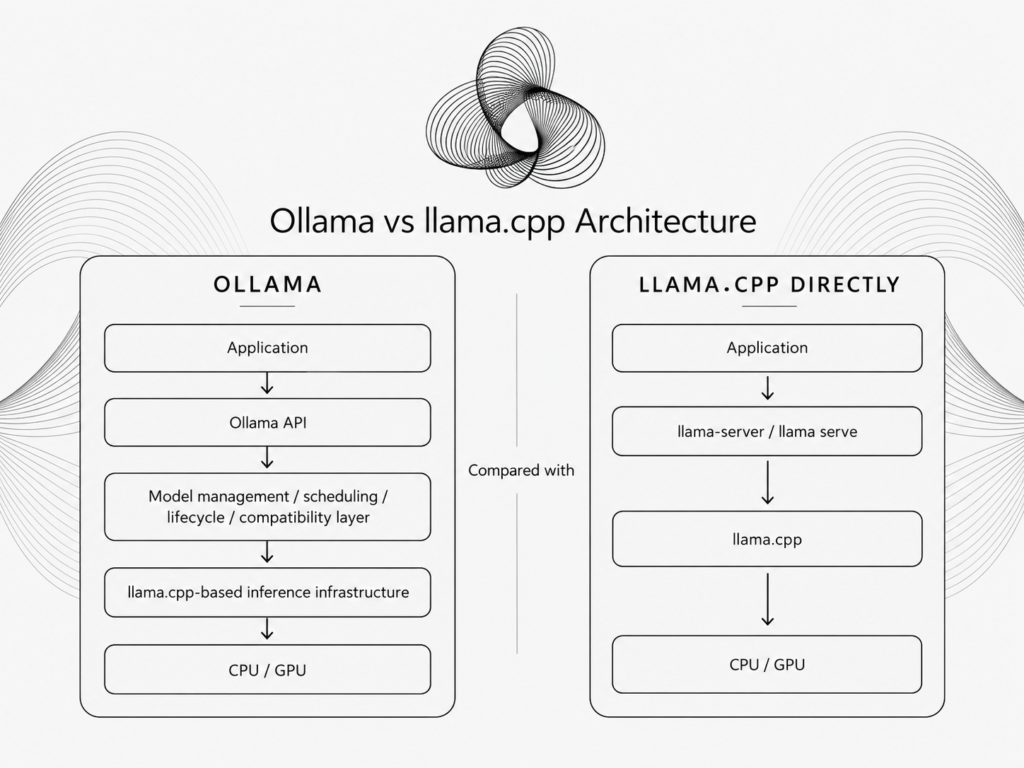
The real decision is therefore not simply which project is better.
It is how much of the inference layer you want to own yourself.
How AIMEC Tested Ollama vs llama.cpp
For this article, AIMEC ran a controlled local benchmark on 6 September 2026.
The most important methodological choice was using the exact same GGUF file in both environments, rather than comparing two separately packaged versions of the same model.
The benchmark used:
| Test variable | AIMEC configuration |
| CPU | AMD Ryzen 5 7535HS |
| System RAM reported by test environment | 14.44 GiB |
| GPU | Nvidia GeForce RTX 2050 |
| VRAM | 4096 MiB |
| GPU driver | 595.84 |
| Operating system | Linux 7.0.0-31-generic x86_64 |
| Ollama | 0.30.8 |
| llama.cpp | version 9934, commit 32e41fa5b |
| Model | Qwen2.5-Coder-7B-Instruct-GGUF |
| Quantization | Q5_K_M |
| Primary context | 8192 |
| Tuning context | 4096 |
| Maximum output | 256 tokens |
| Warm runs | 3 per configuration |
The model file had the SHA256:
586844eac4d6d6321689f0192c8aa8e69cd8625974a5cc2d925b1a03366e4d16
Using the same hash-confirmed GGUF meant model weights and quantization were not variables in the Ollama-versus-llama.cpp comparison.
Ollama imported that GGUF through a Modelfile with an 8192-token context. Ollama officially supports creating a model directly from a GGUF path, which made this same-file comparison possible.
Three configurations were then tested:
- Ollama at 8192 context.
- llama.cpp at 8192 context.
- llama.cpp at 4096 context as the low-level tuning experiment.
Each configuration included a cold/startup measurement followed by three warmed inference runs. The same benchmark prompt contained 374 input tokens in the recorded runs.
Ollama vs llama.cpp Benchmark Results
Here are the final article-ready results:
| Runtime/configuration | Cold load/startup | Median warm TTFT | Prompt tok/s* | Generation tok/s | Peak sampled RAM | Peak VRAM |
| Ollama, context 8192 | 7.33 s | 0.27 s* | 4040.32* | 10.73 | 5497 MiB | 2602 MiB |
| llama.cpp, context 8192 | 5.78 s | 1.20 s* | 312.00* | 11.20 | 3314 MiB | 2680 MiB |
| llama.cpp, context 4096 | 2.86 s | 1.22 s* | 309.15* | 11.26 | 3285 MiB | 2624 MiB |
Generation speed was effectively a near-tie
At the matching 8192 context:
Ollama: 10.73 tok/s
llama.cpp: 11.20 tok/s
That makes llama.cpp approximately 4.4% faster for generation on this test machine.
We would not use that result to claim that llama.cpp is universally faster.
A 4.4% difference is relatively modest, and the test applies only to this particular combination of hardware, model, quantization, runtime versions and settings. The benchmark itself explicitly records that limitation.
The raw llama.cpp logs reinforce how stable generation was. At 8192 context, recorded runs were around 11.18–11.29 tok/s, while the prompt evaluation operated around 277–319 tok/s.
So if your only reason for replacing Ollama with llama.cpp is that you expect a massive tokens-per-second improvement, our test does not support that assumption.
The Memory Result Was More Interesting Than the Speed Result
Peak sampled process-tree RAM across the complete 8192-context benchmark was:
Ollama: 5497 MiB
llama.cpp: 3314 MiB
That makes llama.cpp’s recorded peak roughly 40% lower in this particular run. That number requires some context.
Ollama’s 5497 MiB peak occurred during its cold run, while its warmed runs were lower. So we would describe this as a peak benchmark memory result, not claim that llama.cpp always consumes 40% less RAM during steady-state operation.
VRAM usage was much closer:
Ollama: 2602 MiB
llama.cpp: 2680 MiB
That is only around a 3% difference.
This matters because AIMEC ran the test on an RTX 2050 with only 4 GB of VRAM. Neither runtime had unlimited accelerator memory available.
The result therefore points toward a more nuanced advantage for llama.cpp: not necessarily dramatically lower GPU requirements, but greater transparency and control over how limited resources are used.
Why We Are Not Declaring Ollama 13× Faster at Prompt Processing
The raw table contains one number that immediately stands out:
Ollama: 4040 prompt tok/s
llama.cpp: 312 prompt tok/s
Taken literally, that would make Ollama look more than an order of magnitude faster at prompt processing.
We do not think that is a defensible conclusion from this benchmark.
The same prompt was repeated across warmed requests, and the two runtimes do not necessarily expose or reuse prompt state in identical ways. llama.cpp’s logs themselves show the server selecting subsequent slots based on longest-common-prefix similarity during repeated requests.
The Ollama warm prompt-processing values also jumped from a cold 265 tok/s to thousands of tokens per second on repeated runs.
That makes cache behaviour a likely confounding variable.
For the same reason, we would not use the recorded warm TTFT values—0.27 seconds for Ollama versus 1.20 seconds for llama.cpp—as the main basis for choosing a runtime.
The more reliable findings from this test are generation throughput, sampled memory consumption, server-start behaviour and the effect of changing llama.cpp’s runtime configuration.
What Happened When We Changed llama.cpp Context Size
The required tuning experiment changed llama.cpp from an 8192-token context to 4096.
The result was revealing.
Generation throughput barely moved:
8192 context: 11.20 tok/s
4096 context: 11.26 tok/s
That is only about a 0.5% increase.
Peak sampled RAM also changed little:
8192: 3314 MiB
4096: 3285 MiB
Peak VRAM moved from 2680 MiB to 2624 MiB.
But server startup-to-health changed substantially:
8192 context: 5.78 seconds
4096 context: 2.86 seconds
That is a reduction of roughly 50.6%.
The llama.cpp server logs confirm that the 8192 test initialized one slot with an 8192-token context, while the second configuration initialized a 4096-token slot.
This is a good example of why focusing exclusively on generation tokens per second misses part of the engineering story.
Changing a runtime setting did almost nothing for generation throughput, but materially changed model-server startup behaviour.
That kind of trade-off matters when an inference process is being started, stopped or supervised as part of a larger local application.
A Failure That Demonstrated the Downside of Runtime Control
The benchmark also produced a useful setup failure before the successful final run.
Our first llama.cpp launch forced:
-ngl 999
The intention was to put as much of the model as possible on the GPU.
The test machine only has 4 GB of VRAM.
llama.cpp attempted to honour the explicitly requested GPU-layer configuration, could not fit the requested allocation and exited with a CUDA out-of-memory error.
The fix was simple: remove the forced layer count and allow llama.cpp to fit GPU offload to the hardware automatically.
The final benchmark therefore used automatic GPU fitting rather than a forced -ngl value, which is explicitly recorded in the result file.
That failure captures the llama.cpp trade-off unusually well.
More control means more opportunities to optimise a deployment—but also more opportunities to configure it incorrectly.
Ollama deliberately abstracts more of that complexity away.
Setup and Model Management
This remains one of Ollama’s strongest advantages.
For our benchmark, we created the Ollama model directly from the same GGUF used by llama.cpp. The one-time import/create operation took 18.39 seconds in this test.
The Modelfile itself configured the model path, 8192-token context and temperature of zero.
Ollama’s current Modelfile format officially supports both a local GGUF path and parameters such as num_ctx, making it relatively straightforward to package a local model behind the Ollama service.
Once created, the model can be addressed through Ollama rather than manually launching a new server command every time.
With llama.cpp, we explicitly launched llama-server, supplied the model path, context size, server host and port, parallel slot count, Flash Attention configuration and cache settings.
That is more operational work. But it also means those decisions are visible. This is the recurring theme of the comparison: Ollama removes decisions. llama.cpp exposes them.
API and Application Integration
API availability is no longer a strong reason to choose one over the other.
Ollama’s native API is available by default at localhost:11434/api, and it also provides compatibility with parts of the OpenAI API. Current Ollama documentation includes /v1/chat/completions examples using the standard OpenAI client with a local Ollama base URL.
llama.cpp likewise provides an HTTP-serving path and exposes runtime options through its server interface.
For an application that simply needs a local chat-completion endpoint, either approach can work.
The distinction becomes more important behind the endpoint. With Ollama, your application talks to a higher-level service that manages more of the model lifecycle. With llama.cpp, your application or surrounding infrastructure can manage the inference process much more directly.
Hardware and Runtime Control
This is where llama.cpp became more useful for AIMEC’s local-agent infrastructure. A local agent is rarely only a model.
The wider system may also contain retrieval, embeddings, persistent memory, queues, workers, APIs, on-premise RAG services and other local components competing for the same CPU, RAM and GPU resources.
At that point, questions such as these begin to matter:
- How much context does this workload really need?
- How much VRAM should inference be allowed to occupy?
- Should the system use automatic GPU offload or an explicitly tested configuration?
- How many concurrent slots should be available?
- What should happen if the inference process exits?
- Should a small classification workload use the same context allocation as the primary conversational model?
llama.cpp exposes those decisions directly. Its current server configuration includes context size, GPU-layer offload and parallel slots among many other parameters. Ollama gives you fewer reasons to think about those details. This is useful until those details become part of your product’s architecture.
Debugging and Observability
The failed GPU-offload test also illustrated an important operational difference.
With llama.cpp, when our requested GPU configuration did not fit, the failure occurred at the runtime layer and made the resource problem explicit.
That is valuable when an engineer needs to diagnose why a particular machine cannot start a particular model configuration.
But it assumes someone is willing and able to interpret those runtime logs. Ollama offers a more managed experience.
That reduces operational burden for developers who do not need to understand every model-loading decision.
For AIMEC, the balance changed as local inference became one component inside a larger system rather than the system itself.
What AIMEC Learned From Using llama.cpp in Local-Agent Workloads
The benchmark changed the framing of the Ollama versus llama.cpp decision. For teams that have already built around Ollama, our guide to migrate from Ollama to llama.cpp covers how to make that runtime change without treating it as a complete application rewrite. We did not find that llama.cpp transformed raw generation performance.
At an 8192 context, the difference was only:
10.73 tok/s — Ollama
11.20 tok/s — llama.cpp
The real benefit was having direct control over the inference process.
AIMEC’s local-agent stack needs inference to coexist with memory, retrieval, workers and other locally managed components. That creates operational requirements that are different from simply running a desktop chatbot.
The 4096-versus-8192 experiment is a concrete example. Reducing context barely affected generation speed, but it cut measured llama.cpp server startup-to-health time roughly in half.
That gives us a parameter we can deliberately choose according to the workload rather than accepting one inference configuration for every component.
The price is additional responsibility. The infrastructure now has to account for model files, launch commands, runtime flags, resource constraints, server supervision and updates.
That is worthwhile for our use case. It would be unnecessary complexity for many others.
When Ollama Is the Better Choice
Ollama is the stronger default when running the model is a means to an end rather than an infrastructure problem you want to solve.
That includes local development assistants, early RAG prototypes, private company knowledge assistants, internal AI tools, model experimentation and applications that simply need a local HTTP endpoint. If you are still deciding which local model ecosystem fits your workflow, our Ollama vs Hugging Face comparison covers a different part of that decision.
The benchmark gives another reason not to over-engineer this decision.
On our hardware, choosing Ollama’s additional abstraction did not produce dramatically worse generation performance.
If 10.73 tok/s versus 11.20 tok/s does not materially affect your application, the reduced operational burden may be worth far more than the small throughput difference.
When llama.cpp Is the Better Choice
llama.cpp becomes more compelling when inference itself is part of the system design.
That includes local agent platforms, edge deployments, constrained hardware, embedded applications, custom inference services and systems in which resource allocation or server lifecycle needs to be explicitly controlled.
The value is not simply that llama.cpp can expose more flags. It is that those flags give the surrounding platform more authority over what the inference process is allowed to do.
The failed -ngl 999 experiment also demonstrates the other side of that argument: control only helps if you understand and test the configuration.
Ollama vs llama.cpp Decision Matrix
| Use case | Better starting point | Why |
| First local LLM | Ollama | Less runtime administration |
| Desktop assistant | Ollama | Model-management convenience matters more |
| Local RAG prototype | Ollama | Straightforward API and model lifecycle |
| Testing several models | Ollama | Easier model management |
| Existing OpenAI-style application | Either | Both offer practical HTTP integration |
| Local agent platform | llama.cpp | Runtime behaviour becomes infrastructure |
| Memory-constrained deployment | llama.cpp | More explicit resource control |
| Edge/embedded system | llama.cpp | Greater control over serving configuration |
| Fixed appliance | llama.cpp | More reproducible runtime configuration |
| Inference optimisation work | llama.cpp | Lower-level controls are exposed |
Is llama.cpp Faster Than Ollama?
On AIMEC’s test machine, llama.cpp was slightly faster at generation—but not dramatically.
With the exact same Qwen2.5-Coder-7B-Instruct Q5_K_M GGUF and an 8192-token context:
Ollama: 10.73 tok/s
llama.cpp: 11.20 tok/s
That is approximately a 4.4% difference. These numbers should not be generalized beyond the tested hardware and configuration.
Does Ollama Use llama.cpp?
Yes, there is a direct architectural relationship.
Current Ollama source pins a llama.cpp source version and builds llama-server within its inference infrastructure. Ollama then adds its own model-management, compatibility and service layers around it.
So Ollama is not simply a separate inference engine competing with llama.cpp from scratch. But saying it is “just a wrapper” ignores substantial functionality that Ollama adds.
Can Ollama and llama.cpp Use the Same GGUF?
Yes, for supported models. AIMEC’s benchmark did exactly that.
We downloaded one Qwen2.5-Coder Q5_K_M GGUF, verified its SHA256 and used that exact file in both environments.
Ollama’s current Modelfile documentation explicitly supports building from a local GGUF file using FROM <path>.
Using one identical file is preferable for benchmarking because it removes model and quantization differences as confounders.
Is Ollama Good for Production?
It can be. “Production” is too broad a category for a universal answer.
If your production requirement is a local model API with convenient model management and Ollama’s abstraction exposes the controls you need, it can be a practical choice.
If production means strict hardware allocation, custom process supervision, explicit context configuration and deeply controlled inference behaviour, direct llama.cpp may fit the architecture better. Those runtime considerations are only one part of the broader decision around when a business should self-host an LLM.
A more useful question is: Does Ollama expose enough of the runtime for the system you are building?
Ollama vs llama.cpp: The AIMEC Verdict
Our benchmark did not show a dramatic performance victory for either runtime.
On an AMD Ryzen 5 7535HS system with an Nvidia RTX 2050, the same Qwen2.5-Coder-7B Q5_K_M model generated at:
10.73 tok/s with Ollama
11.20 tok/s with llama.cpp
The difference was only about 4.4%.
The more consequential differences were operational.
llama.cpp recorded a lower peak process-tree RAM figure in this test, exposed direct control over context and GPU behaviour, and allowed us to treat the inference process as an explicit component of the wider application.
Reducing llama.cpp context from 8192 to 4096 barely changed generation throughput—11.20 versus 11.26 tok/s—but reduced server startup-to-health from 5.78 seconds to 2.86 seconds.
We also hit the downside of that control directly: forcing an unrealistic GPU-layer configuration on a 4 GB RTX 2050 caused the server to fail. Allowing llama.cpp to fit offload to the available VRAM resolved it.
So our recommendation is straightforward. Start with Ollama when its abstraction saves you engineering time.
Move closer to llama.cpp when context, memory, GPU allocation, lifecycle or observability become requirements you need to control rather than implementation details you are happy to delegate.
For most developers experimenting with local AI, Ollama remains the easier starting point.
For AIMEC’s local-agent infrastructure, where inference has to operate alongside retrieval, memory, background workers and other locally managed services, the additional runtime ownership available through llama.cpp is worth the extra complexity.
The real choice is not simply convenience versus performance. It is convenience versus ownership of the inference layer.

Steven Walgenbach is an AI Engineer specializing in AI agents, large language models, retrieval-augmented generation and business process automation. He designs and builds practical AI systems that connect with existing tools, data sources and workflows to help businesses reduce manual work, improve decision-making and scale more efficiently.
His work includes developing multi-agent systems, private and locally hosted AI solutions, custom knowledge assistants, SEO automation pipelines and LLM-powered applications using Python, LangGraph, CrewAI, the OpenAI Agents SDK and other modern AI frameworks.
Through AIMEC, Steven helps businesses move beyond AI experimentation and identify practical opportunities where artificial intelligence can deliver measurable operational and commercial value.