
Talk of the agentic economy is growing as AI agents become more capable and technology continues to improve.
While it’s still too early to say whether an economy dominated by AI and agents will one day become a reality, there is no question that agents are becoming an increasingly present force in the workplace. I was one of the many people that were made redundant at my place of employment due to AI. While I was upset at first, I quickly went all in on what I believe could be one of the biggest opportunities of my lifetime: the very thing that made me redundant.
With that being said, one thing has been on my mind. Can these AI agents actually do meaningful work and start to earn money for the work that they do? Better yet, can I create an agent that can go out, find work opportunities, negotiate contracts, and actually earn a living?
As an AI engineer and the founder of AIMEC, I believe that the technology needed to create an agentic employee already exists. Now, I am not just talking about OpenClaw, but more basic tools such as LLM APIs, MCP servers and more that can be combined to create an employee that can work on my behalf and earn an extra living for me.
In the next few months, I will attempt to build such an AI agent and document my experiences, lessons learned, failures, and all so that you too can build your own agentic worker.
My Planned Approach for Building an AI Agent Worker for Extra Income
I already have an idea of how I will build this agent. Will the plan change? More than likely. But I feel my current plan is a solid foundation to build a useful agent that can then go work and earn money.
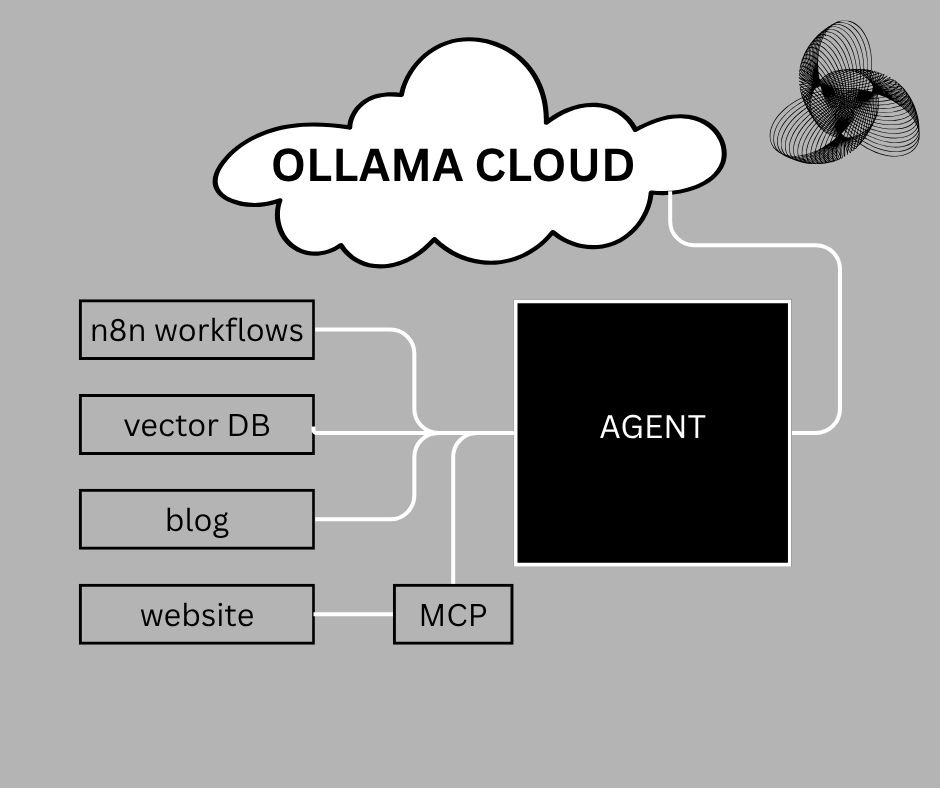
Initial planned approach for an AI agent worker
To start out, I will connect an AI agent to a single n8n workflow. I have already experimented with this combination before, and found that it enabled me to create a more dynamic agent.
In addition to making the AI agent more dynamic, n8n makes it so easy to build complex workflows that can then be used as tools by an agent. This in turn makes it more useful and able to perform complicated tasks.
After setting up a single reference n8n workflow and then connecting it to an AI agent, the next thing I will do is build a vector database.
A vector database is a specialized database designed to store and search data as numerical vectors (embeddings), enabling fast similarity matching for things like semantic search, recommendations, and AI retrieval.
With the vector database, I want to give the AI agent a way to save experiences, feedback, and knowledge. However, I don’t want just a simple text storage solution. I actually want the AI to save the meaning of the information that it is writing to the database.
There are several options to pick from when creating a vector DB. Of these options, I prefer to work with Chroma for no other reason other than I like how simple it is to use.
Chroma is an open-source vector database built specifically for AI applications, allowing you to store embeddings, attach metadata, and efficiently query for the most similar results—making it especially useful for building retrieval-augmented generation (RAG) systems, chatbots, and knowledge bases.
After the n8n workflow and vector DB setup, I will then connect the AI agent to several MCP servers from trusted third-party providers. I’ll confirm the initial list of MCP servers I will use later when I start building out this worker agent. For now though, I’m thinking to at least start with the Gmail MCP server because the agent needs to be able to receive and send emails in order to apply for work and receive correspondence.
I think I’ll also add a memory MCP so that the agent can better remember what it has already done. For instance, it needs to remember what jobs it has applied for and the status of each application. Or, hopefully later on, be able to keep track of work progress better.
The MCP servers will also include ones linked to websites so that the AI agent can keep track of studies, maybe SEO knowledge, job boards, etc. However, I think that these connections will be structured more like APIs.
Lastly, I will also be connecting the AI worker agent to this blog so that it can document its own experiences, knowledge, and progress. Wouldn’t this be cool? An AI agent that can blog as it grows and learns!
How My AI Agent Worker Will Learn and Grow
Of course, the AI agent worker will need to evolve. Otherwise, how will it grow and learn to become more valuable in the workplace?
To give the AI agent the ability to grow, one of the basic tools that I’m thinking of adding to the AI agent is a CrewAI coding team that can write scripts in Python.
The main agent will be written in Python, which I have seen over the years has some of the best support for AI functionality. Also, it’s simplistic but so powerful. This makes it perfect for an ambitious project like this.
With the coding team, the AI agent should be able to decide if it has the tools needed to perform a certain task. If it does not, it will ask the coding team to develop the functionality for it and then save the functionality as a new tool in a tool registry. The AI agent can then read its list of tools, which will constantly grow as the dev team builds out the functionality.
Here is a high-level overview of how the AI agent will work and develop its own tools.
High-level overview of how AI agent worker will use tools and coding team
The coding team will be made up of several agents.
First, there will be a planning agent, which will determine what tool or tools need to be coded to complete a given task. This agent will write the development scope and save it as PLAN.md.
Next up, there will be a coding agent. This agent will read PLAN.md and actually write the code for the tools. It will then save the tool or tools’ code in a file for each tool using a defined naming convention for the tool. There will also be metadata included in this system so that the agent knows what tools are available and what they can be used for.
Lastly, there will be a reviewer agent. This agent will take a look at the code file, metadata structure and the overall output of the coder agent. It will be responsible for ensuring that the coder’s output complies with the hardcoded/defined limits and structure. If not, it will task the coder agent with fixing its mistakes.
I have found that a reviewer agent is the best way to double-check if a multi-agent system outputs the desired results. Just by including this type of agent in the system, I have seen my error rates on production systems drop by between 10-15%.
Of course, there are other safeguards, such as Pydantic structured output validation, that can be added to a system to ensure that the expected output is returned. Having a reviewer agent, however, is a great way to have a dynamic editor/reviewer that does not need to have set logic for every possible deviation or thing that can go wrong.
In addition to the coding team, the agent will also have access to the web through various MCP servers. This will enable it to extract information from the internet, consume it, and save it.
This Is How I Aim To Run the Agent at Low Cost
It will be pointless to have an AI agent worker that costs more to operate than it can earn.
That’s one of the main reasons that I am going to use n8n workflows, Python scripts, and Chroma for this agent. They all offer free usage, which is perfect for a system like this.
Of course, the most expensive part of any AI or agentic system is the actual intelligence that powers the system. Most of the time, these automated AI powered systems rely on third-party LLM APIs such as OpenAI’s ChatGPT, Anthropic’s Claude Sonnet, or Google’s Gemini.
The one major problem with those APIs is that it costs money to make calls to the agent. Usage for these providers is measured in the number of tokens. If you don’t keep an eye on usage constantly, costs can skyrocket quickly and you can receive a nasty surprise at the end of the month when the cost is deducted from your bank card.
For instance, I once built an agentic editorial team. When I started building the system, I had used OpenAI’s ChatGPT via the API. I thought it would cost a couple of cents, but the costs were a bit too high for an experiment and prototype system at the time.
That cost led me to search for alternatives. I then found Ollama, which allows you to host small to medium models locally. The only limitation? The amount of computing power and the strength of your hardware in your PC. I initially started with a model with 4 billion parameters. The responses didn’t take too long, but the quality and accuracy of the output was not that great.
Since I have an average gaming PC with a GPU, I decided to up the model size to 8 billion parameters. This was the sweet spot of performance and quality.
As such, I want to use a larger model that is more capable. But I will either need a way to increase my compute (expensive), or find a cloud hosting provider that can host the model at next-to-nothing cost.
I was pretty hopeless for this project until I stumbled on Ollama’s cloud solution. It offers the opportunity to run powerful models with fairly generous usage limitations. This is perfect for what I have planned. To ensure I don’t hit my usage limits too quickly, I plan on making the AI agent worker self-aware of how much compute it uses. I’ll do this by building a tool that can check the model’s Ollama cloud usage and a tool to calculate how much compute a given task used. This way, it can pace itself.
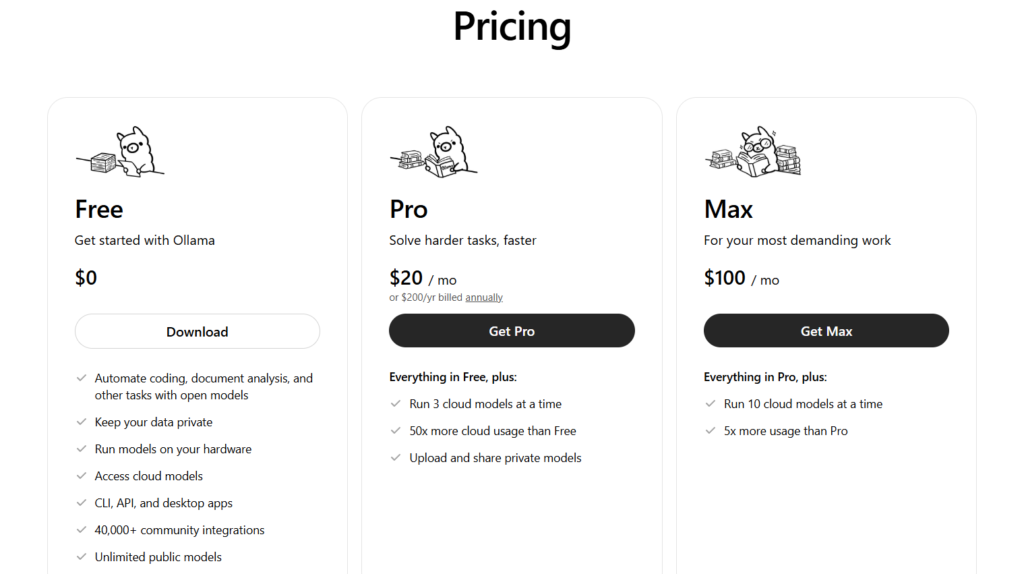
Ollama cloud pricing (Source: Ollama)
That will be perfect for the initial phase of this project. As this scales, I will need more compute. The great news is that the Ollama cloud comes with a $20/month paid tier which offers much higher usage limits! This is about the same price of a ChatGPT subscription, but with the API usage included!
With the Ollama cloud, I will be able to run the multi-tool, multi-agent AI with high-parameter models at a very low cost. My expenses per month for this AI worker agent will most likely reach $20/month or even lower since I plan to run this system on my local desktop. Of course, this excludes electricity costs and the hardware setup, which I already have. This, however, is significantly less than if I were to host the model myself.
Frequently Asked Questions
What is an “Agentic Employee” or AI Agent Worker?
An agentic employee is an autonomous AI system designed to go beyond generating text. Unlike a standard chatbot, it is built to perform complex tasks independently—such as searching for job opportunities, managing emails, and writing code—using a suite of digital tools and reasoning loops.
What technologies are being used to build this AI agent?
The system is built on a foundation of Python and utilizes several key components:
- Ollama Cloud: Provides the “brain” (LLM) at a low cost.
- n8n: Handles complex automation workflows.
- ChromaDB: A vector database that acts as the agent’s long-term memory and experience storage.
- MCP (Model Context Protocol) Servers: Provides standardized connections to tools like Gmail and web search.
How does the agent “learn” to do things it wasn’t originally programmed for?
The agent uses a multi-agent coding team (via CrewAI). If it encounters a task it doesn’t have the tools for, it tasks a sub-team of agents (Planner, Coder, and Reviewer) to write a new Python script. This script is then saved to a tool registry, allowing the agent to expand its own capabilities dynamically. The agent also has access to the internet through various MCP servers and can search for information, then save it to its memory and context database.
What is the role of a “Reviewer Agent” in this system?
The Reviewer Agent acts as a quality control layer. It checks the output of the coding agent against predefined structures and limits. In production environments, adding this “human-like” editorial step can reduce system error rates by 10–15%.
How do you keep the operating costs low?
To avoid expensive API fees from providers like OpenAI, this project uses:
- Local Hardware: Running the framework on a local desktop to save on hosting.
- Ollama Cloud: Utilizing its free or low-cost ($20/month) tier for high-parameter model inference.
- Self-Awareness Tools: The agent will have a specific tool to monitor its own compute usage, allowing it to “pace” its tasks to stay within free or budget-friendly limits.
Is it safe to give an AI agent access to Gmail and local files?
Security is a priority. While the agent uses the Gmail MCP to communicate, it is essential to run such systems in isolated environments (like containers) and avoid running them with “root” or administrative privileges to prevent the agent from making unintended changes to the host system.
Can I follow along and build my own?
Yes! This project is part of an ongoing series where all experiences—including the failures and lessons learned—will be documented. The goal is to provide a blueprint so others can create their own “agentic workers” to supplement their income.

Steven Walgenbach is an AI Engineer specializing in AI agents, large language models, retrieval-augmented generation and business process automation. He designs and builds practical AI systems that connect with existing tools, data sources and workflows to help businesses reduce manual work, improve decision-making and scale more efficiently.
His work includes developing multi-agent systems, private and locally hosted AI solutions, custom knowledge assistants, SEO automation pipelines and LLM-powered applications using Python, LangGraph, CrewAI, the OpenAI Agents SDK and other modern AI frameworks.
Through AIMEC, Steven helps businesses move beyond AI experimentation and identify practical opportunities where artificial intelligence can deliver measurable operational and commercial value.