With popular large language models (LLMs) like Claude, Gemini, ChatGPT, and Grok growing more sophisticated almost by the day, companies are rushing to incorporate everything these AI models have to offer as part of a broader efficiency push.
One major roadblock to enterprises fully adopting AI that I have seen in my experience as an AI engineer is the need for privacy. Companies can’t just hand Claude or another third-party model all of their information without any legal ramifications from clients.
Due to that problem, I always champion open-source models that can be run internally. One of the most popular solutions to do this is Ollama, which has a large library of open-source models that can be run on internal infrastructure.This ensures that company and, most importantly, client data is not just handed over to an LLM, which might then be retrained using this information.
While running models via Ollama locally addresses the privacy concern, there may come a time when you will need more compute behind your models as the tasks they have to perform grow in complexity.
Now, if that time comes within your company, don’t feel the need to rush and buy more compute to boost your internal infrastructure, especially if you are not sure what the ROI will be for the infrastructure investment. Instead, you can use Ollama Cloud. It’s one of the solutions offered by Ollama that gives companies and developers the opportunity to test larger models on a secure cloud. What’s more, it offers generous usage limits. Even if you have high usage, you can take on a paid plan, which not only boosts usage limits around 50X, but also comes at a more than reasonable monthly cost.
In this article, we will take a look at what Ollama Cloud is. The benefits of running models in Ollama Cloud, as well as important considerations that developers and business executives need to keep in mind before choosing to go the Ollama Cloud root.
What Ollama Cloud Actually Is
If you have been searching for what is Ollama Cloud, the simplest explanation is this: it is Ollama’s cloud layer for running larger or faster models when your local machine is not enough.
In Ollama’s own documentation and website, the product language is usually “cloud models” or “Ollama’s cloud”, not a totally separate platform. The important point is that it extends the same Ollama workflow instead of replacing it.
You still work in the Ollama ecosystem, but certain models can be offloaded to hosted infrastructure when you need more horsepower.
That hybrid approach is the real appeal. Local Ollama is great when you want privacy, offline access, or full control over your stack. Ollama Cloud becomes useful when you need a model that would be awkward or expensive to run on your own hardware, or when you need more parallel requests than your workstation can comfortably handle.
Ollama describes its cloud as a way to access larger models on datacentre-grade hardware, run many requests in parallel, and pull in real-time information from the web, while still keeping the local-first developer experience familiar.
From an AI engineer’s point of view, that matters. A lot of teams do not want to choose between “fully local” and “fully cloud-only”. They want to prototype locally, keep their code paths simple, and only reach for hosted inference when the use case justifies it.
Ollama Cloud fits the middle ground well because the same API shape exists locally at localhost and remotely via ollama.com, which lowers friction when you move from experimentation to something more production-minded.
How Ollama Cloud Works
Under the hood, Ollama’s cloud models are a new kind of model that can run without a powerful GPU on your side. If you are using Ollama locally and you are signed in, requests for cloud models are automatically offloaded to Ollama’s hosted service.
In practice, that means you can keep interacting with Ollama through the CLI, Python, JavaScript, or the local API while cloud-backed inference happens where the compute lives.
There are really two ways to think about it.
The first is the local-Ollama-with-cloud-access path: install Ollama, run ollama signin, and use cloud-enabled models through the normal workflow.
The second is direct hosted API access: Ollama’s API is local by default at http://localhost:11434/api, but the same API is also exposed remotely at https://ollama.com/api.
For the direct hosted mode, you need an API key and must pass it as a Bearer token.
This is also why Ollama Cloud feels practical rather than gimmicky. Ollama provides compatibility with parts of the OpenAI API and the Anthropic Messages API, specifically to help existing applications connect to Ollama.
On top of that, the official integration docs show hosted Ollama being used in tools like n8n by creating an API key, setting the API URL to Ollama’s hosted endpoint, and authenticating normally.
For agencies or product teams, that reduces migration pain because you are not learning an entirely foreign interface just to test hosted open models.
As of May 2026, Ollama’s cloud-enabled model catalogue includes families such as Qwen 3.5, Gemma 4, GLM-5.1, DeepSeek-V4, MiniMax, and others, which shows that the cloud layer is not limited to one or two flagship models. It is increasingly a broad hosted inference option inside the wider Ollama ecosystem.
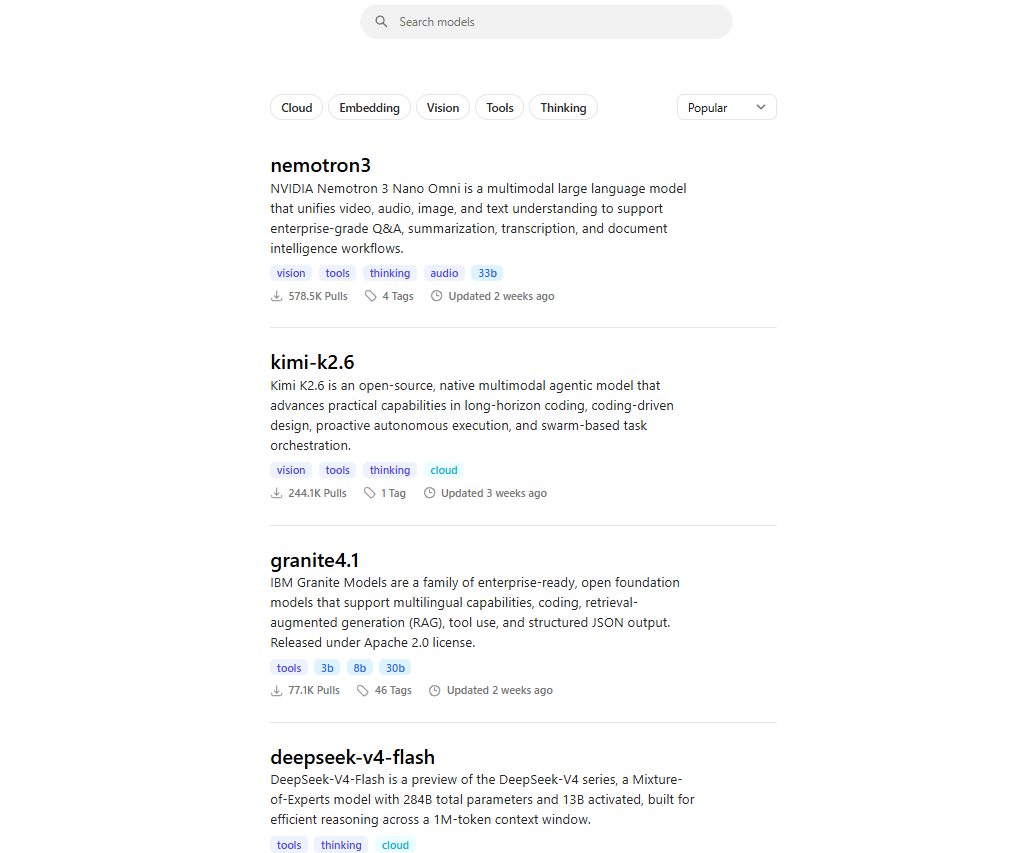
Some of the many models available on Ollama (Source: Ollama)
Why I Use Ollama Cloud With Qwen
In my own AI engineering work, I like Ollama because it lets me stay close to a local-first workflow.
But when I need more headroom, or when I want to run a stronger model without playing hardware Tetris, Ollama Cloud is a sensible extension of that setup. The model family I keep gravitating back to is Qwen, especially for agentic and tool-using workflows.
The reason is straightforward: tool calling matters. Ollama’s own Qwen model page tags the family for tools, and the model description highlights “agent capabilities” and integration with external tools. That lines up with my practical experience: if I am building assistants that need to call search, automation, retrieval, or external business logic, Qwen is often one of the most useful open-model options in the stack.
There is also a more specific reason I am comfortable mentioning Qwen in this article. Ollama’s coding-model announcement noted that Qwen3-Coder-30B was updated for faster, more reliable tool calling in Ollama’s newer engine, and Ollama’s pricing FAQ says cloud models that are trained for tools are tested for tool calling and real agent workflows before they go live.
That is exactly the kind of detail I look for as an engineer: not just “does the model benchmark well?”, but “is this likely to behave in an actual agent loop?”
Another reason Qwen works well for me is that Ollama has already documented practical agent patterns around it. The web search docs include an example of building a mini search agent with Qwen 3 using web_search and web_fetch as tools, and the Anthropic-compatible docs use qwen3-coder in examples for Claude Code-style workflows and tool use.
So when I say I use Ollama Cloud with Qwen for real project work, I am not talking about a theoretical combo. It maps neatly onto the kind of multi-step, tool-augmented systems many of us are actually building right now.
Pricing, Privacy, and Practical Caveats
Ollama’s pricing is fairly easy to understand.
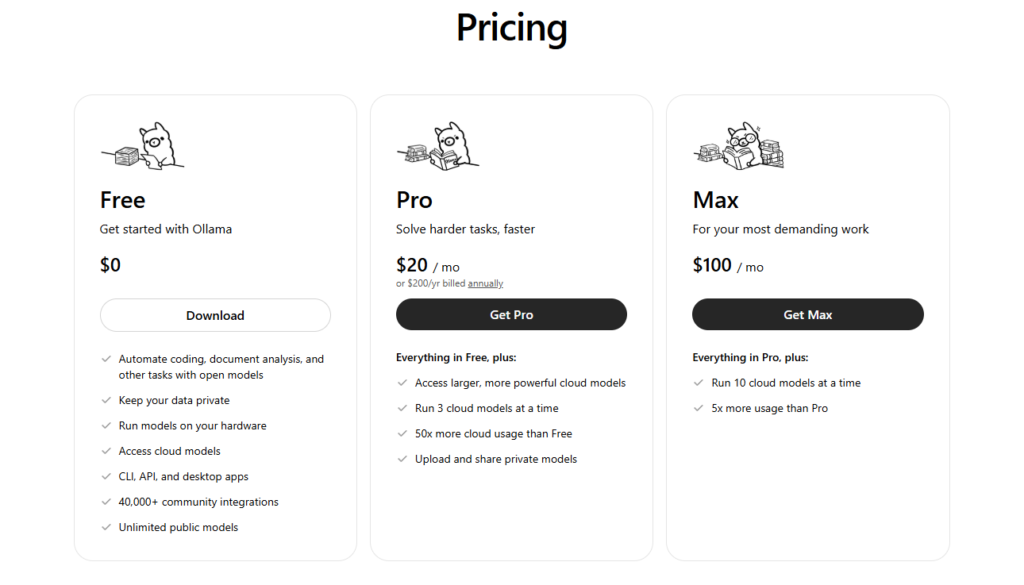
Ollama pricing (Source: Ollama)
Free is R0 equivalent on the site and includes access to cloud models with light usage. Pro is $20 per month or $200 per year, and adds access to larger, more powerful cloud models, the ability to run 3 cloud models at a time, and 50x more cloud usage than Free.
Max is $100 per month, raises concurrency to 10 cloud models, and includes 5x more usage than Pro. Ollama also says usage is based primarily on actual cloud infrastructure use such as GPU time, not a fixed token bucket, and that limits reset on rolling session and weekly windows.
On privacy, Ollama’s claims are stronger than many readers might expect from a hosted AI service.
The company says prompt and response data is never logged or trained on, that models and compute are hosted primarily in the United States, and that traffic may be routed to Europe and Singapore for additional capacity.
Ollama also says it can run entirely offline for mission-critical local work, which matters if you want a mixed strategy rather than a cloud-only dependency.
That said, the honest caveat is that Ollama Cloud is not feature-identical to every part of local Ollama. A particularly important limitation for engineers is that structured outputs are currently not supported in Ollama’s Cloud.
So if your workflow depends on strict schema enforcement or deterministic JSON validation, that is something to test carefully before you commit.
In other words, Ollama Cloud is excellent for many practical inference and agent workflows, but you should still evaluate feature parity against your exact production requirements rather than assuming every local capability carries over unchanged.
Frequently Asked Questions
What is Ollama Cloud, really?
It is Ollama’s hosted inference layer for cloud-enabled models. It lets you keep using Ollama’s familiar tools and APIs while offloading bigger or faster model runs to Ollama’s infrastructure when local hardware is not enough. Officially, Ollama mostly refers to this as cloud models or Ollama’s cloud.
How do you get an Ollama API key and how does it work?
The official path is simple: create an API key in your Ollama account, set OLLAMA_API_KEY, and send it as a Bearer token when calling https://ollama.com/api. If you are just using Ollama locally with cloud access through the normal workflow, signing in with ollama signin handles authentication automatically, so you do not always need to manage a key yourself.
How much is Ollama Cloud?
The current public pricing is: Free at $0, Pro at $20/month, and Max at $100/month. Free includes light cloud access, Pro adds larger cloud models plus 3 concurrent cloud runs and 50x more usage than Free, and Max pushes that to 10 concurrent cloud runs with 5x more usage than Pro. Ollama says usage is based mainly on GPU time rather than a hard token allowance.

Steven Walgenbach is an AI Engineer specializing in AI agents, large language models, retrieval-augmented generation and business process automation. He designs and builds practical AI systems that connect with existing tools, data sources and workflows to help businesses reduce manual work, improve decision-making and scale more efficiently.
His work includes developing multi-agent systems, private and locally hosted AI solutions, custom knowledge assistants, SEO automation pipelines and LLM-powered applications using Python, LangGraph, CrewAI, the OpenAI Agents SDK and other modern AI frameworks.
Through AIMEC, Steven helps businesses move beyond AI experimentation and identify practical opportunities where artificial intelligence can deliver measurable operational and commercial value.