If you’re looking to build a fully local AI agent that can automate real tasks, combining OpenClaw with Ollama is the gold standard.
Instead of bleeding money on OpenAI credits, this stack lets you run an autonomous assistant that manages your inbox, browses the web, and runs code.
But here is the problem: Local models are heavy. If you don’t have 64GB of RAM, your “local” agent will be painfully slow.
In this guide, I’ll show you a “loophole” to run massive 400B+ parameter models through OpenClaw using Ollama’s free cloud tier—giving you GPT-4 level power on a basic laptop for $0.
What Is OpenClaw + Ollama?
- OpenClaw: An open-source AI agent framework. It’s the “hands” and “feet” that can connect to Telegram, Slack, or your terminal to actually do things.
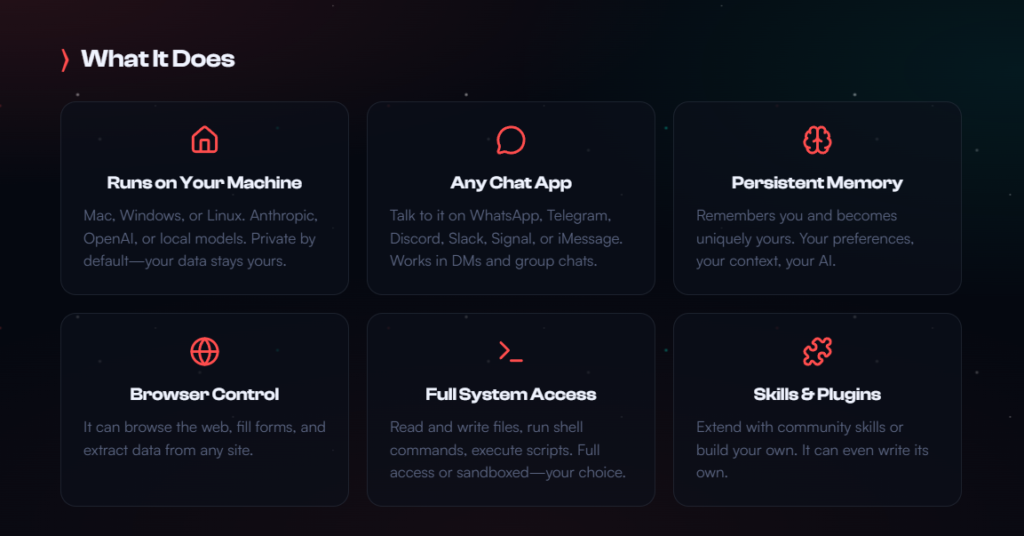
What OpenClaw can do (Source: OpenClaw website)
- Ollama: The “brain” runtime. It manages the AI models.
When combined, you get a private, autonomous system that doesn’t share your data with Big Tech.
Prerequisites
- Node.js v22+ (Required for the OpenClaw gateway)
- Ollama v0.17+ (Earlier versions don’t support the launch command)
- OS: Windows (via WSL2), macOS, or Linux.
Step-by-Step Setup Guide
For this guide, I will be covering how to set up Ollama and OpenClaw on Windows using WSL, which is my personal setup.
I use a Windows PC for my everyday work, but have encountered so many issues trying to build AI agents.
If you want to develop AI agents, the support for Windows is fairly limited and it’s therefore difficult to build systems. To get around the current limitations, I have found that installing WSL on your laptop or desktop running Windows is the best way to go.
Linux users can follow along, and won’t have to first set up WSL.
With that out of the way, let’s get to setting up OpenClaw with Ollama.
1. Install Ollama & OpenClaw
The good news about OpenClaw and Ollana is that you no longer need to install them separately and fiddle with JSON configs. In 2026, Ollama handles the installation for you.
Windows Users: Open your WSL2 terminal and run:
Bash

curl -fsSL https://ollama.com/install.sh | sh
2. The “Secret” Cloud Launch (Free Tier)
Most guides tell you to pull a local model like qwen3:8b. Don’t do that yet. If your computer isn’t a beast, use Ollama’s cloud inference. It’s currently free for individual users.
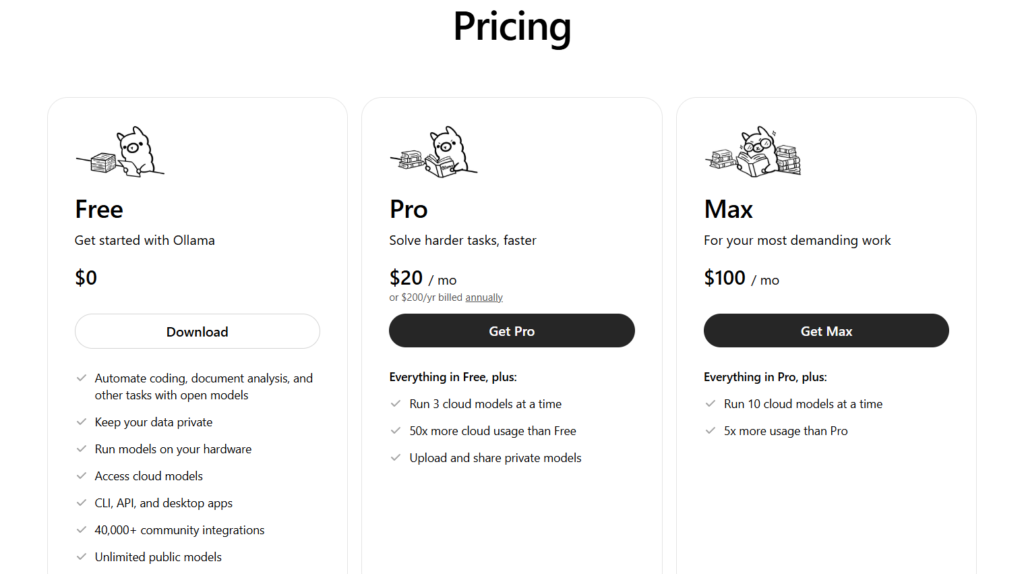
Ollama cloud pricing (Source: Ollama)
Run this command to bridge OpenClaw directly to a high-performance cloud model:
Bash

ollama launch openclaw --model kimi-k2.5:cloud
What this does:
- Downloads and installs the OpenClaw gateway.
- Authenticates your Ollama account.
- Connects OpenClaw to a datacenter-grade GPU for free.
- Automatically enables the Web Search & Fetch plugins.
3. (Optional) Going 100% Local
If you have a high-end GPU (24GB+ VRAM) and want total offline privacy:
Bash

ollama pull qwen3:14b-coder

ollama launch openclaw --model qwen3:14b-coder
You can take a look at how to run an Ollama model on-premise with this guide.
4. Connect Your Messaging Apps
OpenClaw is most powerful when it lives where you do. To set up Telegram or WhatsApp:
Bash

openclaw configure --section channels
Follow the prompts to paste your Bot API keys. Now, you can text your agent from your phone to “Summarize the last 10 emails” or “Research the what the agentic web is”
Cost Comparison: Local vs. Cloud vs. API
| Feature | Ollama (Local) | Ollama (Cloud Free) | OpenAI / Anthropic |
| Cost | $0 (Electricity only) | $0 (Limited daily) | $20+/mo + Usage fees |
| Privacy | 100% Private | High (No data retention) | Low (Training data) |
| Hardware | Need high-end GPU | Works on any laptop | Works on any laptop |
| Speed | Depends on your PC | Fast (Datacenter) | Fast |
Important Considerations
- Context Windows: OpenClaw needs a large context window to remember your conversation. Ensure your model supports at least 64k tokens (the :cloud models support this by default).
- Security: Because OpenClaw can execute shell commands, never run it as root. Use the built-in security prompt to restrict its access to specific folders.
- The “Cloud” Catch: While the Ollama cloud tier is currently free, it has rate limits. For heavy 24/7 automation, you will eventually want to migrate to a local 70B model or a paid tier.
Risks of Running OpenClaw
Running OpenClaw can be appealing for experimentation or specific use cases, but it introduces several layers of risk across security, stability, and compliance. An understanding of these risks is essential before integrating it into any environment.
Security Risks
One of the most significant concerns is system security. If OpenClaw is downloaded from unofficial or unverified sources, there is a real possibility that the software has been modified to include malicious code. This could range from hidden backdoors to credential harvesting scripts or remote access tools.
Even when the original repository is trustworthy, compiled binaries shared in forums or third-party sites cannot always be verified. Running such software may expose sensitive data, API keys, or local environment variables, especially if the tool has access to your development stack or file system.
System Stability and Performance
OpenClaw may not be consistently maintained or tested across all operating systems and environments. This can result in crashes, excessive resource usage, or conflicts with other applications.
In development-heavy environments—such as those involving Docker, Python scripts, or automation tools—this instability can cascade into larger issues. Memory leaks, hanging processes, or unexpected behavior may interrupt workflows and require manual intervention to resolve.
Compatibility and Integration Challenges
Another risk lies in how OpenClaw interacts with your existing systems. It may rely on outdated dependencies, incompatible libraries, or undocumented configurations.
This becomes particularly problematic when integrating it into automated pipelines or agent-based systems. Misalignment between versions or missing dependencies can lead to silent failures, making debugging difficult and time-consuming.
Legal and Compliance Considerations
Depending on how OpenClaw is used, there may be legal implications. If the tool interacts with proprietary systems, copyrighted content, or third-party services in unintended ways, it could violate terms of service or licensing agreements.
This is especially relevant in commercial or client-facing environments, where compliance and data governance are critical. Misuse could expose you to legal risk or reputational damage.
Network and Exposure Risks
If OpenClaw operates over a network or exposes endpoints, it can introduce vulnerabilities beyond your local machine. Poorly secured ports, lack of authentication, or misconfigured services could allow unauthorized access.
In a broader infrastructure—such as a microservices or agent-based architecture—this risk extends to other connected systems, potentially creating entry points for attackers.
Mitigation Strategies
To reduce these risks, OpenClaw should be run in a controlled and isolated environment. Using containers, virtual machines, or sandboxed setups can limit its access to critical resources.
It is also important to verify sources, review code where possible, and monitor system behavior during execution. Implementing proper firewall rules, restricting permissions, and avoiding use on production systems can further minimize potential damage.
Taking a cautious and structured approach ensures that experimentation with OpenClaw does not compromise system integrity or security.
Maximizing OpenClaw: Building a High-Performance Local AI Agent System
As the industry shifts from simple chatbots to fully autonomous systems, the focus is no longer just on generating text—it’s about executing real-world tasks.
This is where OpenClaw becomes essential. While tools like Ollama provide the model layer, OpenClaw acts as the orchestration engine, turning those models into agents that can plan, act, and interact with external systems.
For developers building privacy-first, cost-efficient AI infrastructure, OpenClaw serves as the missing layer between raw model capability and real-world automation. However, getting the most out of it requires a different approach to architecture, tooling, and system design.
Model Selection Is the Foundation
OpenClaw is not designed for simple conversational tasks.
It relies heavily on reasoning, structured outputs, and accurate tool usage, which means model selection directly impacts performance.
For local deployments, smaller models often struggle to maintain coherence across multi-step workflows. In practice, models in the 14B parameter range represent the lower bound for usable performance, while larger models—especially those optimized for coding or reasoning—provide far more consistent results.
Equally important is the context window. Agent-based systems rely on long chains of instructions, intermediate outputs, and tool responses.
Models with limited context quickly lose track of the objective, leading to broken workflows. A 64k token context window should be treated as a baseline for serious implementations.
A hybrid approach tends to deliver the best results. Local models can handle repetitive or sensitive workloads at zero cost, while more complex reasoning tasks can be routed to higher-capability cloud models when necessary.
Designing Workflows Instead of Prompts
One of the most common mistakes when working with OpenClaw is treating it like a traditional prompt-based system. In reality, its strength lies in task orchestration rather than one-off responses.
Instead of issuing isolated instructions, workflows should be structured as sequences of actions. A well-designed agent task might involve gathering data, processing it, generating outputs, and storing results—all within a single execution chain.
This shift from prompts to tasks allows the agent to plan its own steps, select appropriate tools, and execute them in a logical order. The result is a system that behaves less like a chatbot and more like an autonomous operator.
Tools Define the Agent’s Capabilities
Without tools, an AI agent is limited to generating text. With tools, it becomes capable of executing meaningful actions.
OpenClaw is built around that concept, allowing developers to register functions, scripts, and APIs that the agent can call dynamically. The effectiveness of the system depends heavily on how these tools are designed.
Smaller, modular tools tend to perform better than large, complex ones. Each tool should have a clearly defined purpose and a precise description, as the model relies on these descriptions to decide when and how to use them.
This is where integration with systems like Python scripts or n8n workflows becomes powerful. By exposing automation pipelines as callable tools, OpenClaw can orchestrate complex, multi-step processes across an entire infrastructure.
Streamlining Setup with Auto-Discovery
Initial configuration can be simplified using OpenClaw’s onboarding capabilities. Instead of manually mapping models and configurations, the system can automatically detect available resources and set defaults accordingly.
Running the onboarding process ensures that local models are properly recognized and reduces the likelihood of configuration errors. It provides a stable foundation before introducing custom workflows or advanced agent logic.
Scaling with Multi-Agent Architecture
As systems grow in complexity, a single monolithic agent becomes difficult to manage and prone to errors. A more effective approach is to break responsibilities into specialized agents.
For example, one agent can focus on data collection, another on content generation, and another on validation or analysis. This separation of concerns improves reliability, simplifies debugging, and aligns with scalable system design principles.
OpenClaw supports that modular structure, allowing tasks to be distributed across different agents while maintaining coordination through shared workflows.
Rethinking the Role of AI in Your Stack
To fully leverage OpenClaw, it’s necessary to move beyond the idea of AI as a tool you interact with occasionally. Instead, it should be viewed as an embedded system component that operates continuously within your infrastructure.
When integrated into messaging platforms, development workflows, or automation pipelines, the agent becomes an active participant rather than a passive assistant. It can monitor processes, execute tasks, and respond to events in real time.
This shift—from chatbot to autonomous system—is what defines the next phase of AI adoption. OpenClaw, when combined with a local stack like Ollama and orchestration layers such as n8n, provides a practical path toward building that future.
Final Thoughts
The combination of OpenClaw + Ollama Cloud is a “cheat code.” You get the sophistication of a $100/month agentic setup for absolutely nothing.
Ready to start? Run ollama launch openclaw and see it in action.
Frequently Asked Questions
What is OpenClaw?
OpenClaw is an open-source AI agent framework designed to take actions on your behalf. It can connect to tools and channels such as terminals, messaging apps, and web-based workflows, allowing it to perform practical tasks instead of only generating text.
How does OpenClaw work with Ollama?
In this setup, Ollama acts as the model runtime while OpenClaw acts as the agent layer. Ollama handles the language model itself, and OpenClaw uses that model to reason, plan, and interact with connected tools or services.
Can I run OpenClaw locally?
Yes. The article explains that OpenClaw can be run locally with Ollama, which can be useful for privacy and control. However, fully local use may require stronger hardware, especially if you want to run larger models with acceptable speed.
Do I need a powerful computer to use OpenClaw with Ollama?
Not necessarily. The article notes that local models can be resource-heavy, but cloud-based inference through Ollama can reduce the need for high-end hardware. That makes it possible to use OpenClaw on more modest machines, although usage limits may apply on free tiers.
What are the main risks of running OpenClaw?
The main risks include security exposure, software instability, compatibility issues, legal or compliance concerns, and network-related vulnerabilities. Because OpenClaw can interact with files, commands, and connected systems, it should be used carefully and in a controlled environment.
Is OpenClaw safe to run on a production machine?
It is generally safer to avoid running OpenClaw directly on production systems unless strict controls are in place. This article recommends using isolated environments such as containers, virtual machines, or sandboxes, along with limited permissions and trusted sources.
Why should OpenClaw not be run as root?
Because OpenClaw may execute commands or interact deeply with the host environment, running it as root increases the blast radius of any mistake, exploit, or malicious modification. Restricting privileges helps reduce the risk of serious system damage.
Is OpenClaw better in the cloud or fully local?
That depends on your priorities. A cloud setup can offer faster performance and lower hardware requirements, while a local setup can provide more privacy and control. The tradeoff is usually between convenience and infrastructure demands.

Steven Walgenbach is an AI Engineer specializing in AI agents, large language models, retrieval-augmented generation and business process automation. He designs and builds practical AI systems that connect with existing tools, data sources and workflows to help businesses reduce manual work, improve decision-making and scale more efficiently.
His work includes developing multi-agent systems, private and locally hosted AI solutions, custom knowledge assistants, SEO automation pipelines and LLM-powered applications using Python, LangGraph, CrewAI, the OpenAI Agents SDK and other modern AI frameworks.
Through AIMEC, Steven helps businesses move beyond AI experimentation and identify practical opportunities where artificial intelligence can deliver measurable operational and commercial value.