Pricing and features verified: September 2026
If you are choosing between Zapier, Make and n8n, there is no universal winner.
For businesses that want to connect common SaaS applications quickly with minimal technical overhead, Zapier is usually the easiest place to start.
For teams that need more sophisticated branching, transformations and a highly visual workflow builder, Make offers a strong middle ground.
For technical teams building API-heavy automations, AI workflows or systems that require more control over infrastructure, n8n is often the strongest fit.
There is also a fourth possibility that most platform comparisons overlook: sometimes the right answer is none of them. Once an automation requires complicated state, high execution volumes, specialist processing or strict security boundaries, custom software can become a better architecture than adding more steps to a workflow platform.
In this comparison, we model the same representative business workflow across Zapier, Make and n8n to show where those differences start to matter.
Zapier vs Make vs n8n: Quick Verdict
| If your priority is… | Best fit | Why |
| Fastest route to simple automation | Zapier | Lowest initial learning curve |
| Non-technical business users | Zapier | Strong abstraction and broad SaaS connectivity |
| Visual workflow design | Make | Excellent scenario canvas and routing |
| Complex branching | Make or n8n | More control over workflow structure |
| API-heavy automation | n8n | Strong HTTP, code and integration flexibility |
| AI orchestration | n8n | Works naturally with APIs, code and specialised services |
| Self-hosting | n8n | Community and commercial self-hosted options |
| Minimal infrastructure management | Zapier or Make | Managed SaaS platforms |
| Developer control | n8n | More technical workflow model |
| High-volume complex workflows | n8n or custom | Execution-based pricing can become advantageous |
| Complex application logic | Custom | Workflow platforms may become the wrong abstraction |
The simplest way to think about the three is:
Zapier for accessibility. Make for visual control. n8n for technical control.
But that summary only becomes useful once we understand what happens when all three are given the same job. These tools sit within a broader category of business automation platforms, ranging from simple SaaS connectors to technically sophisticated orchestration systems.
How We Compared Zapier, Make and n8n
AIMEC uses n8n in existing automation infrastructure, including analytics, SEO, API integration and data-processing workflows. This gives us direct operational experience with n8n.
We do not use Zapier and Make in the same production capacity, so this article does not pretend that we performed a controlled production benchmark across all three platforms.
Instead, we use one representative business workflow and model how it would typically be implemented across each platform based on their current architectures and billing systems.
The workflow is deliberately realistic without being unnecessarily complicated:
Webhook → API enrichment → data transformation → AI classification → structured JSON validation → conditional branch → write result → notify on exceptionIn practical terms, imagine a new business lead arriving through a website.
The automation:
- receives the lead;
- sends the company information to an enrichment API;
- cleans and normalises the returned data;
- asks an LLM to classify the opportunity;
- expects structured output;
- branches according to the AI result;
- stores or forwards the outcome; and
- triggers an alert if something goes wrong.
This type of workflow is useful because it tests more than simple application connectivity. It introduces APIs, transformations, AI, conditional logic, error handling and downstream actions.
Those are exactly the areas where the differences between Zapier, Make and n8n become more important.
The implementation times, step counts and usage figures below are therefore estimates, not timed AIMEC lab measurements. Exact figures will vary according to the apps, AI model, validation strategy and error-handling logic used.
The Same Workflow Across Zapier, Make and n8n
All three platforms can implement the workflow. The difference is how they ask you to think about it.
Building It in Zapier
A representative Zapier implementation would likely require roughly six to eight visible steps. Zapier’s biggest strength is abstraction.
A trigger starts the Zap, an action enriches the data, an AI step classifies it, built-in logic handles the branch and another action writes the result.
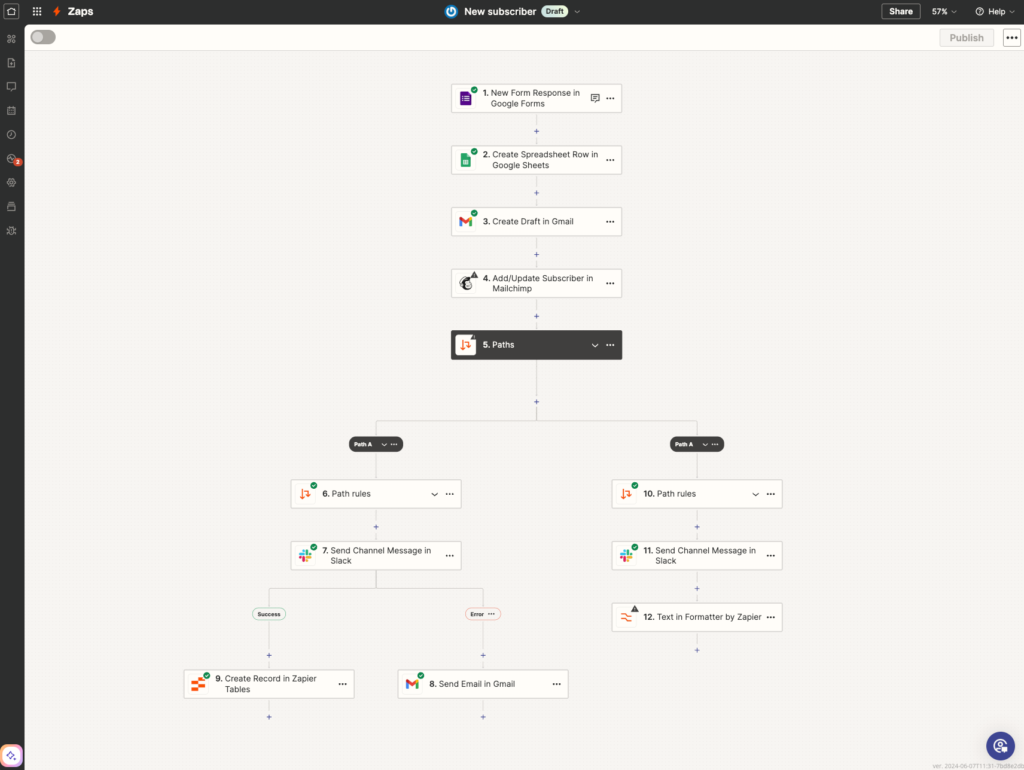
Figure 1. Zapier’s Visual Editor shows a multi-step automation with Paths and branching visible on the canvas. Source: Zapier.
For a straightforward business workflow, that is easy to understand.
Zapier currently positions its platform around more than 9,000 connected apps, and its pricing model treats Zap workflows, AI steps, code and other platform actions through a shared task system.
That breadth makes Zapier especially useful when the business requirement looks something like:
When something happens in SaaS application A, do something in applications B and C.
You do not necessarily want engineers involved every time a sales team needs a CRM field updated or a Slack message triggered.
That abstraction becomes less beneficial when the workflow accumulates unusual APIs, sophisticated transformations, multiple AI decisions or large amounts of custom logic.
Zapier can handle much more complicated workflows than its early reputation suggests, but eventually you can start fighting against the abstraction that made it attractive in the first place.
Building It in Make
The same workflow would probably require approximately seven to nine Make modules. Make exposes more of the underlying flow visually.
A webhook receives the input. HTTP or app modules perform enrichment. The AI step processes the information. Routers and filters divide the workflow into different paths.
That visual model can make complicated workflows easier to reason about.
Make currently advertises more than 3,000 applications, with routers and filters available even on its Free plan.
The result is a useful middle ground.
You get more explicit control over data movement and branching than a heavily abstracted workflow tool without necessarily taking responsibility for running the underlying automation infrastructure.
The downside appears when scenarios become very large.
A canvas containing multiple routers, iterators, error handlers, filters and transformations can become difficult to navigate. Visual does not automatically mean simple.
The platform still benefits from proper software architecture principles once the automation becomes important to the business.
Building It in n8n
A representative n8n implementation would likely contain eight to ten nodes.
That may sound like more than the equivalent Zapier workflow, but raw node count is a poor measure of complexity.
n8n tends to make individual pieces of the workflow explicit.
A typical version might contain:
- Webhook;
- HTTP Request;
- Edit Fields or transformation;
- LLM or AI node;
- structured-output validation;
- IF or Switch;
- result-write node; and
- error-handling logic.
n8n feels less like a conventional no-code application and more like a visual orchestration environment designed for technical users.
That distinction becomes particularly useful when the workflow needs to interact with custom APIs, code, databases or specialist services.
Rather than trying to make the workflow platform perform every part of the job, n8n can act as the orchestration layer.
For example:
n8n receives event → validates input → calls Python service → receives result → makes decision → updates downstream systemThat pattern is one reason AIMEC uses n8n.
The workflow controls when specialised processing happens without necessarily owning all of the code that determines how it happens.
Estimated Implementation Comparison
For our representative workflow, a reasonable modelling estimate is:
| Dimension | Zapier | Make | n8n |
| Estimated build time | 35–50 min | 45–65 min | 50–75 min |
| Approx. steps/modules/nodes | 6–8 | 7–9 | 8–10 |
| Custom code required | Usually none | Usually none | None to light |
| Initial learning curve | Lowest | Medium | Highest |
| Data mapping | Easy | Very good | Technical but flexible |
| API flexibility | Good | Very good | Excellent |
| Complex branching | Good | Excellent | Excellent |
| Technical ceiling | Medium | High | Very high |
These are modelled estimates rather than benchmark measurements.
Someone experienced with n8n may build the n8n version faster than a first-time Zapier user builds the Zapier version.
The useful comparison is not whether one takes exactly 42 minutes and another takes 57.
It is how each platform’s architecture affects the work.
Which Is Easiest to Build?
For first-time automation builders, Zapier is likely to be the easiest. Its trigger-action mental model is intuitive. Something happens. Zapier performs an action. Another action follows. Conditional logic can then be layered on top.
This works particularly well for:
- CRM automation;
- lead routing;
- email notifications;
- spreadsheet synchronisation;
- task creation;
- form processing;
- sales workflows; and
- common SaaS integrations.
Make requires the user to think somewhat more explicitly about the flow of information.
That creates a slightly higher initial learning curve, but it becomes beneficial when a process contains several routes.
n8n generally has the highest learning curve. Expressions, JSON structures, authentication, webhooks, APIs and code become more visible.
For a business user who wants to connect a form to a CRM, that may be unnecessary complexity. For a developer integrating several internal services, it can be exactly what they want.
Our estimated accessibility ranking is:
Zapier → Make → n8n
For technical flexibility, the order is closer to:
n8n → Make → Zapier
Neither ranking makes one platform universally better. They describe different users.
Which Handles Complex Logic Best?
All three platforms can support conditions and branching. The meaningful differences emerge as the workflow grows.
For a simple rule such as:
If opportunity score > 70, send to sales. Otherwise, place in nurture sequence.
Any of the three platforms can handle the requirement. Zapier provides Paths and Filters, and these logic steps do not currently consume tasks. Make provides routers and filters directly inside its visual scenario model. n8n provides branching alongside code, APIs, sub-workflows and other more developer-oriented capabilities. The decision changes once complexity means more than conditional branches.
Consider a workflow that must:
- loop over hundreds of records;
- maintain intermediate state;
- call several APIs;
- recover from partial failures;
- perform custom calculations;
- coordinate several AI tools;
- wait for human approval;
- resume hours later; and
- prevent duplicate transactions.
At this point you are no longer comparing simple no-code features. You are making an architecture decision.
Make and n8n generally provide more room to express complicated flows. n8n gains an additional advantage when custom services and code become central to the workflow. But there is another threshold after that. If most of your automation consists of increasingly complicated state management and custom logic, it may be becoming an application rather than a workflow.
What Zapier, Make and n8n Actually Cost
Pricing is one of the easiest parts of this comparison to get wrong. The monthly subscription price does not tell you what the workflow actually costs.
The important question is:
What does the platform meter?
Zapier uses tasks. Make uses credits. n8n’s commercial plans are primarily based on complete workflow executions.
Those differences can produce dramatically different usage numbers from the same business process.
Zapier: Task-Based Usage
Zapier counts completed units of work as tasks. Triggers do not currently consume tasks, and neither do Filters or Paths. Actions generally do. AI steps have their own model-tier multipliers.
As of September 2026, AI by Zapier uses:
- Standard models: 1 task per AI step;
- Advanced models: 3 tasks;
- Premium models: 5 tasks;
- Bring Your Own Key: 1 task for the AI step.
Tool calls made by the AI can add further task consumption according to the selected tier. This creates an important wrinkle in AI automation. Two visually identical Zaps can consume different amounts of usage depending on which model tier is selected.
Make: Credit-Based Usage
Make now uses credits as its billing unit. For most conventional modules, one module action consumes one credit.
Third-party AI applications using providers such as OpenAI or Claude generally continue to consume one credit per operation, while Make’s own AI Provider can use variable credit consumption based on AI usage.
At 10,000 credits per month, Make currently lists:
| Plan | Monthly price |
| Free | $0, up to 1,000 credits |
| Core | $12 |
| Pro | $21 |
| Teams | $38 |
| Enterprise | Custom |
These are current monthly figures shown by Make for the 10,000-credit tier and should still be checked on publication day.
n8n: Workflow Executions
n8n approaches billing differently. Its current paid plans are priced around complete workflow executions regardless of the number of steps inside the workflow.
Current annual-billing prices include:
| Plan | Price | Included executions |
| Starter | €20/month | 2,500 |
| Pro | €50/month | 10,000 |
| Business | €667/month | 40,000 |
| Enterprise | Custom | Custom |
Starter and Pro are hosted by n8n. The current Business plan is self-hosted, while Enterprise can be hosted by n8n or self-hosted. A standard self-hosted Community Edition is also available.
The important distinction is that n8n counts an entire workflow execution rather than separately charging for every node.
That becomes increasingly relevant as workflows become longer.
Modelling the Same Workflow at Scale
Let’s apply a simple model to our representative automation.
Assume one successful business workflow consumes approximately:
- 4 Zapier tasks;
- 4 Make credits;
- 1 n8n workflow execution.
Why four? We are modelling several chargeable external actions around the AI step while excluding logic that may not itself consume a Zapier task.
This is deliberately an illustrative baseline rather than a claim that every implementation will consume exactly four units.
A simpler Zapier build may consume less. A Premium AI step may consume considerably more. A Make implementation using Make’s AI Provider may also use variable credits.
With that caveat, the usage model becomes:
| Monthly business workflows | Zapier estimate | Make estimate | n8n |
| 1,000 | ~4,000 tasks | ~4,000 credits | 1,000 executions |
| 10,000 | ~40,000 tasks | ~40,000 credits | 10,000 executions |
| 100,000 | ~400,000 tasks | ~400,000 credits | 100,000 executions |
This table does not demonstrate that n8n is automatically cheaper. It demonstrates that the billing units behave differently.
Self-hosting n8n introduces costs that a SaaS subscription can hide:
- server infrastructure;
- databases;
- monitoring;
- backups;
- software updates;
- security;
- engineering time;
- incident response; and
- scaling infrastructure.
An external LLM provider also introduces separate model costs.
The point is that businesses should model costs around their real workflow architecture rather than comparing three headline monthly prices.
An Important AI Pricing Example
Suppose our model assumes four Zapier tasks including one Standard AI step. At Standard tier, that AI step consumes one task. Switching the same AI step to Advanced makes that component three tasks. Premium makes it five.
That could turn an illustrative four-task workflow into roughly six or eight tasks without changing the number of business events being processed.
At 100,000 business events per month, the difference is significant.
This is why asking “How much does Zapier cost?” is less useful than asking:
How many billable actions will our actual workflow generate, and which AI tier will those actions use?
Which Is Best for AI Workflows?
In 2026, all three platforms are serious about AI. Simply asking whether a platform can call OpenAI is no longer useful.
The better questions are:
- Can the LLM produce structured output?
- Can that output control the workflow?
- How is invalid output handled?
- Can the model call other tools?
- Can developers use their own APIs?
- Can you switch models?
- Can humans approve critical actions?
- Can the workflow recover from AI failure?
- How does AI usage affect billing?
Consider a structured response such as:
{

  "priority": "high",

  "reason": "Concrete automation project",

  "needs_human_review": false

}
The automation needs more than text generation. It must reliably use priority as an input to subsequent business logic.
Zapier for AI-Enhanced Business Automation
Zapier works particularly well when AI is added to an otherwise conventional SaaS workflow.
For example:
New support ticket → AI categorises issue → assign team → create ticket → notify Slack
Zapier’s abstraction is an advantage here. The business wants AI functionality without necessarily building an AI system. Zapier’s current model tiers also provide a direct trade-off between model capability and task consumption.
Make for Visual AI Workflows
Make becomes particularly attractive when AI results generate several routes or transformations. A classification can feed directly into visible routers and filters.
That makes it easier to inspect how AI output affects downstream logic.
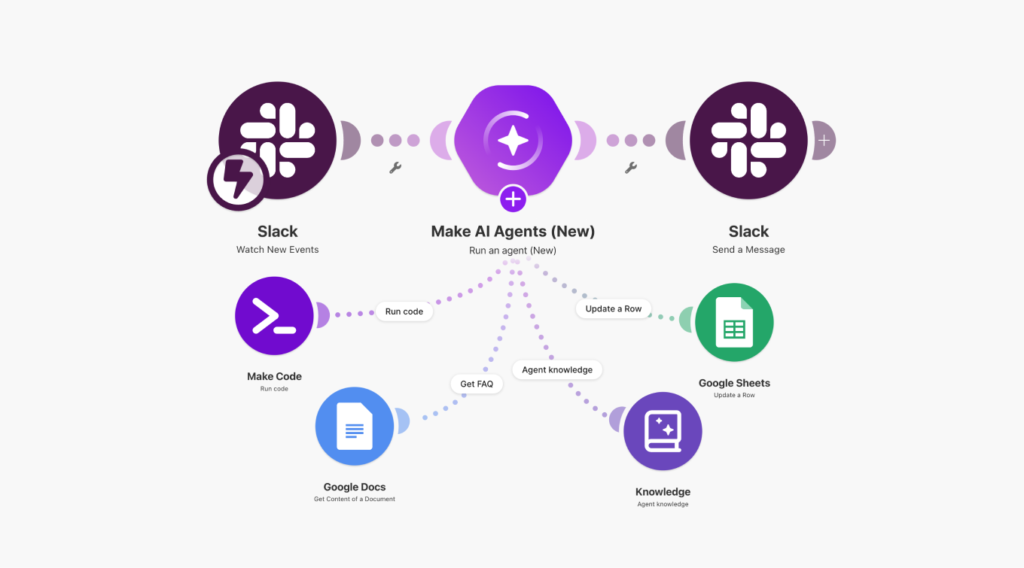
Figure 2. Make’s 2026 AI Agent interface places agents directly inside the Scenario Builder, reinforcing its visual-first approach. Source: Make.
Make has also integrated AI capabilities into its credit model, including variable consumption for some built-in AI services.
n8n for Technical AI Orchestration
n8n becomes more compelling when AI is interacting with a broader technical architecture.
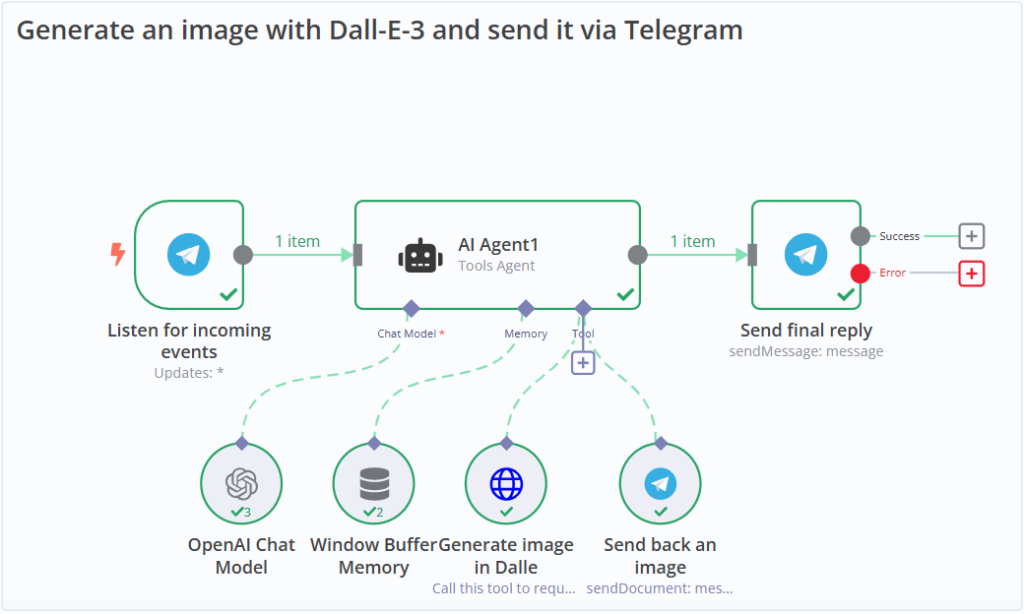
Figure 3. An n8n AI workflow example showing an agent connected to model, memory and tool nodes. Source: n8n.
Examples include:
- internal APIs;
- vector databases;
- retrieval systems;
- Python services;
- custom tools;
- databases;
- locally hosted models;
- agent frameworks; and
- other automation systems.
This is an important distinction.
An AI workflow might classify a support ticket. An AI system might discover available tools, retrieve enterprise context, call specialist services, maintain state and delegate work to other agents. The second problem requires a much larger architecture.
That is where AIMEC generally prefers n8n as an orchestration layer rather than as the entire application.
Which Is Easiest to Debug?
A workflow platform is easy to evaluate while everything succeeds. Failures are more revealing.
Imagine two problems. First, the enrichment API returns a valid response with the wrong schema. Second, the API temporarily returns HTTP 503 Service Unavailable.
Because we have not performed a timed controlled failure test across all three platforms, the comparison below is an architectural assessment rather than measured recovery data.
| Debugging dimension | Zapier | Make | n8n |
| Identifying failed step | Very good | Very good | Very good |
| Payload inspection | Good | Very good | Excellent |
| Retry/replay | Good | Very good | Very good |
| Error-routing flexibility | Good | Excellent | Excellent |
| Non-technical accessibility | Excellent | Very good | Moderate |
| Technical diagnosis | Good | Very good | Excellent |
Zapier Debugging
Zapier’s abstraction helps non-technical users understand where a workflow stopped. That can be more valuable than exposing every implementation detail. Actions that error or halt do not currently count toward task usage.
For teams owning relatively standard business automations, the ability to quickly see that one action failed may be exactly what is required.
Make Debugging
Make’s visual scenario architecture makes it easier to connect a failure to a particular part of the workflow. Detailed execution logs become especially valuable once data is passing through several branches. Make’s current Pro tier also includes full-text execution log search.
n8n Debugging
n8n’s debugging environment generally suits technical users particularly well because the data moving between individual nodes is highly visible.
For malformed JSON, API errors or unexpected payload structures, that visibility can make diagnosis easier.
The trade-off is accessibility. A developer may prefer seeing the raw response. A sales operations user may simply want to know which CRM action failed.
So the useful distinction is:
Zapier makes common business failures easier to understand. n8n makes technical failures easier to investigate. Make sits between the two.
What Happens at 100,000 Runs?
At 1,000 monthly runs, ease of use may dominate the decision. At 100,000 runs, operational architecture becomes much more important.
Using our illustrative four-unit model:
100,000 business workflow runs → approximately 400,000 Zapier tasks or 400,000 Make credits, compared with 100,000 n8n workflow executions.
Again, those are modelling assumptions, not vendor quotes. But the difference illustrates why scale changes the conversation.
At high volume, businesses need to think about:
- concurrency;
- queueing;
- worker capacity;
- API rate limits;
- database performance;
- retries;
- idempotency;
- duplicate writes;
- execution history;
- logging;
- monitoring;
- deployments; and
- failure isolation.
n8n’s Business tier, for example, currently includes scaling options, separate environments and Git-based version control, while Enterprise adds capabilities such as log streaming and extended retention.
Those are not features most businesses care about when they automate their first spreadsheet.
They become considerably more important once automation becomes operational infrastructure.
When No-Code Automation Becomes the Wrong Architecture
There is a common assumption that if Zapier becomes too simple, the answer is Make. And if Make becomes too limited, the answer is n8n. Sometimes it is. Sometimes the answer is to stop building the system as a workflow. If your decision has reached that point, see when custom automation makes more sense than Zapier for a deeper architecture comparison.
1. Latency Is Critical
Background synchronisation can tolerate orchestration overhead. A user-facing application that must respond predictably in milliseconds may not. If every request must move through several automation nodes before the application can respond, workflow orchestration may be sitting in the wrong part of the architecture.
2. Business State Is Becoming Complicated
A workflow that says: If X happens, do Y is easy to reason about. A system coordinating complex state transitions, concurrent users, transactions and long-running processes is increasingly behaving like application software.
At some point, the workflow should orchestrate the application rather than become the application.
3. Processing Is Computationally Heavy
Putting 300 lines of Python into a workflow code node does not necessarily mean the workflow platform is the right place for that logic.
Large data transformations, machine-learning workloads, crawling, optimisation or specialist processing may belong in a dedicated service. The workflow can invoke that service.
That separation often produces a cleaner system.
4. Integrations Are Highly Specialised
Automation platforms shine when connecting systems that resemble the applications and APIs they were designed around.
A proprietary legacy platform, specialist protocol or unusual authentication model may be more maintainable through a custom integration service.
5. Security Boundaries Are Strict
Sometimes the automation platform should not have direct access to the underlying system at all. A safer architecture may expose a deliberately narrow internal API containing only the operations the automation is authorised to perform.
6. Volume Changes the Economics
A platform that is inexpensive at 2,000 transactions may become expensive at 500,000.
At sufficient volume, custom infrastructure can become economically attractive even after accounting for engineering and hosting costs.
7. You Are Building Agent Infrastructure
There is a substantial difference between adding an AI node and building an agentic system.
An agent platform may need:
- capability discovery;
- tool permissions;
- authentication;
- state;
- persistent memory;
- task delegation;
- human approvals;
- inter-agent communication;
- protocol support;
- auditability; and
- long-running execution.
A workflow engine can be part of this system. It usually should not be mistaken for the entire system.
Zapier vs Make vs n8n: Decision Tree
Use the following questions instead of picking a platform based on popularity.
Choose Zapier if:
- your users are primarily non-technical;
- most integrations are mainstream SaaS products;
- workflows are relatively straightforward;
- speed of implementation is a priority;
- you want infrastructure managed for you; and
- task-based pricing fits your expected usage.
Choose Make if:
- you want a visual-first workflow environment;
- processes contain meaningful branching;
- transformations are becoming more complicated;
- visual visibility into data routes is valuable;
- you still want fully managed infrastructure; and
- Make’s credit model fits your execution pattern.
Choose n8n if:
- APIs are central to the workflow;
- developers or technical users will own automation;
- you need custom code;
- AI orchestration is important;
- infrastructure control matters;
- self-hosting is valuable;
- workflow complexity is growing; or
- you need to connect automation to specialised internal services.
Choose Custom Automation if:
- business state is becoming complicated;
- latency requirements are strict;
- transaction integrity is critical;
- processing is computationally heavy;
- integrations are highly unusual;
- security boundaries require specialised controls;
- execution volumes materially change the economics; or
- your “workflow” is becoming an application.
Overall Comparison
| Dimension | Zapier | Make | n8n |
| Ease of use | Excellent | Very good | Good |
| Estimated build speed | Fastest | Medium | Slower initially |
| Visual workflow design | Good | Excellent | Excellent |
| SaaS integrations | Excellent | Excellent | Very good |
| API flexibility | Good | Very good | Excellent |
| Data transformation | Good | Excellent | Excellent |
| Branching | Good | Excellent | Excellent |
| AI workflows | Very good | Very good | Excellent |
| Custom code | Moderate | Good | Excellent |
| Business-user debugging | Excellent | Very good | Moderate |
| Developer debugging | Good | Very good | Excellent |
| Self-hosting | No | No | Yes |
| Infrastructure control | Low | Low | High |
| Initial learning curve | Low | Medium | Higher |
| Technical ceiling | Medium | High | Very high |
| Typical best fit | SaaS automation | Visual complex automation | Technical orchestration |
These ratings are not laboratory scores.
They represent AIMEC’s assessment of how the current platforms fit a representative business workflow based on their architectures, current billing systems and our direct experience building with n8n.
So, Is n8n Better Than Zapier and Make?
Not universally.
Zapier is likely to be the better product for a business that wants common applications connected quickly and does not want every automation project to become an engineering exercise.
Make offers an excellent middle ground.
It exposes substantially more of the workflow visually and can be particularly effective for processes involving branching and data transformation.
n8n becomes increasingly compelling when APIs, AI, custom code and infrastructure control enter the picture.
That is why AIMEC uses n8n for much of its own automation work. It fits the type of technical systems we tend to build.
That does not mean every company should use it. The automation platform should follow the business problem.
And if that problem becomes sufficiently complex, there is a more important question than Zapier vs Make vs n8n:
Should this still be implemented as a workflow at all?
The strongest automation architecture is often hybrid. Use workflow platforms for orchestration. Use dedicated software for specialised business logic. And avoid forcing either one to do a job it was not designed to do.
Frequently Asked Questions
Which is cheaper: Zapier, Make or n8n?
There is no universal cheapest platform because they meter usage differently. Zapier primarily uses tasks. Make uses credits. n8n’s commercial pricing is primarily based on complete workflow executions.
A simple automation may therefore produce similar economics across platforms, while a long multi-step workflow can create significantly different usage.
The correct comparison is based on the number of real business events and the amount of billable work each event generates.
Which automation platform is best for AI?
For simple AI classification, summarisation or extraction, all three platforms are viable. For AI workflows involving custom APIs, code, internal systems, specialist tools or broader agent orchestration, n8n generally provides the strongest technical flexibility.
That does not necessarily make it the easiest choice. A simple AI-enhanced CRM workflow may be considerably easier to maintain in Zapier.
Is n8n harder than Zapier?
Usually. Zapier intentionally abstracts more technical complexity. n8n exposes more of the underlying data flow, API behaviour and workflow structure.
That produces a steeper learning curve but also gives technical teams more control.
Is Make easier than n8n?
For many non-developers, yes. Make’s visual scenario builder provides sophisticated routing while maintaining a relatively approachable interface. n8n generally becomes more attractive as developer-oriented requirements increase.
Does n8n support self-hosting?
Yes. n8n currently provides a standard self-hosted Community Edition as well as commercial self-hosted options.
Does self-hosting make n8n POPIA compliant?
No. Self-hosting changes where and how parts of the system operate, but POPIA requires appropriate technical and organisational safeguards around personal information. Infrastructure location is only one component of that responsibility.
When should a business use custom automation instead?
Consider custom automation when workflows require complicated application state, strict latency, unusual security boundaries, high transaction volumes, heavy processing, highly specialised integrations or sophisticated agent orchestration.
In many cases, the best architecture combines the two approaches: a workflow platform handles orchestration while dedicated services perform specialised processing.

Steven Walgenbach is an AI Engineer specializing in AI agents, large language models, retrieval-augmented generation and business process automation. He designs and builds practical AI systems that connect with existing tools, data sources and workflows to help businesses reduce manual work, improve decision-making and scale more efficiently.
His work includes developing multi-agent systems, private and locally hosted AI solutions, custom knowledge assistants, SEO automation pipelines and LLM-powered applications using Python, LangGraph, CrewAI, the OpenAI Agents SDK and other modern AI frameworks.
Through AIMEC, Steven helps businesses move beyond AI experimentation and identify practical opportunities where artificial intelligence can deliver measurable operational and commercial value.