The current automation landscape is characterized by a definitive transition from simple application connectivity to the sophisticated orchestration of autonomous agents.
The proliferation of Software-as-a-Service (SaaS) tools—averaging over fifty per scaling organization—has necessitated a central nervous system capable of governing data flows with precision, intelligence, and fiscal predictability.
Within this technological milieu, two primary platforms, Zapier and Make.com, have emerged as the foundational architects of the integration-Platform-as-a-Service (iPaaS) market.
While Zapier continues to emphasize the democratization of automation through guided, linear interfaces, Make has solidified its position as the preferred environment for technical specialists requiring spatial flexibility and granular data manipulation.
The divergence between these platforms is not merely aesthetic but rooted in fundamental design philosophies that dictate how work is conceptualized and executed.
In this article on Zapier vs Make, we’ll compare the two popular platforms so that you can make a more informed decision when choosing a solution for your needs.
The Architectural Divide: Visual Scenarios vs. Linear Wizards
The user experience of an automation platform serves as the primary gateway to its technical capabilities.
Zapier utilizes a “wizard-style” builder that leads the user through a step-by-step trigger-and-action sequence. This design is intentionally restrictive; it “railroads” users into specific, proven flows to ensure high success rates for those with minimal technical training.
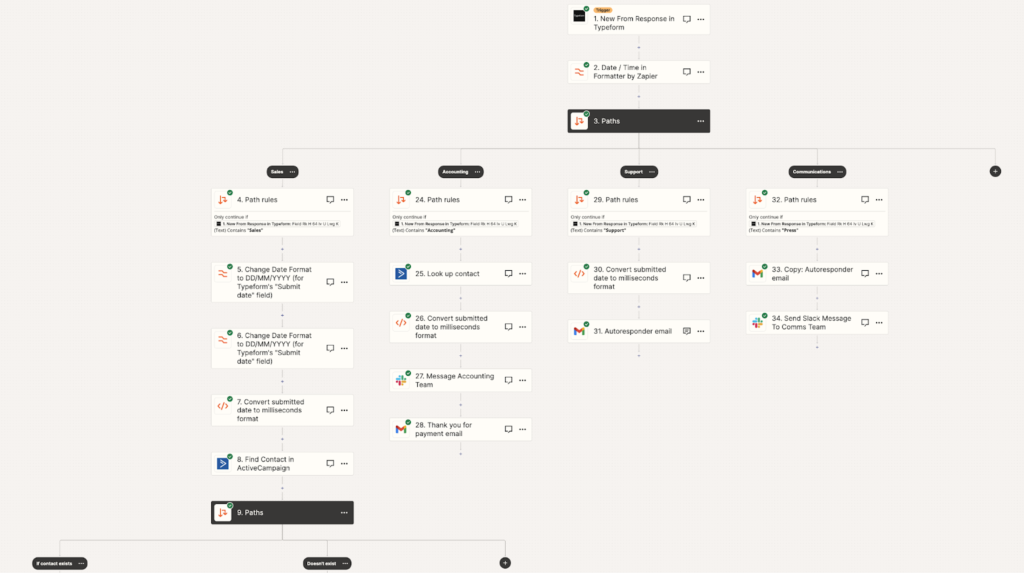
A screenshot of Zapier’s visual editor (Source: Zapier)
That approach is ideal for “A-to-B” or “A-to-B-to-C” automations, where the primary objective is the rapid movement of data between common platforms like Gmail, Slack, and Google Sheets.
Make, in contrast, employs a visual, drag-and-drop canvas that treats automation as a flowchart. This spatial freedom allows users to visualize data paths, parallel processing, and conditional branches simultaneously on a single screen.
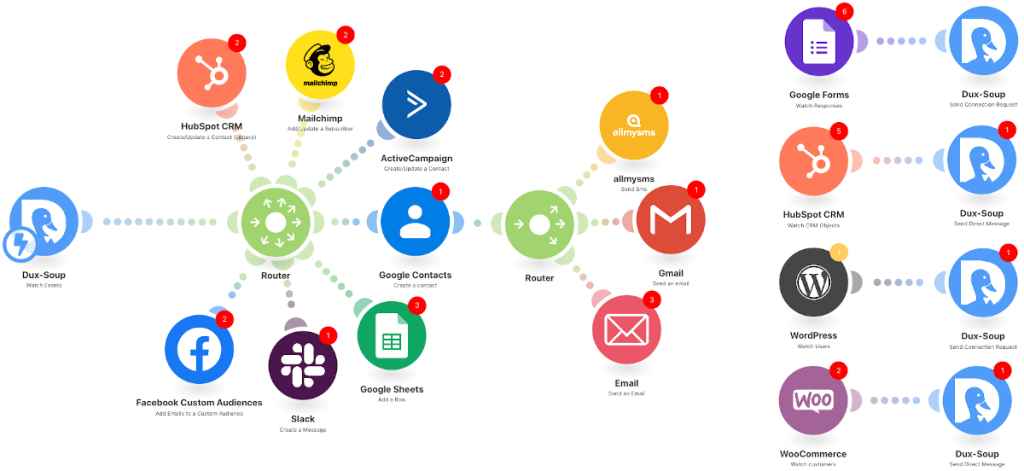
Example Make workflow (Source: Make)
While this interface offers unparalleled clarity for multifaceted processes, it introduces a significant learning curve. New users often report initial frustration, suggesting that the platform’s power requires a foundational understanding of modules, routers, and filters, frequently acquired through structured education such as the Make Academy.
Comparative Structural Interface Analysis
| Feature | Zapier | Make.com |
| Builder Type | Linear, step-by-step wizard | Visual, drag-and-drop canvas |
| Philosophy | Guided simplicity, low friction | Spatial flexibility, logical depth |
| Workflow Name | Zaps | Scenarios |
| Navigation | Sequential; nested paths require menu drilling | Holistic; entire logic tree visible at once |
| Complexity Limit | Up to 100 steps; paths limited to 3 levels | Unlimited modules and branching within a scenario |
| Beginner Onramp | Minutes to value; high template adoption | Steeper curve; often requires academy training |
The structural difference in these builders has profound implications for the long-term maintainability of enterprise workflows.
Today, where a single automation might handle lead scoring, sentiment analysis, and multi-channel routing, the ability to see the “decision tree” on a single canvas is a critical advantage for Make users.
In Zapier, complex branching via “Paths” can become opaque, as users must click into each branch individually to view its contents, making it difficult to maintain a holistic view of the system. However, Zapier has mitigated this through the introduction of “Zapier Canvas,” an AI-powered planning tool that allows teams to map out entire business processes visually before building the underlying Zaps.
Integration Ecosystems: Breadth of Connectivity vs. Granularity of Action
The utility of any iPaaS platform is directly proportional to its ability to connect with the tools used by modern businesses.
Zapier maintains its status as the “King of Quantity,” offering a library exceeding 8,000 integrations. This breadth is particularly vital for organizations using niche or newly launched SaaS applications that may not yet have developed standard API connections for smaller platforms.
Zapier’s market dominance creates a “flywheel effect”: as more users adopt Zapier, more app developers prioritize building Zapier integrations, further cementing its position as the industry standard for connectivity.
Make, while possessing a smaller library of approximately 3,000 apps, focuses on the “Champion of Depth” strategy.
For supported applications, Make typically provides a more comprehensive list of triggers and actions than Zapier. This granularity allows technical teams to interact with specific sub-components of an app’s API.
For instance, while Zapier might offer a standard “Update Contact” action for a CRM, Make might provide modules to “Update Custom Field,” “Associate Record,” or “Manage Permissions” within that same contact record.
Integration Depth Comparison: HubSpot CRM Case Study
HubSpot remains one of the most frequently automated platforms, serving as a primary data source for sales and marketing teams. The comparison between Zapier and Make’s HubSpot integrations below reveals the trade-off between accessibility and control.
| Capability | Zapier HubSpot Integration | Make HubSpot Integration |
| Total Modules | Approximately 50-60 actions/triggers | 121 modules (Triggers, Actions, Search) |
| Trigger Type | Polling (1-15 min) & Instant (New Deal) | Polling & Webhooks (Instant for most) |
| Advanced Objects | Custom Objects, Engagements | Custom Objects, Associations, Line Items, Products |
| Efficiency | One action per record (Task-heavy) | Aggregators bundle records (Operation-efficient) |
| Extensibility | Webhooks by Zapier for missing endpoints | Native HTTP module for any API call |
Make’s integration allows for “selective removal” of specific values from multi-checkbox properties, an operation that historically required clearing the entire field and rebuilding the list in other platforms.
Furthermore, Make’s ability to “Iterate” through a list of HubSpot records and then “Aggregate” them into a single file before sending them to a database is significantly more operation-efficient than Zapier’s model, which would count each individual record update as a separate task.
For developers, Make’s “HTTP module” is a defining feature. It enables the creation of custom API calls to any endpoint, even those not officially supported in the Make library.
While Zapier has “Custom Actions” and “Zapier Functions,” Make’s visual builder for HTTP requests—complete with header management and JSON parsing—is often cited by technical specialists as more intuitive for building bespoke integrations.
Economic Models: Analyzing the Fiscal Impact of Tasks and Operations
The most contentious aspect of the Zapier versus Make debate is the divergent pricing models and their impact on the Total Cost of Ownership (TCO). Zapier utilizes a “task-based” billing system. A task is defined as any successful action carried out by a tool within a workflow. Critically, triggers and filters usually do not count toward the task limit, meaning users only pay for the actual work produced by the automation.
Make employs an “operation-based” model. In this system, every module that runs in a scenario counts as an operation—this includes the trigger module, every logic gate (Router), every data transformer, and every final action. This granular counting can lead to higher consumption than beginners initially expect, particularly if a scenario is poorly optimized.
Comparative Pricing Tiers (Annual Billing Estimates)
| Plan Type | Zapier Monthly Price | Zapier Monthly Tasks | Make Monthly Price | Make Monthly Operations |
| Free | $0 | 100 | $0 | 1,000 |
| Entry (Core) | $19.99 | 750 | $9.00 | 10,000 |
| Pro | $49.00 | 2,000 | $16.00 | 10,000 (Plus features) |
| Team | $69.00 | 2,000+ | $34.12 | 10,000+ (Team features) |
| Enterprise | Custom | Custom | Custom | Custom |
The fiscal disparity becomes evident at scale. Make provides roughly 13 times more operations per dollar than Zapier provides tasks.
For a business automating 10,000 actions per month, Make would cost approximately $9-16, whereas Zapier could exceed $100-200 depending on the plan.
However, the “Polling Trap” represents a significant hidden cost in Make. If a scenario is set to check for new data every five minutes, it will consume 12 operations per hour (288 per day) even if no data is found. Zapier’s polling is typically bundled into the subscription, meaning empty checks do not consume task credits.
To achieve cost efficiency in Make, users must shift from polling to “Webhooks,” which trigger the automation only when data is actively pushed to the platform. This technical optimization is essential for high-volume businesses, such as e-commerce stores processing hundreds of daily orders.
A workflow that costs $0.10 per run on Zapier might be reduced to $0.02 on Make through effective use of webhooks and aggregators.
The Rise of the Agentic Ecosystem
Workflow Automation has matured into AI Orchestration recently. No longer content with merely moving data, both platforms have integrated Large Language Models (LLMs) to provide reasoning, summarization, and autonomous decision-making.
Zapier has positioned itself as an “AI-First” platform. The introduction of “Zapier Copilot” allows users to build automations by describing the desired outcome in natural language. Furthermore, “Zapier Agents” enable the creation of autonomous digital workers that can browse the web, interact with apps, and solve complex problems based on goal-oriented prompts rather than rigid “if-then” logic. This accessibility allows non-technical employees to build sophisticated, AI-enhanced systems in minutes, significantly shortening the “time to value” for enterprise AI initiatives.
Make’s AI strategy focuses on “Modular Intelligence.” Rather than a single conversational builder, Make provides specialized “AI Modules” that users can place within their scenarios. This includes “AI Content Extractors” to turn unstructured files into data and “AI Web Search” modules that bring live web data into automations.
While Make’s setup is more manual, it offers technical teams better “debugging of prompt chains.” Because every step of the AI’s reasoning is visible as a module on the canvas, engineers can precisely identify where a prompt might be failing or where an LLM is producing malformed data.
The AI Fiscal Model: Credits, Tokens, and Multipliers
The economic model for AI is more complex than standard automation. Make has transitioned to a “Credit” system where non-AI operations use one credit, but AI-based operations can use multiple credits based on the model’s complexity (e.g., Small, Medium, or Large).
| AI Usage Model | Mechanism | Fiscal Responsibility |
| Make AI Provider | Built-in LLM access | Pay Make via Credits (Tokens + Operations) |
| Custom AI Connection | Link your own API (OpenAI/Claude) | Pay Make for 1 Credit; Pay AI provider for Tokens |
| Automatic Connection | Pre-set models for Search/Extraction | Pay Make via dynamic Credit usage |
| Zapier AI Agents | Prompt-driven autonomous bots | Bundled in Pro/Team (Activity-based caps) |
A third-order insight from this model is the “Hallucination Tax.”
In 2026, when an AI model returns an error or malformed JSON, Zapier’s “Autoreplay” might simply rerun the task, potentially repeating the error and consuming more tasks.
Make’s “Error Handling” modules allow the system to “catch” a bad AI response and route it through a secondary “cleanup” prompt before continuing, which—while consuming more credits—ensures higher data integrity for mission-critical processes.
Error Handling and Reliability: The Enterprise Standard
In a professional automation context, failure is inevitable.
API timeouts, rate limits, and malformed data from source apps are “standard operating conditions”. The divergence in how Zapier and Make handle these failures defines their suitability for enterprise-level infrastructure.
Zapier offers “Basic Reliability” features. These include error notifications, “Autoreplay” for failed tasks, and a “Success/Error” path for custom error handlers available on Professional plans. While sufficient for simple notification pipelines, this approach is often inadequate for complex workflows requiring robust data recovery.
Make provides “Professional-Grade Error Management.” Users can attach specific error handlers to any module in a scenario, allowing for a variety of responses:
- Resume: Substitutes a fixed value for a failed step and continues the scenario.
- Rollback: Reverts any changes made to external apps during the scenario run to maintain data consistency.
- Break: Stops the scenario run but allows a human to manually resolve the error and resume it from that exact point.
- Ignore: Silently continues the workflow despite the error, useful for non-essential steps.
This granular control is why Make is often preferred for “Reasoning Engines” and high-value financial automations. For instance, if an e-commerce automation successfully charges a customer’s credit card but fails to update the inventory system due to a timeout, Make’s “Rollback” function could theoretically prevent a situation where the customer is charged for an item that is out of stock.
Enterprise Governance, Security, and Scalability
As automation moves from individual convenience to organizational infrastructure, “Governance” becomes the primary concern for IT departments.
Zapier has invested heavily in “Enterprise-Grade Security,” offering a centralized admin dashboard, SAML Single Sign-On (SSO), and SCIM provisioning. These tools allow admins to manage permissions across thousands of users and monitor “Audit Logs” to track who created which automation and what data it accessed.
Make offers similar security features, including SOC 2 Type II and GDPR compliance. However, its “Teams” and “Enterprise” tiers focus more on collaborative building, allowing teams to share templates and variables within a secure workspace.
A critical consideration is “Data Sovereignty.”
For highly regulated industries like healthcare and finance, the cloud-based nature of Zapier and Make can be a barrier. This has led to the rise of “fair-code” or open-source alternatives like n8n and Activepieces. These platforms allow organizations to “Self-Host” their automation engine on their own servers, ensuring that sensitive customer data never leaves their secure environment.
Frequently Asked Questions
How does “Polling” vs. “Webhooks” impact the monthly bill?
In Zapier, polling is typically a hidden cost included in the subscription; however, it can introduce delays of up to 15 minutes on lower tiers. In Make, polling is “expensive” because every check—even if no data is found—consumes an operation credit. Professional architects prioritize Webhooks in Make to ensure real-time triggers and minimize operational waste.
Can Zapier handle complex data transformations without external code?
Yes, via “Formatter by Zapier,” which provides tools for text manipulation, date formatting, and basic math. However, complex JSON parsing or array manipulation often requires multiple Formatter steps, each consuming a task. In Make, these transformations are handled natively within the module mapping or through dedicated “Iterators” and “Aggregators,” which are generally more powerful for handling bulk data.
Which platform is better for “AI Agent” development?
Zapier is superior for “Rapid Agent Deployment.” Its natural language “Copilot” and “Agents” allow a non-technical user to deploy a web-browsing, reasoning bot in minutes. Make is superior for “Agent Architecture.” Its visual canvas allows technical teams to build “Reasoning Engines” where the agent’s logic is explicitly mapped, allowing for better debugging of complex prompt chains and token usage monitoring.
Is it possible to migrate from Zapier to Make as a business scales?
While technically possible, there is no “one-click” migration tool due to the fundamental differences in how the platforms structure logic. Most successful organizations use Zapier for “Prototyping” and “Simple Notification Pipelines” but migrate their high-volume, mission-critical logic to Make when the Zapier monthly bill crosses a certain threshold—often $500/month—or when the logic requires sophisticated error handling.
Does Make.com support custom API integrations for niche software?
Make’s “HTTP module” is its most powerful extensibility feature. It allows any user with a basic understanding of APIs to build their own connectors using standard authentication methods (OAuth2, API Key, Basic Auth). This provides Make with “infinite depth,” as it can connect to any tool with a public or private API, regardless of whether it is officially listed in the library.
Which platform offers better support for team collaboration?
Zapier’s “Team” and “Enterprise” plans are designed for organization-wide adoption, offering shared folders, shared app connections, and collaborative Zaps. Make’s “Teams” tier allows for similar sharing but emphasizes “Role-Based Access Control” (RBAC) and the ability to share complex scenario templates as “Blueprints” across the company.
“`html “`
Steven Walgenbach is an AI Engineer specializing in AI agents, large language models, retrieval-augmented generation and business process automation. He designs and builds practical AI systems that connect with existing tools, data sources and workflows to help businesses reduce manual work, improve decision-making and scale more efficiently.
His work includes developing multi-agent systems, private and locally hosted AI solutions, custom knowledge assistants, SEO automation pipelines and LLM-powered applications using Python, LangGraph, CrewAI, the OpenAI Agents SDK and other modern AI frameworks.
Through AIMEC, Steven helps businesses move beyond AI experimentation and identify practical opportunities where artificial intelligence can deliver measurable operational and commercial value.