
AI agents are becoming capable of doing much more than answering questions. The growing list of things an AI agent can do for a business includes sending emails, updating CRM records, creating invoices, modifying files, interacting with APIs, executing code and triggering workflows. This ability to take action is what makes AI agents useful. It is also what makes them dangerous when security controls are poorly designed.
An AI assistant that gives a bad answer creates an inconvenience. An AI agent that makes a bad decision and immediately executes it can affect customers, money, infrastructure or sensitive business data. This is where the AI agent human in the loop model becomes important.
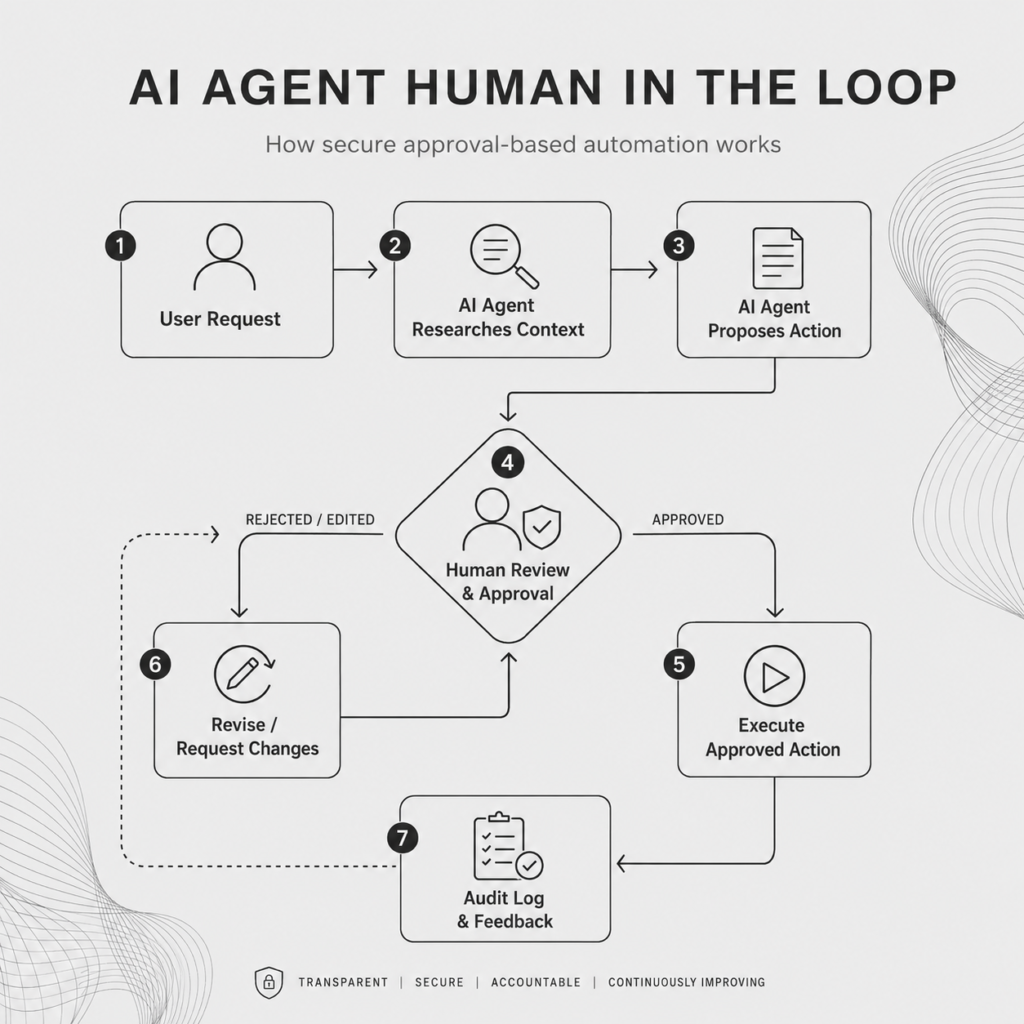
High level overview of how human in the loop works
Human-in-the-loop systems allow an AI agent to work autonomously while requiring human approval before certain high-impact actions are executed. The objective is not to have humans approve everything. It is to determine which decisions an AI agent can make independently and which ones should remain under human control.
What Is AI Agent Human in the Loop?
Human in the loop, often shortened to HITL, means inserting human review into specific stages of an automated AI workflow. A simple workflow might look like this:
User request → AI researches → AI proposes action → Human reviews → AI executesThe AI still performs most of the work. This type of workflow builds on the same reasoning, tool use and autonomy covered in our guide to how autonomous AI agents work, but adds explicit control points before sensitive actions. The person only intervenes when the workflow reaches an action that requires judgment, authority or additional verification.
Consider an AI customer service agent. The agent might automatically:
- retrieve a customer’s account;
- inspect previous support conversations;
- check an order;
- identify the likely problem;
- draft a response; and
- recommend a refund.
None of those steps necessarily require human involvement. But if the agent decides that the company should refund $5,000, the workflow could pause. A human reviews the evidence and chooses: Approve, Reject, or Modify.
Only then does the agent call the refund system. That approval checkpoint is the human-in-the-loop layer.
Why Human Approval Matters for AI Agents
Traditional business automation is usually predictable. A workflow might say: If an invoice is overdue by 30 days, send a reminder. The software follows a predefined rule. AI agents introduce another layer.
That is one of the key differences between AI agents and traditional automation. Traditional workflows usually execute predefined rules, while agents can interpret context, decide what to do next and select tools dynamically. But it also means their decisions are not perfectly deterministic.
An agent can misunderstand the situation. It can use incomplete information. It can choose the wrong tool. It can misinterpret instructions. It may even encounter malicious instructions hidden inside documents, emails or websites.
Human approval creates an additional barrier between AI reasoning and real-world consequences. This is why human oversight remains important in the agentic enterprise even as more of the underlying work becomes autonomous. The role of the person changes from performing every task to supervising the decisions where judgment, authority or accountability matter most.
The Real Question: What Should the Agent Be Allowed to Do?
Human-in-the-loop security actually begins before the approval screen appears. The first question should be: What authority should this AI agent have?
A common mistake when building agents is giving them broad access because it makes development easier. This becomes particularly important when looking at how AI agents connect to business software, because integrations with CRMs, databases, email platforms, payment systems and internal APIs can turn model decisions into real-world actions.
For example, suppose an AI agent needs to look up customer orders. The easiest implementation might be to give the agent access to the entire customer database.
But the agent may only need three capabilities:
- search for a customer;
- retrieve order information;
- retrieve shipping status.
It probably does not need the ability to delete customers, modify billing information or export the entire database. This is the principle of least privilege. Give the agent the smallest set of capabilities required to perform its job. Human approval then becomes an additional security layer for the capabilities that genuinely carry risk.
Which AI Agent Actions Should Require Human Approval?
Not every agent action should trigger an approval request. If employees have to approve every database read or API call, the system stops being useful. A better approach is to classify actions according to their potential impact.
| Risk | Example | Approval |
| Low | Search internal documentation | Usually automatic |
| Low | Summarize a customer conversation | Usually automatic |
| Low | Retrieve CRM information | Usually automatic |
| Medium | Update a CRM field | Policy dependent |
| Medium | Draft an external email | Often review-only |
| High | Send sensitive customer communication | Human approval |
| High | Issue a large refund | Human approval |
| High | Change user permissions | Human approval |
| High | Modify production infrastructure | Human approval |
| Critical | Transfer significant funds | Mandatory approval |
| Critical | Permanently delete important data | Mandatory approval |
Another useful question is: How easy is this action to reverse? Changing the classification of a CRM lead is relatively easy to undo. Sending $100,000 to the wrong account is not. The harder an action is to reverse, the stronger the approval requirements should become.
Human in the Loop Does Not Mean Approving Everything
There is a danger in overusing approval prompts. Imagine an employee using an AI agent throughout the day. Every few minutes, the agent asks: Approve this?
Eventually the employee stops thinking about the decision. They simply click Approve. The security control still exists technically, but it has stopped providing meaningful protection. This is approval fatigue.
Human approval works best when it is relatively rare and associated with decisions that genuinely deserve attention. A good agent system therefore needs to distinguish between: Routine actions and Consequential actions. The routine work should usually remain automated. Human attention should be reserved for the exceptions.
A Better Architecture for Human-in-the-Loop AI Agents
A strong AI agent security model can be built in several layers.
1. Give the Agent Narrow Tools
Instead of giving an agent broad system access, expose specific capabilities. For example, instead of unrestricted access to a payment platform, the agent might receive:
lookup_invoice()

prepare_payment()

request_payment_approval()

execute_approved_payment()
This makes the agent’s authority easier to understand and control. This is also the advantage of a modular AI agent architecture: capabilities can be separated into narrow components instead of giving one agent unrestricted access to every system.
Each tool can also have its own rules. The agent may use lookup_invoice() whenever necessary. But execute_approved_payment() might only work after a valid approval token has been issued. This distinction is extremely important. The AI should not automatically inherit every permission available to the underlying software.
Explicitly defining agent skills and capabilities can also make this architecture easier to control, because the system has a clearer boundary around which operations the agent is supposed to perform.
2. Separate Reasoning From Execution
One of the safest patterns for AI agents is separating: What should we do? from Do it. An AI agent might conclude: Customer order 1842 qualifies for a $650 refund because the product was returned and the replacement shipment also failed.
That is reasoning. Actually calling the payment system and issuing the refund is execution. Those should be treated as separate stages. The agent can perform the reasoning automatically. The execution layer can require additional policy checks or human approval. This reduces the chance that one bad model decision immediately becomes a business action.
3. Use Deterministic Policies Where Possible
Not every security decision needs another AI model. Normal software is often better for enforcing rules. Suppose your refund policy is: Under $100: automatic. $100–$1,000: supervisor approval. Above $1,000: senior manager approval.
The AI does not need to decide whether approval is required. Normal code can do that. This creates a useful division of responsibilities. The AI handles ambiguous reasoning. Deterministic software enforces predictable business rules. Humans handle high-impact decisions.
4. Give the Reviewer Enough Context
A weak human approval system simply asks: Approve this action?
That is not enough information. The reviewer should understand exactly what the agent intends to do. A good approval interface might display:
Proposed action: Refund customer

Customer: ACME Ltd

Amount: $850

Reason: Duplicate invoice

Evidence: Invoice #8291 and payment transaction #28814

System affected: Stripe

Reversible: No
Then the reviewer can make a meaningful decision. The objective is not simply to obtain a click. It is to obtain informed authorization.
5. Approve the Action, Not the Agent
There is an important security distinction here. Suppose a manager approves: Refund Customer A $850. This should not mean: The agent now has permission to issue refunds. The authorization should ideally apply only to that specific operation.
For example:

customer_id: 4382

refund_amount: $850

approval_id: 72FD91

expires: 10 minutes
The agent can use that authorization once. It cannot decide five minutes later to issue a second refund to someone else using the same approval. This is much safer than temporarily giving the agent unrestricted authority.
6. Log Important Agent Actions
Every consequential action should leave an audit trail. You should be able to reconstruct:
- what the agent was trying to do;
- what information it used;
- which tools it attempted to call;
- which action required approval;
- who approved it;
- what parameters were approved;
- what actually executed; and
- whether execution succeeded.
This matters for debugging, security and accountability. When an agent makes a mistake, one of the first questions will be: Why did the system do that?
Without structured logs, that question can become surprisingly difficult to answer. These records can also support AI self-correction loops, where failed actions, rejected recommendations and human feedback become signals the system can use to improve future decisions.
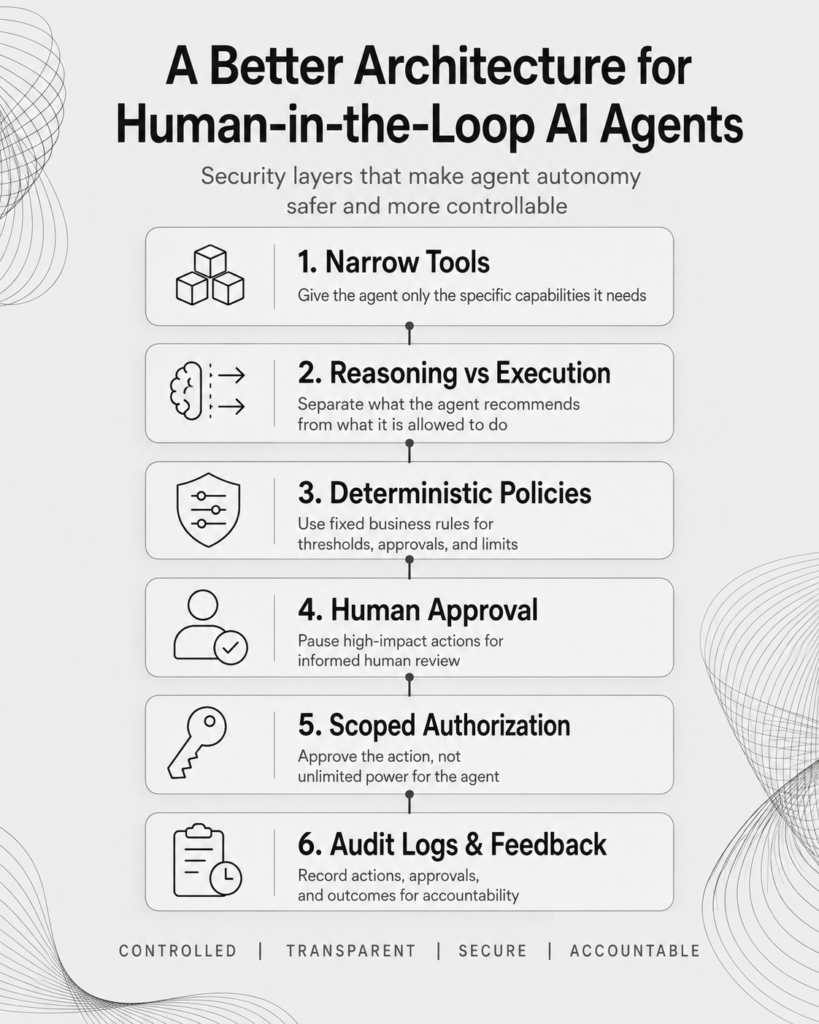
A better architecture for human in the loop processes for AI agents
Example: Human in the Loop for an AI Sales Agent
Consider an AI sales agent connected to:
- a CRM;
- company email;
- a calendar;
- a knowledge base; and
- lead enrichment tools.
The sales manager asks: Follow up with leads that have gone quiet during the last 30 days. The workflow might operate like this.
Step 1: Find Leads
The agent searches the CRM for inactive opportunities. No approval required.
Step 2: Research Context
It reads:
- previous emails;
- meeting notes;
- lead information; and
- account history.
No approval required.
Step 3: Select Opportunities
The agent identifies the leads most likely to respond. No approval required.
Step 4: Draft Messages
The agent prepares personalized follow-up emails. Still no approval required.
Step 5: Apply Policy
The system checks the message. For ordinary leads, sending might be permitted automatically. But perhaps the company defines additional rules:
- Strategic account: approval required.
- Discount included: approval required.
- Contract terms mentioned: approval required.
- Normal follow-up: automatic.
Step 6: Human Approval
A salesperson reviews only the messages that triggered those conditions. They approve, edit or reject them.
Step 7: Execution
The agent sends approved messages and updates the CRM.
Step 8: Audit
The system records:
- what was sent;
- why the lead was selected;
- whether a human reviewed it; and
- which actions were performed.
The employee has not manually performed the workflow. The AI still did most of the work. Human judgment was inserted only where it added value.
Some Actions Should Never Be Available to the Agent
There is another security category that is often overlooked. Not every capability needs an approval process. Some capabilities should simply be unavailable. Suppose an internal research agent needs access to company files.
It might need to:
- search;
- read;
- summarize; and
- compare.
It does not necessarily need to:
- permanently delete folders;
- change file ownership;
- create administrator accounts; or
- export the entire document library.
You do not need a human approval screen for these actions if the agent cannot perform them in the first place. When designing agent systems, every capability can therefore fall into four categories:
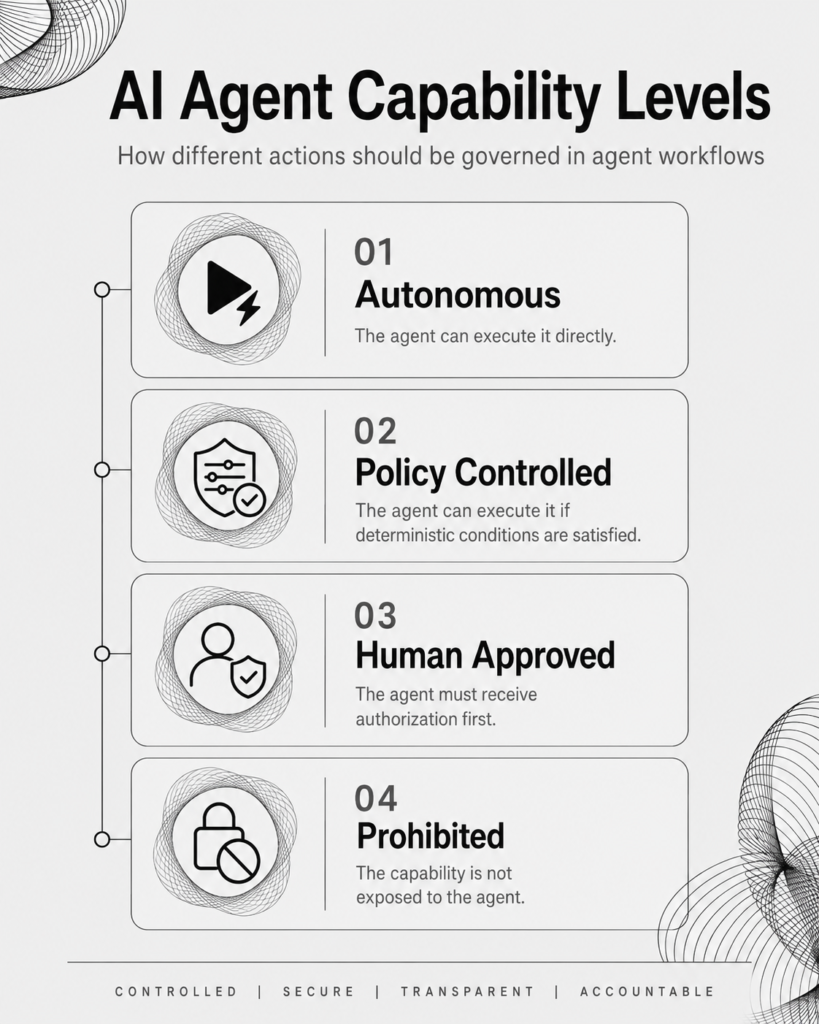
Categories of capabilities
That fourth category can significantly reduce the attack surface of an AI system.
Human in the Loop vs Human on the Loop
There are two common ways humans can supervise agent systems.
Human in the Loop
The agent must stop before certain actions. A person needs to approve before execution continues. This is best suited to actions involving:
- money;
- permissions;
- sensitive data;
- external communication;
- infrastructure;
- contractual commitments; or
- irreversible decisions.
Human on the Loop
The agent operates autonomously while humans monitor the system. The person does not approve every action but can intervene if something unusual happens. This works better for mature, relatively low-risk workflows. For example, an AI agent might automatically classify thousands of support tickets while supervisors monitor:
- error rates;
- unusual activity;
- escalations; and
- agent performance.
The long-term goal for many businesses will probably be a combination of both. High-risk actions remain human-in-the-loop. Lower-risk processes become human-on-the-loop.
Human Approval Is Not the Entire Security System
Human approval is useful, but it should never be the only thing standing between an AI agent and a critical system. A secure agent architecture should also consider:
- authentication;
- authorization;
- least-privilege access;
- tool restrictions;
- isolated execution;
- API permissions;
- spending limits;
- transaction limits;
- rate limits;
- network access;
- input validation;
- monitoring;
- audit logs; and
- emergency shutdown controls.
Think of human approval as one security layer. If an agent can access every system, retrieve every secret and execute arbitrary commands, adding an Approve button does not suddenly make the architecture secure. The best agent systems limit what can go wrong before asking humans to supervise what remains.
How to Design Human Approval for Your AI Agent
Before deploying an agent into a business process, map every action it can take. For each action, ask:
- What can the agent read?
- What can it change?
- What can it delete?
- What can it send outside the organization?
- Can it spend money?
- Can it modify permissions?
- Can it trigger another system?
- Can the action be reversed?
- What happens if the AI makes the wrong decision?
- What happens if someone manipulates the AI into attempting the action?
Then decide whether the capability should be:
- Autonomous
- Policy controlled
- Human approved
- Unavailable
This exercise is often more useful than starting with the AI model itself. The real security boundary of an AI agent is not simply how intelligent the model is. It is what the system allows that model to do.
Controlled Autonomy Is the Goal
Businesses are unlikely to adopt AI agents at scale if every action requires manual approval. This would simply replace one manual workflow with another. At the same time, giving AI agents unrestricted autonomy over important business systems creates unnecessary risk.
The practical answer sits between those two extremes. Agents should be able to work independently inside clearly defined boundaries. Low-risk actions can happen automatically. Predictable decisions can be governed by deterministic policies. High-impact actions can require human authorization.
Certain capabilities can remain completely unavailable. This is the purpose of an effective AI agent human-in-the-loop architecture. Human approval is not there to prevent automation. It exists to make greater automation possible without giving up control. As AI agents gain access to more business systems, that distinction will become increasingly important.
The companies that benefit most from agentic AI will not necessarily be the ones that give agents the most autonomy. They will be the ones that know exactly where autonomy should end.
Frequently Asked Questions
What is AI agent human in the loop?
AI agent human in the loop is a workflow design where an AI agent can perform tasks autonomously but must receive human approval before executing certain sensitive or high-impact actions.
Why is human in the loop important for AI agents?
AI agents can interact directly with business systems. Human approval adds a control point before potentially costly, sensitive or irreversible actions are executed.
Should every AI agent action require approval?
No. Low-risk actions should generally remain automated. Approval should focus on actions involving money, sensitive data, permissions, external communication or other meaningful consequences.
What types of actions should require human approval?
Common examples include large payments, refunds, destructive database operations, permission changes, production deployments and sensitive external communications.
What is the difference between human in the loop and human on the loop?
Human in the loop requires approval before specific actions can continue. Human on the loop allows the agent to operate autonomously while people monitor the system and intervene when necessary.
Can business rules replace some human approvals?
Yes. Deterministic rules can often handle straightforward decisions. For example, small refunds might be automatically approved while larger refunds require a manager.
Is human approval enough to make an AI agent secure?
No. Human approval should be combined with least-privilege permissions, restricted tools, authentication, authorization, logging, monitoring and other security controls.
What is controlled autonomy?
Controlled autonomy means allowing an AI agent to operate independently within predefined boundaries while requiring additional controls for actions that create greater risk.

Steven Walgenbach is an AI Engineer specializing in AI agents, large language models, retrieval-augmented generation and business process automation. He designs and builds practical AI systems that connect with existing tools, data sources and workflows to help businesses reduce manual work, improve decision-making and scale more efficiently.
His work includes developing multi-agent systems, private and locally hosted AI solutions, custom knowledge assistants, SEO automation pipelines and LLM-powered applications using Python, LangGraph, CrewAI, the OpenAI Agents SDK and other modern AI frameworks.
Through AIMEC, Steven helps businesses move beyond AI experimentation and identify practical opportunities where artificial intelligence can deliver measurable operational and commercial value.