
When the crypto news outlet I worked for as a journalist for several years downsized to “invest in AI,” I didn’t see it as a threat, I saw it as a technical challenge.
With over a decade of experience as a full-stack developer, I knew that the “standard” way of using AI (single prompts and copy-pasting) was a race to the bottom.
To stay competitive in 2026, you don’t need “AI content”; you need an Autonomous Editorial Agentic Workflow.
I decided to build a “Digital Newsroom” for my personal blog that replicates a professional editorial hierarchy. My goal was simple: Triple output and slash overhead to near-zero, without sacrificing the editorial integrity that Google’s Search Quality Raters demand.
The result? A system that sources, drafts, and fact-checks news with minimal human intervention. Here is the blueprint of how I moved from manual labor to an automated “Cruise Control” system.
The AI Editorial Framework
The first step in building out the system was to determine what “roles” I would need in the AI-powered editorial team.
After spending several years in the industry, I reached the conclusion that the most basic team comprises a news researcher, a writer, and an editor. As such, I coded an AI agent for each role.
To develop the agents, I used the OpenAI Agents SDK. The reason I went with this framework is because it gives developers the ability to connect to agents other than ChatGPT. For the software side of things, I wrote the system in Python using Virtual Studio Code. Since my OS is Windows, I had to set up WSL on my PC, just to make it easier to run the Agents SDK.
For the news researcher role, I decided to keep the list of news sources relatively simple during this prototype stage. I used 3 websites that had a good and relatively fixed HTML structure for their content, making it easier to read the actual content on their pages.
Agent 1: News Fetcher
The first actor in the AI editorial workflow is the News Fetcher Agent, which visits the list of sources and finds news that is no longer than 2 hours old (posted over 2 hours ago). If there is news that matches this time requirement, it saves the articles in JSON format in a file called articles.json.

A blank list of article objects showing the JSON schema the AI editorial workflow uses
Above is an example of how the system would save the list of JSON objects (I removed the values to keep the content evergreen). Looking at the JSON above, the fields are fairly self-explanatory.
Here is a breakdown of what each filed is just in case:
- “source”: The website that the news was fetched from.
- “url”: The URL of the web page.
- “title”: The original title of the article/source.
- “original content’: The actual content/body text of the article.
- “rewrite”: A field used to indicate to the system which articles it must write (more on this below).
- “timestamp”: The timestamp that the original article was published.
The news fetcher agent is not necessarily a true AI agent but rather a script with some basic web scraping. I am working on changing this. More on that later.
Agent 2: Journalist Agent
Now that the system has fetched news and saved the relevant information for each article, it’s time to move on to the next step.
I opted for a human-in-the-loop approach. Before passing the workload on to the next agent, a human editor/co-ordinator (in this case me), scrolls through the list of articles and sets the “rewrite” field to true for the system to rewrite its own version of the article.
After picking which articles to proceed with, the user tells the system to move on to the next step. In this second step, a Journalist Agent loops through articles.json and pulls the “original article” content for all JSON objects where “rewrite” is set to true.
It puts all of the articles into a list and sends them to OpenAI’s API one-by-one to rewrite its own news story. The prompt I use is fairly basic.
Here is the prompt I use for the article rewrite: “You are a crypto journalist and news reporter. Write a news article in newsroom style that is between 500 and 700 words long based on this: {original article}.”
ChatGPT then rewrites the articles and returns them as JSON. The list of returned articles is saved in another file called edited_articles.json.
Important Note: I added a pause between each article rewrite call to the API to avoid hitting restrictions. I just made it 1 minute between each article.
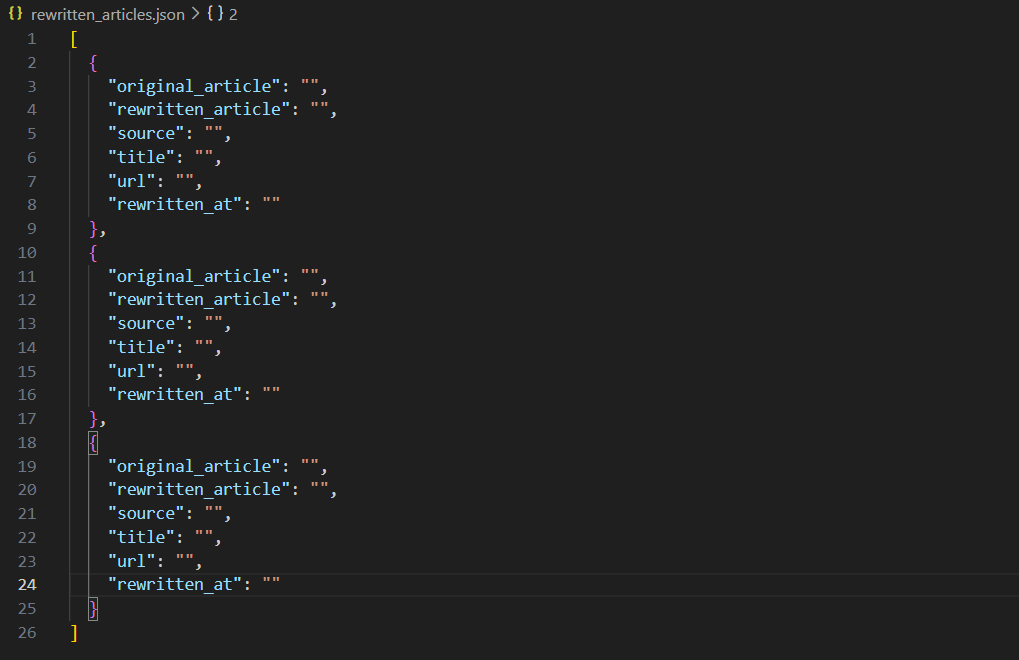
A screenshot of the file where the edited articles are saved
The above screenshot from my IDE shows the JSON structure that is used for the second step.
Here is a breakdown of the fields for each object:
- “original_article”: The content/body text of the source article.
- “rewritten_article”: The content of the rewritten article returned from the OpenAI API.
- “source”: The website of the source used.
- “title”: The title of the original article.
- “url”: The URL of the source.
- “rewritten _at”: The timestamp for when the article was rewritten.
Final Agent: Editor Agent
After the rewritten articles are saved, the next step is for an Editor Agent to compare the original article’s content with the rewritten article’s content. This is to check for any factual inaccuracies or made up facts (because AI likes to hallucinate).
Here is the prompt I used for the Editor Agent:
“You are an expert crypto news editor. Your job is to evaluate the factual accuracy
of a rewritten article compared to its original source text.
CURRENT DATE: {datetime.datetime.now().isoformat()}
INSTRUCTIONS:
– Compare the ORIGINAL ARTICLE and the REWRITTEN ARTICLE below.
– Focus ONLY on factual accuracy:
– Names, dates, numbers, tickers, prices, entities, quotes, attributions, and causal claims.
– Ignore style changes, paraphrasing, and reordering as long as the meaning is preserved.
– Identify:
– Any incorrect facts in the rewritten article.
– Any invented details that are NOT supported by the original.
– Any important factual omissions that might mislead the reader.
– Do NOT restate the full articles.
– If there are no factual problems, explicitly write: “No factual issues found.”
Return your response as plain text notes suitable for an internal editor, NOT for publication.
================ ORIGINAL ARTICLE ================
{original_article}
================ REWRITTEN ARTICLE ================
{rewritten_article}
“
Looking at the prompt, it starts off by specifying a role for the agent and its job.
I then feed in the current date. Since I’m working with an AI model that has been trained on data up to a certain point, I needed to give it contextual awareness so that it doesn’t flag dates after its training date cutoff as “inaccurate”.
Next, I feed the instructions for the editor, before passing both the original article and rewritten article for it to compare.
The Editor Agent then returns, you guessed it, JSON objects, which are saved in a file called edited_articles.json.
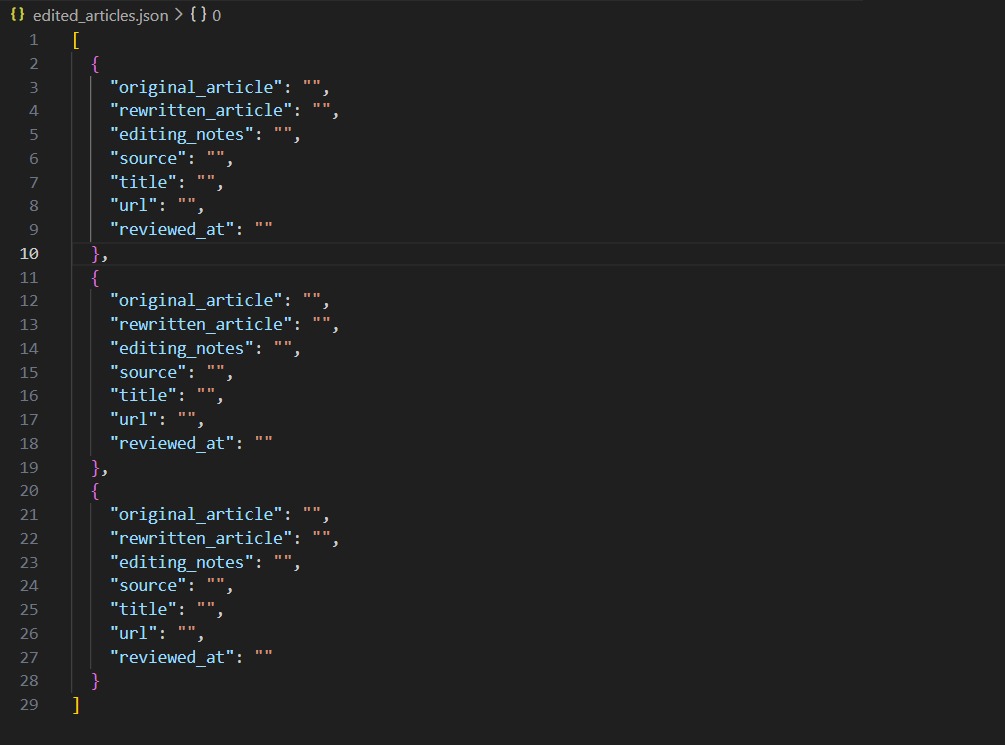
Screenshot of the edited_articles.json file
The above screenshot shows the structure used for the edited articles JSON.
Here’s what each field is
- “original_article”: The content/body text of the original source.
- “rewritten_article”: The content of the rewritten article.
- “editing_notes”: The notes returned from the Editor Agent.
- “source”: The website that the source came from.
- “title”: The title of the source article.
- “url”: The URL for the source.
- “reviewed_at”: The timestamp of when the article was edited by the AI agent
After the Editor Agent returns the list of JSON objects for the reviewed articles, the last step is to push the articles and the editing notes through to a human editor for one final check. To do this, I connected to the Google Docs API. This way, I could push through the article’s content as well as add the “editing_notes” string as a comment in the document. I can then review the article and the comments, make any needed changes, and then post it to WordPress.
Solving the “Hallucination” Problem
In a traditional newsroom, the writer and the editor are never the same person. In an AI workflow, businesses often make the mistake of asking the same LLM to “check its own work.” This leads to a blind spot bias where the AI misses its own hallucinations.
To solve this, I implemented a Cross-Model Verification system. I use OpenAI’s GPT-4o for the creative “Journalist” role, but I pivot to Google’s Gemini 1.5 Pro for the “Editor” role.
The Rationale for Cross-Model Logic
Using different foundational models ensures that the logic used to verify the facts isn’t the same logic that created them. Since Gemini is natively integrated with Google Search’s live data, it is far superior at spotting “stale” crypto prices or incorrect ticker symbols.
The Editor’s System Prompt
I don’t just ask the AI to “fix errors.” I give it a structured persona and a specific JSON-output requirement:
Role: Expert Crypto News Editor Objective: Evaluate factual accuracy between the original_article and the rewritten_article. Focus: Identify names, dates, numbers, tickers, and causal claims. Constraint: If no errors exist, return “No factual issues found.”
Why Two Models are Better Than One
From a developer’s perspective, this is a redundancy check. By passing the output of Agent A (Writer) to Agent B (Editor), I create a “Zero-Trust” environment. For a business owner, this is the difference between a high-quality publication and an AI-generated “slop” site that eventually gets hit by a Google Helpful Content update.
Possible Changes That Can Be Made to the AI Editorial Workflow
The above AI editorial workflow is a prototype that has a lot of room for improvement.
Firstly, you don’t really want to regurgitate the same news that has already been covered by another outlet. Not only is this boring, it’s somewhat unethical if you violate the source website’s scraping policy. While the approach was shown in this article, it was purely for educational purposes.
To fix that issue, I’ve already built a script that opens X with a PlayWright session, logs into a dedicated account, and then pulls the latest posts one-by-one from a list of X accounts. These accounts belong to public figures, and other relevant sources. This system then classifies the tweet as newsworthy if it is by using the OpenAI API, and saves them as a list of JSON. The idea is that this will eventually replace the logic of the News Fetcher Agent.
Another change that can be made is to feed through a CSV or spreadsheet of the best-performing URLs, or the pages that have seen the most traffic for a given period. This is so that the News Fetcher Agent only fetches and saves articles that the system believes might interest your readers before the rest of the AI editorial workflow is initiated.
Oh, I’ve also built an Internal Linking Agent. The concept is fairly straightforward. It involves a script that fetches and saves my site’s sitemap in a folder when triggered at a specific time each day. After the Editor Agent is triggered, I’m planning on adding the internal linking step. This step will read the pulled sitemap, and then submit it to an LLM via an API call with a prompt. Something like: “Here are the links on my website: {extracted_sitemap}, suggest 3-5 internal link suggestions for this article: {rewritten_article}.”
I’m thinking of doing that internal linking step for the list of edited articles and saving the response as a list of JSON objects before pushing the articles to Google Docs.
How I Plan On Keeping Costs Low
Of course, the ideal automation system comes at barely no cost. Otherwise, what’s the point really?
To keep costs low, I suggest doing a self-hosted WordPress setup on Hostinger. This is far cheaper than hosting the site on WordPress. To give you an idea, my strictly WordPress site costs around $45, while my Hostinger setup costs about $3-5 per month. Both of these costs are just for the hosting and not the domain and associated mailboxes.
Another step I’m taking to keep costs low is to host open-source LLMs on my PC and then plug them into the workflow. Remember I said that you can use the OpenAI Agents SDK to connect to various LLMs? This is how I do it. I just create an OpenAI client but specify the open source models instead of ChatGPT and Gemini. To manage the open source models, I’m using Ollama, which does all of the background work.
Frequently Asked Questions
Will an AI editorial workflow replace the need for human editors?
Absolutely not. In my experience, the role of the editor shifts from producer to curator and strategist. While my AI agents handle the heavy lifting of sourcing and drafting, a human editor is still essential for the “Final Mile”—injecting unique brand voice, verifying high-stakes facts, and ensuring the content aligns with long-term business goals. Think of it as upgrading your editor from a writer to a “Director of AI Operations.”
How do you prevent AI “hallucinations” in a fully automated system?
I solve this using a Cross-Model Verification strategy. I never let the same AI model check its own work. For example, if GPT-4o writes the article, I use Google’s Gemini 1.5 Pro as the Editor Agent. Since these models have different training sets and logic paths, Gemini is much more likely to catch a factual error or “made-up” stat that GPT-4o might have generated with high confidence.
Does Google penalize websites that use AI-generated content?
Google’s 2026 guidelines are clear: they reward helpful, high-quality content, regardless of how it was produced. However, “thin” or “spammy” AI content that simply rehashes existing articles without adding value will likely be deprioritized. By using my agentic workflow to synthesize news and adding a final human-in-the-loop editorial pass, the content remains original and authoritative enough to meet E-E-A-T standards.
What is the biggest cost-saving benefit of an agentic workflow?
The most significant saving isn’t just the “cost per word,” but the cost of scale. In a traditional model, tripling your content output requires tripling your headcount. With an agentic workflow, my output tripled while my costs remained flat—limited only by minimal API fees and a few minutes of my time for final approval. For a business, this turns content from a variable expense into a scalable asset.