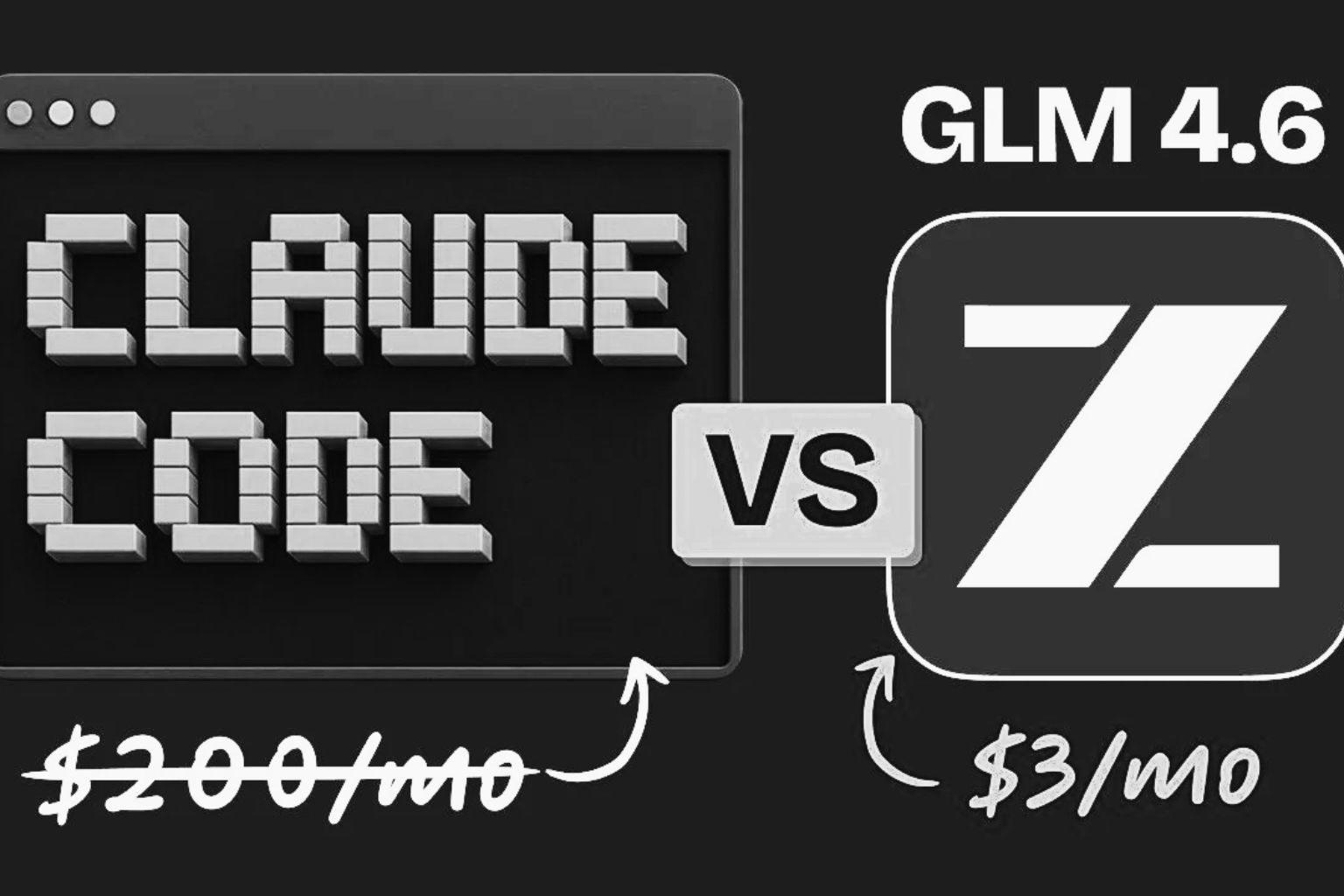
If you’ve been looking for a powerful coding AI without the hefty price tag of proprietary models, Zhipu AI’s GLM-4.6 might be exactly what you need.
GLM-4.6 is a cutting-edge large language model from Z.ai (Zhipu AI) that’s making waves as an open-source, budget-friendly alternative to Anthropic’s Claude Code.
In this article, I’ll explain what GLM is, introduce the GLM-4.6 model and Z.ai’s platform, give an overview of Claude Code (Anthropic’s coding assistant), and compare their pricing.
I’ll also discuss how developers can integrate GLM-4.6 into their workflow (yes, even in Visual Studio Code) and why it’s gaining popularity in coding circles.
What is GLM (General Language Model)?
GLM stands for “General Language Model.” It represents a family of large language models developed by Zhipu AI (formerly known as Zhipu Huazhang or Z.ai) in collaboration with Tsinghua University.
In simple terms, GLM models are AI systems designed for general-purpose natural language understanding and generation – similar to GPT-style models – but with some unique twists. Zhipu’s GLM series emphasizes broad capabilities (from conversation to coding) and is known for being open and accessible.
The GLM models first gained attention through ChatGLM (an earlier version) and have since evolved rapidly. By mid-2025, Zhipu AI released GLM-4.5, and in late September 2025 they unveiled GLM-4.6, a major upgrade using domestic Chinese chips.
GLM-4.6 is a frontier-scale model boasting 357 billion parameters in a Mixture-of-Experts architecture, yet it’s open-sourced under the permissive MIT license.
That makes GLM-4.6 the only model of its size that enterprises and developers can use without vendor lock-in – you can even run it on your own hardware if you have the resources.
So, what is GLM-4.6 specifically? It’s the latest iteration of the General Language Model, fine-tuned for strong performance in coding, reasoning, and long-context tasks. GLM-4.6 introduced a whopping 200K token context window (up from 128K in its predecessor), meaning it can handle extremely large inputs – think analyzing hundreds of pages of code or documentation in one go.
It also achieved significant improvements in coding benchmarks and real-world programming tasks. In internal tests, GLM-4.6 performed on par with Anthropic’s Claude (specifically Claude Sonnet 4 model) on many leaderboards. In fact, on a human-evaluated coding benchmark (CC-Bench), GLM-4.6 attained near-parity with Claude’s previous-gen model, Claude Sonnet 4, with a 48.6% win rate in head-to-head comparisons.
Zhipu’s team is candid that it still lags slightly behind Anthropic’s absolute newest (Claude “Sonnet 4.5”) in coding ability, but the gap is closing fast.
Importantly for developers, GLM-4.6 isn’t just theoretically powerful – it’s practical for coding workflows. It’s designed to excel at code generation, debugging, and even multi-step “agentic” tasks. The model is highly token-efficient, using ~15% fewer tokens than GLM-4.5 to accomplish the same tasks.
In plain English, it can write or analyze code more concisely, which is great when you’re on limited budgets or running it on local hardware. GLM-4.6 has been praised for front-end development capabilities (“generating visually polished front-end pages”) and handles both English and Chinese fluently, making it a bilingual AI suitable for international teams.
To summarize, GLM is Zhipu AI’s series of general-purpose large language models, and GLM-4.6 is the flagship version as of early 2026. It stands out for its open-source nature, massive context window, and specialized strength in coding tasks – essentially offering Claude-like intelligence in an openly accessible form.
Overview of Z.ai (Zhipu AI)

Zhipu AI, branded internationally as Z.ai, is the company behind the GLM models.
Founded in 2019 as a spin-off from Tsinghua University researchers, Zhipu AI has grown into one of China’s leading AI companies. It’s often mentioned among China’s top AI contenders (one of the “AI tigers”), focusing on foundational large language models and AI agents. In 2025, the company rebranded to the shorter name Z.ai and even went public with a successful IPO in Hong Kong.
Z.ai’s mission revolves around developing safe and beneficial AI and pushing toward AGI (artificial general intelligence). They have an impressive lineup of models beyond just text-LMs – including vision-language models (like GLM-4.6V for image+text), multimodal generators, etc. – but the GLM series is their crown jewel. Notably, Zhipu is committed to an open innovation approach. Several of their models (GLM-130B, GLM-4.x series) have been released with open weights or permissive licenses, which is quite different from the closed-source approach of Western labs for models of similar scale.
For developers, Z.ai provides a platform where you can use their models via API or web interface. The platform offers Z.ai Chat (a free AI chatbot demo using GLM-4.6/4.7 models) and developer APIs with various pricing plans.
I’ll delve into pricing shortly, but the key point is that Z.ai is positioning itself as a developer-friendly, budget-friendly AI provider. They even highlight that GLM-4.6 can integrate with many coding tools – a point we’ll explore when I talk about using GLM in place of Claude.
In summary, Z.ai (Zhipu AI) is the company making waves with GLM-4.6. Think of them as an emerging OpenAI/Anthropic equivalent, but with an open-source twist and a strong focus on enabling developers (including those on a budget) to harness large models.
What is Anthropic’s Claude Code?
Now, let’s switch gears to Claude Code – Anthropic’s offering that we’re comparing against.
Claude is Anthropic’s well-known large language model (similar to OpenAI’s GPT series). Claude Code specifically refers to Claude’s specialization or mode tailored for coding assistance. You can think of Claude Code as an AI coding assistant built on Claude’s intelligence.
Anthropic developed Claude Code as part of their Claude AI suite to provide advanced help with programming tasks. It’s designed to write, debug, and explain code in a conversational way, acting like an expert pair-programmer available on demand.
Claude Code is quite powerful. It supports generating code in multiple programming languages, finding and fixing bugs, answering questions about APIs or algorithms, and even reviewing code for improvements.
For example, Claude Code can analyze a piece of JavaScript and point out where a token expiration might cause a bug, then suggest a fix. It is also known for giving very detailed, step-by-step explanations – great for learning new concepts or understanding complex code logic.
Many developers love Claude Code’s reasoning ability; it doesn’t just spit out code, it “thinks aloud” to explain the solution (though sometimes this can make it a bit slower).
Anthropic provides Claude Code through a subscription model (accessible via a web-based IDE or terminal-like interface) and via API for integration into developer tools.
The Claude Code interface is often described as an AI-augmented IDE or agent that can autonomously perform coding tasks. In fact, Anthropic has demonstrated Claude Code acting as an “AI agent” that can write and deploy code almost autonomously. This makes it more than just a simple autocomplete – it can handle multi-step development tasks.
However, all that capability comes with a hefty price and some constraints, which is where the comparison with GLM gets interesting. Claude Code’s pricing has been a point of contention among developers.
As of early 2026, Anthropic’s official plans for Claude Code range roughly from $20 per month up to $200 per month for heavy users. The lower tier (around $17–$20/month, often called “Pro”) gives basic access but with strict limits (only a few prompts per 5-hour window).
The highest “Max” tier (around $100 or $200/month) unlocks more usage and the most powerful versions of Claude, but even these plans have rate limits that advanced users find constraining.
For instance, the $100–200 plans might allow on paper up to 200–800 prompts per 5 hours, but in practice Anthropic also imposed weekly token limits which translate to certain maximum context sizes per session. Many developers reported hitting limits quickly or being unsure how much usage they truly had, leading to frustration.
In short, Claude Code is a top-tier AI coding assistant known for its strong performance and deep reasoning, but it’s a closed proprietary service that can be expensive and rate-limited for the end user. This situation has led developers to seek alternatives – either other services or open models – which brings us back to GLM-4.6.
GLM-4.6 vs Claude Code: Performance and Integration
Given the context, why are developers excited about GLM-4.6? The answer is that GLM-4.6 is offering Claude-like coding help at a fraction of the cost, and can be integrated into similar workflows. Let’s break down the comparison.
Performance
GLM-4.6 has demonstrated performance in the same ballpark as Claude’s models for coding.
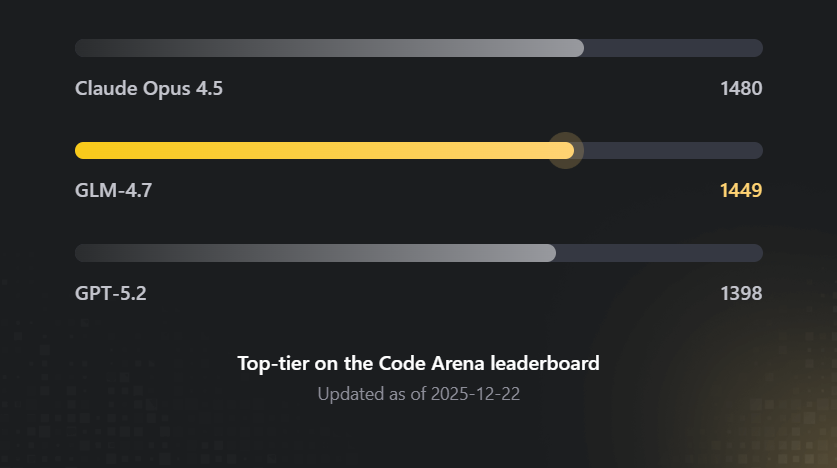
Coding performance overview
As mentioned, Zhipu’s internal benchmarks put GLM-4.6 near Claude Sonnet 4 level on coding tasks. Independent observers have echoed this – for example, when GLM-4.6 was integrated into a coding tool, it achieved about 95% of the quality of a Claude-powered setup in some users’ tests.
It excels particularly in front-end coding and maintaining coherence on large, multi-file projects. Claude still has an edge in some complex reasoning or the absolute latest model version, but for day-to-day coding problems, GLM-4.6 is proving to be “good enough” that many can’t tell the difference in output quality. In fact, some developers have dubbed GLM-4.6 a “Claude Code killer” because it’s so close in capability that paying big money for Claude starts to look unnecessary.
One reason GLM-4.6 shines in coding is its design for agentic tasks and tool use. It was trained to work within coding agent frameworks, meaning it can plan and execute multi-step operations (like reading documentation, writing code, then testing or calling tools) more effectively. It has native support for things like web search and tool invocation during inference, similar to how Claude can integrate with tools for better answers. This makes GLM-4.6 quite suitable for coding assistants that allow AI to use external tools or look up info (which is a feature of some advanced IDE agents).
Integration (“Connecting GLM with Claude Code”)
Here’s an interesting part – you can actually use GLM-4.6 within some of the same environments designed for Claude.
Z.ai has made GLM-4.6 compatible with a variety of AI coding tools. For instance, Claude Code’s interface itself can be configured to use GLM-4.6 as the backend model (via API keys).
I recently used Claude Code’s nice UI and “context engine” in Visual Studio Code while hooking it up to GLM-4.6 through a bring-your-own-key setup – resulting in a much cheaper but still effective combo.
Similarly, there are other AI coding assistants like Cursor, Kilo Code, Roo, Cline, etc., which either natively support GLM or allow custom model keys. Zhipu AI’s documentation explicitly notes that GLM-4.6 works in Claude Code, Cline, Roo Code, Kilo Code and more.
In fact, the GLM-4.6 launch came with partnerships/integrations so that within days of release, you could just go to these tools’ settings and select GLM-4.6 as your model.
One popular integration is Kilo Code – a VS Code-like AI coding assistant. Kilo Code added GLM-4.6 support upon its release, boasting that GLM came in at near Claude parity for a fifth of the cost. Users of Kilo Code or Cursor.ai have found that switching their model to GLM-4.6 (with an API key from Z.ai) retains most of the coding assistance quality they got with Claude. There might be slight differences – e.g. maybe Claude is still a bit better at very intricate algorithm explanations – but for many, GLM-4.6 is “95% as good” in practical coding tasks. That’s impressive considering the cost difference.
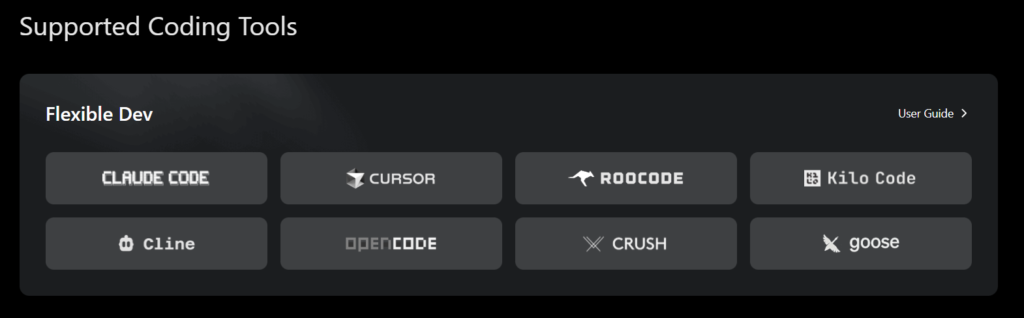
Supported coding tools for GLM
It’s worth noting that GLM-4.6’s 200K context window is actually larger than Claude’s typical 100K context, meaning GLM can ingest more code at once in theory.
In real use, that can translate to analyzing huge codebases or lengthy documentation in one shot (though using such a large context in practice might be limited by prompt limits on certain plans or tools). Nonetheless, the ability is there for GLM to handle truly big inputs.
Bilingual and Customization
Another differentiator is GLM’s bilingual training.
If you work with Chinese-English mixed codebases or documentation, GLM-4.6 might have an edge as it’s specifically noted to be state-of-the-art in Chinese and English understanding.
Meanwhile, Claude is primarily an English-trained model (though it can handle some other languages, it’s not specialized in bilingual tasks in the same way).
Also, because GLM-4.6 is open-source (MIT licensed), developers who need to self-host or fine-tune a model for specialized coding tasks actually can do that with GLM. You obviously can’t with Claude (Anthropic’s model is proprietary and you only get it via their API/cloud).
For most individual developers this might not be immediately relevant (fine-tuning a 355B model is not trivial!), but for companies or advanced users, having that open-model option is a huge strategic advantage.
In summary, GLM-4.6 and Claude Code are closely matched in their goal (AI-assisted coding). Claude Code currently might be the gold standard in polish and raw quality, but GLM-4.6 is extremely close in capability.
Crucially, GLM-4.6 can be plugged into similar developer workflows – whether that means using it through Z.ai’s own interface, or injecting it into tools like Claude Code’s UI, Kilo, Cursor, or even your own VS Code extension. This “bring your own model” flexibility is liberating for developers who don’t want to be tied to Anthropic’s ecosystem or pricing.
Pricing Comparison: Z.ai’s GLM vs Claude Code
One of the biggest factors driving interest in GLM-4.6 is cost.
Let’s compare the pricing of Z.ai’s platform for GLM to Anthropic’s Claude Code/API pricing.
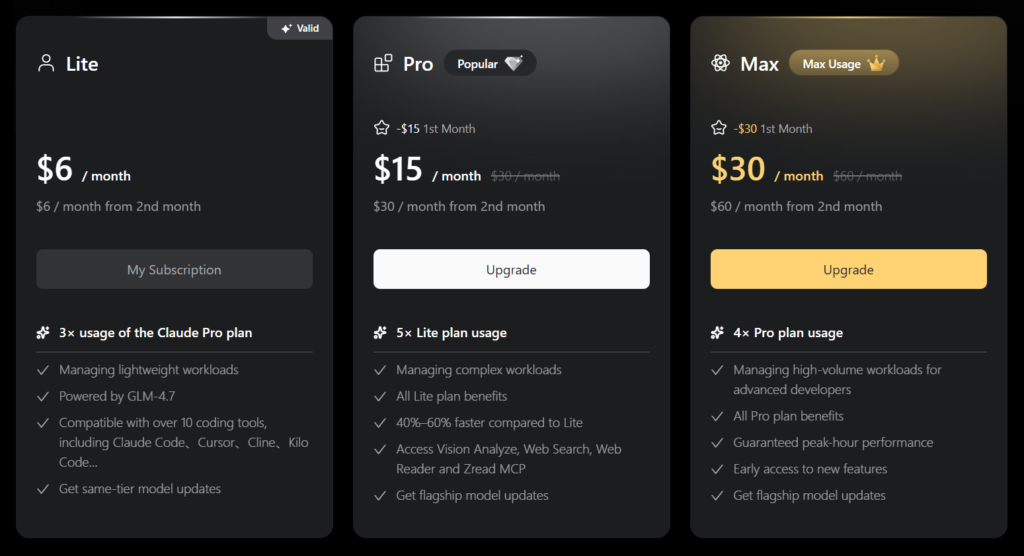
Z.ai’s GLM Coding Plan pricing tiers (Lite, Pro, Max) as of late 2025. Even the highest tier costs far less than Anthropic’s Claude Code plans.
Z.ai’s GLM Platform Pricing
Zhipu offers affordable subscription plans for using GLM-4.6 via their cloud API or tools.
The entry-level “GLM Coding Lite” plan is just $3 per month (a limited-time promo, $6/month normally) which includes a generous allowance (for example, ~120 prompts or 5 hours of usage).
The Pro plan at $15/month ups that to around 600 prompts, suitable for more intensive daily coding. Even a higher tier (Max) if offered would still be on the order of <$30/month.
In terms of raw token pricing, this works out to about $0.60 per million input tokens (and around $2.20 per million output tokens) for GLM-4.6 usage – extremely cheap for a model of this caliber.
Z.ai’s pricing undercuts competitors dramatically, often by 5-10x or more.
Anthropic’s Claude Pricing
By contrast, Claude Code is relatively expensive.
As highlighted earlier, the Claude Code Pro plan is ~$20/month and still quite limited. Many serious users end up needing the Claude Max plans ($100 or $200 per month) to get workable usage quotas.
If you use Claude via the API, the pay-as-you-go pricing is also steep: for some of Anthropic’s models, it’s on the order of $3 per million input tokens and $15 per million output tokens (for the Claude 4.5 series).
Even their newer “Opus” model pricing (as per early 2025) was something like $5/$25 per million tokens in a discounted push – still an order of magnitude more than GLM’s cost. In short, whether monthly subscription or per-token, Claude is among the priciest AI models to use.
To put it in perspective, one developer comparison noted that typical coding usage could see a 50× to 100× cost difference in favor of GLM-4.6. In other words, what might cost you $100 of Claude API calls could cost only $1–$2 on Zhipu’s GLM.
That’s huge, especially for individual developers, students, or startups watching their budget. It explains the recent surge of interest in GLM-4.6 – it essentially democratizes access to high-end AI coding assistance.
Another angle is what you get for that money. GLM’s $3/month plan has been jokingly described as “3× Claude Pro for a coffee price” – because that low tier alone gives roughly triple the usage of Claude’s $20 plan. Meanwhile, Claude’s plans also come with those complex rate limits (resets every few hours, weekly caps, etc.), whereas Z.ai’s seem more straightforward prompt counts or hours.
In sum, Z.ai’s platform is dramatically more affordable. You can experiment with GLM-4.6 for the price of a latte, whereas Claude Code might be a serious line item in your expenses. This price difference does not mean GLM is “worse” – rather, it reflects Zhipu’s strategy to gain users by lowering the barrier to entry (and perhaps the efficiencies of their model and infrastructure). For developers, it means you now have a viable alternative where cost won’t be the limiting factor.
Using GLM-4.6 for Coding (Setup and IDE Integration)
So, how can you actually use GLM-4.6 in your coding workflow? The good news is that setting up GLM-4.6 for coding is straightforward, and you have a few options to choose from:
- Z.ai Web Interface: If you just want to try GLM-4.6 quickly, Z.ai offers a web chat interface (Z.ai Chat) where you can use GLM-4.6 or GLM-4.7 directly in your browser for free. This is more for general chat and simple Q&A, but it can certainly handle coding queries too (e.g. “write a Python function for X”). For more serious coding sessions, though, you’ll likely want an IDE integration.
- Visual Studio Code Integration: Many developers prefer to have AI assistance directly in VS Code while they code. There are a couple of ways to integrate GLM-4.6 with VS Code:
- One method is using extensions like the CodeGPT VS Code extension or others that allow custom model API endpoints. For example, CodeGPT (a popular extension) has support for multiple AI providers – you could configure it to use Zhipu’s API with your GLM-4.6 API key.
- Another route is Kilo Code, which is a separate AI coding tool but closely mirrors the VS Code experience. Kilo Code has native support for GLM-4.6 – as simple as selecting GLM-4.6 from a dropdown in settings. In Kilo, you don’t even need to manage API keys; they handle it once you subscribe to the GLM plan. This effectively gives you a VS-Code-like editor with GLM AI built in, which many have used as an alternative to Cursor or Claude’s own IDE.
- There’s also Cursor.ai, an AI-powered code editor. While Cursor’s default models might be OpenAI or their own, it supports Bring-Your-Own-Key. Developers have taken a $20 Cursor plan and plugged in a GLM-4.6 key to get a Cursor+GLM combo. This gave them Claude-like coding assistance in Cursor at a much lower total cost (since GLM’s usage cost is low, you just pay Cursor’s base fee).
- One method is using extensions like the CodeGPT VS Code extension or others that allow custom model API endpoints. For example, CodeGPT (a popular extension) has support for multiple AI providers – you could configure it to use Zhipu’s API with your GLM-4.6 API key.
- Claude Code interface with GLM: As mentioned earlier, if you have access to Claude Code’s UI (Anthropic’s environment), you can actually configure it to use GLM via API. This might involve some tweaking (and possibly using a community-developed plugin or proxy), but it has been done. Essentially, you replace the backend model that Claude Code calls, using your GLM API credentials. This way you keep the Claude Code experience (some people like its UI and features) but the brains behind it is GLM-4.6. A few users report this as the “best combination” for both quality and cost.
- Other IDEs and Agents: Zhipu’s GLM is also compatible with tools like Roo, Cline, and OpenCode (these are AI coding agents/environments popular in certain communities). If you’re using JetBrains IDEs, check if there are plugins that support custom models – often there are ways to set them up similarly to VS Code extensions. And of course, you can always call the GLM-4.6 API directly in your own scripts or tools. For instance, you could write a small Python script to query the GLM API for code completions or use it in a Jupyter notebook to get coding help.
How I Setup GLM in VS Code
I was caught up in the hype around Claude Code, and had heard a number of developers around me talk about how they are using it. Now, I’ve always championed streamlined systems that keep costs low. This is a main reason why I had connected my VS Code Chat to open-source models through Ollama. But this was not really giving me the desired performance, pushing me to explore Claude Code.
While doing my research on Anthropic’s offering, I stumbled upon GLM, which Z.ai is marketing as the best alternative. So, I thought I would try it out.
I read that you could connect to GLM through the Claude Code extension in VS Code, and then just configure the extension to point to Z.ai’s model.
Below is how I did it.
Get an API Key
The first step to setting up GLM is to get an API key from Z.ai. As mentioned, you can get an API key for relatively cheap, just $3/month with the latest promo. Even if this promotion ends by the time you’re reading this, the cost will only be about $6/month.
If you can recall, that price is still way better than the $20/month that Anthropic charges for the basic package for Claude Code.
You can get the API key at this link. You’ll need to register and login first. Once logged in, you can then click on “API Key” at the top right of your screen, name the key, and then click to create it. Once you’ve done this, leave the tab open and proceed to the next step.
Download Claude
Next, you will need to actually download Claude on your system so that you will be able to use Claude Code. To do this, you will need Node.js 18 or newer installed on your system. In case it’s not installed, you can download Node.js here. Remember to pick the correct version.
Once Node.js is downloaded, open a terminal on your PC or desktop and type the following lines one by one:
# Install Claude Code

npm install -g @anthropic-ai/claude-code

#Create your projects

mkdir your-awesome-project

# Navigate to your project

cd your-awesome-project

# Complete

claude
Claude should now be set up on your system.
Next, you need to point Claude to GLM using your API Key.
To do this on Mac/Linux, close the previous terminal and open another one. Now type:
curl -O "https://cdn.bigmodel.cn/install/claude_code_zai_env.sh" && bash ./claude_code_zai_env.shTo do it on Windows, open a CMD terminal. Then run the following commands in the terminal
Note: you’ll need to replace `your_zai_api_key` with the API Key you obtained in step 1.
setx ANTHROPIC_AUTH_TOKEN your_zai_api_key

setx ANTHROPIC_BASE_URL https://api.z.ai/api/anthropic
Add the Claude Code Extension in vs Code
Now that you have your Z.ai API key and Claude installed, you’ll need to download the Claude Code extension in VS Code. To do this, go to the “extensions” tab in the sidebar. It’s the icon with the 4 squares. Once there, search for “Claude Code.” You should see “Claude Code for VS Code.”
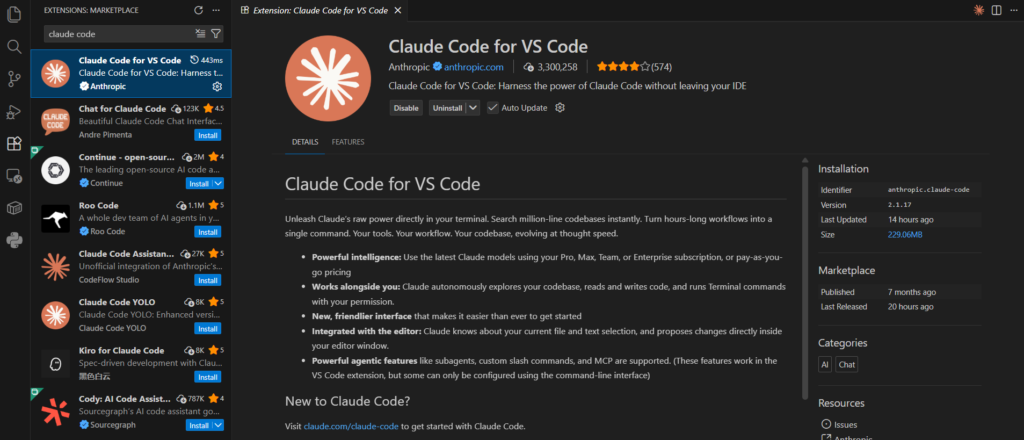
Extensions in VS Code
I have already installed it on my PC. Where it says “uninstall” next to the Claude Code icon in the picture, you should see “install” if it is not activated in your IDE.
Once set up, you can use GLM-4.6 like you would use any AI assistant: you can ask it natural language questions about your code in the IDE (you should see the Claude Code icon at the top right of your screen), have it generate functions or classes, get it to explain errors, etc.
Coding with GLM-4.6 feels very much like coding with Claude or GPT— you write a prompt (like a comment or instruction) and the model responds with code or advice. Many developers use an iterative approach: ask GLM for a code snippet, try it out, then ask follow-up questions. Thanks to the large context, GLM can keep a lot of your conversation and code in mind.
One thing to remember: GLM-4.6, while powerful, is not infallible. You’ll still need to review its output. It can produce errors or occasional hallucinations (like any AI). That said, users have found it reliable enough for daily development work. If something is mission-critical, you might double-check with another model or write tests – but for most coding tasks, GLM-4.6 will save you time and keystrokes.
Finally, because GLM-4.6 is open source, if you have the hardware (and a lot of VRAM and patience), you could even try running it locally for free. This isn’t trivial – we’re talking multiple GPUs or cloud instances – but the truly adventurous or companies with resources might do it. For everyone else, Z.ai’s cloud is the convenient route.
Frequently Asked Questions
What is GLM?
GLM is short for General Language Model – a family of large language models from Zhipu AI (Z.ai). It’s essentially Zhipu’s equivalent to models like GPT or Claude, designed for general-purpose AI tasks (chatting, coding, reasoning, etc.).
The GLM series emphasizes broad capabilities and openness; for example, GLM-4.6 is available under an open-source license.
What is a GLM?
In the context of AI, a GLM refers to any model from the General Language Model series. So asking “what is a GLM” is similar to asking “what is one of Zhipu’s language models?”. It’s a large language model developed to understand and generate human-like text across many domains. (Note: Don’t confuse it with the statistical term “generalized linear model” – here we’re talking about AI models!)
What’s the best IDE integration for GLM 4.6?
One of the best IDE setups for GLM-4.6 is using Visual Studio Code with an AI extension that supports custom models (such as CodeGPT or similar), then plugging in Z.ai’s API. Another excellent option is Kilo Code, which is an IDE-like environment built for AI pair programming – it natively supports GLM-4.6, so you can just select it and start coding.
Essentially, any development environment that allowed integration with OpenAI or Anthropic can often be configured to use GLM-4.6 by providing your API endpoint and key. Many developers find VS Code + GLM-4.6 to be a powerful combo once set up.
How do I code with GLM 4.6?
To code with GLM-4.6, you’ll need access to the model (through Z.ai).
First, sign up on the Z.ai platform and get an API key (possibly subscribe to their coding plan). Then integrate that into your coding environment. For example, in VS Code you might install an extension that lets you call the GLM API for completions or chat.
Once configured, you can ask GLM-4.6 to generate code, explain snippets, or even debug issues by describing what you need in natural language. It’s similar to coding with ChatGPT or Claude – you provide instructions in comments or a chat panel, and GLM outputs the code or answer.
Over time, you’ll develop a feel for how to prompt it effectively (e.g. “Given the following error log, what’s the likely bug?” or “Write a Python function to X using Y library”). The key is that GLM-4.6 becomes your AI assistant, embedded in your workflow.
What is GLM 4.6?
GLM-4.6 is the version 4.6 model in Zhipu AI’s General Language Model series. It’s a state-of-the-art large language model released in late 2025, with 355B parameters (Mixture-of-Experts architecture) and a 200,000-token context window.
GLM-4.6 was trained to excel at coding tasks, reasoning, and long documents. In benchmarks, it performs similarly to Anthropic’s Claude (circa Claude 4) on many tasks. Importantly, GLM-4.6 is available via Z.ai with an open-source MIT license, meaning it’s one of the most capable models that anyone can use or even self-host.
What’s the best way to set up GLM 4.6 for coding?
The best way is to use an IDE or tool you’re comfortable with and integrate GLM into it. A straightforward approach is:
- Get API access from Z.ai: subscribe to a GLM Coding plan and obtain your API key.
- Use an IDE extension or tool: For VS Code, something like the CodeGPT extension can be configured to use GLM-4.6 by setting the API endpoint to Zhipu’s and inputting your key. Alternatively, use a dedicated AI coding tool like Kilo Code or Claude Code (with BYO model) where you can select GLM-4.6 as the model.
- Configure and test: Follow the setup instructions – usually adding your key in settings – and then try a simple prompt to ensure GLM responds. For example, ask it to write a short function or explain a piece of code.
- Iterate in your workflow: Once set up, use GLM-4.6 as you code: trigger it to autocomplete code, generate snippets from comments, or ask it questions in a chat window.
This setup process typically only takes a few minutes. Z.ai’s documentation and community guides (and even YouTube tutorials) are available that walk through using GLM-4.6 in popular coding environments. Many find VS Code integration to be the most convenient, since it keeps everything in one place as you write and test code.
What does GLM mean?
GLM means General Language Model. It’s the name chosen by Zhipu AI for their large language model series, highlighting that these models are meant to handle a wide range of language tasks generally (not just specialized to one narrow domain). So whenever you see “GLM” in the context of AI models (especially from Zhipu), it’s referring to this concept of a general-purpose language model.
What’s a Cursor alternative to code with GLM 4.6?
If you enjoy the experience of the Cursor AI editor but want to use GLM-4.6 (and likely save money), a great alternative is Kilo Code with GLM-4.6. Kilo Code provides a similar AI-assisted coding environment and has GLM-4.6 built-in as a model choice.
Another option is using Claude Code’s interface with GLM-4.6, as some have done by bringing their own key – this gives you Claude Code’s workflow but powered by GLM. You could also simply use VS Code with a GLM integration, which, combined with some plugins, can mimic much of Cursor’s functionality (like inline code suggestions, chat, etc.).
In essence, GLM-4.6 + the right IDE setup can replicate what Cursor does. Many developers switched to GLM-4.6 because it’s cheaper and still effective – for example, one comparison showed GLM-4.6 (at ~$6/month) plus a basic Cursor plan ($20) was about 7× cheaper than Cursor’s own higher-end plan using Claude, with nearly the same results. If you want completely free alternatives, there are also open-source editor plugins and the Roo environment which was mentioned as using GLM-4.6 for free (aside from the model’s cost). But the easiest “Cursor-like” experience with GLM would likely be Kilo Code.