The “Old Web” is dying. For decades, we’ve built websites for humans to scroll and search engines to crawl. But in 2026, a new visitor has arrived: The AI Agent.
If your content isn’t queryable, it’s invisible to the agents that now navigate the web on behalf of users. Recently, I decided to bridge this gap on my own site using NLWeb.
Here is everything you need to know about what NLWeb is and how you can deploy a “No-Vector” setup in under an hour.
What is NLWeb? (The Shift to Agentic Content)
NLWeb (Natural Language Web) is an open standard—spearheaded by Microsoft and the architects of Schema.org—that transforms a static website into a conversational interface.
Instead of a user clicking through categories, they ask a question. Instead of a search engine indexing keywords, an AI agent discovers your site’s discovery file (like llms.txt or ai-plugin.json) and queries your site via the Model Context Protocol (MCP) to retrieve structured, verifiable knowledge.
Why NLWeb Matters for SEO
We are moving from “Ranking” to “Reliability.”
- Traditional Web: Pages, Links, and Keywords.
- NLWeb: Knowledge Graphs, /ask endpoints, and Agent-interoperability.
By adopting NLWeb, your blog stops being a collection of URLs and becomes a Knowledge API for the agentic economy.
How I Built It: The “No-Vector” Architecture
Most people think you need a complex Vector Database (like Pinecone or Milvus) to build an AI-ready site. You don’t—at least not to start.
I built a lean, privacy-focused stack using:
- WordPress: My existing content source.
- FastAPI: The glue that creates the NLWeb layer.
- Ollama (Local): Running mistral:7b to handle reasoning without per-token API costs.
Now, I can chat to an agent that has context of my website.
The Logic
Instead of high-latency retrieval, the system pulls recent articles via the WordPress API, builds a dynamic context window, and feeds it directly to the local LLM.
Here is the python code for this. This is a very basic version without auth or rate limiting (I plan to add these for production).
import requests

from fastapi import FastAPI, HTTPException

from pydantic import BaseModel

from typing import Optional, List

import uvicorn

import html

# =========================

# CONFIG

# =========================

OLLAMA_URL = "http://localhost:11434/api/chat"

MODEL = "mistral:7b"

# Your website endpoints

WP_API = "https://aimec.io/wp-json/wp/v2/posts"

RSS_FEED = "https://aimec.io/feed"

MAX_ARTICLES = 10  # keep small to avoid context overflow

# =========================

# APP INIT

# =========================

app = FastAPI(

    title="Aimec NLWeb Server",

    description="Minimal NLWeb implementation",

    version="1.0"

)

# =========================

# REQUEST SCHEMA (NLWeb style)

# =========================

class AskRequest(BaseModel):

    query: str

    prev: Optional[List[str]] = None

    mode: Optional[str] = "generate"  # generate | summarize | list

# =========================

# FETCH CONTENT FROM WEBSITE

# =========================

def fetch_articles():

    try:

        res = requests.get(WP_API, timeout=10)

        res.raise_for_status()

        return res.json()

    except Exception as e:

        print(f"[ERROR] Fetching articles: {e}")

        return []

# =========================

# CLEAN HTML

# =========================

def clean_text(text):

    return html.unescape(text).replace("<p>", "").replace("</p>", "").strip()

# =========================

# BUILD CONTEXT (NO VECTOR DB)

# =========================

def build_context(posts):

    context_parts = []

    for post in posts[:MAX_ARTICLES]:

        title = clean_text(post["title"]["rendered"])

        excerpt = clean_text(post.get("excerpt", {}).get("rendered", ""))

        link = post.get("link", "")

        context_parts.append(

            f"TITLE: {title}\nSUMMARY: {excerpt}\nURL: {link}\n"

        )

    return "\n---\n".join(context_parts)

# =========================

# CALL OLLAMA

# =========================

def call_ollama(query, context, prev=None, mode="generate"):

    system_prompt = f"""

You are an AI assistant for a website.

Rules:

- Answer ONLY using the provided context

- If unsure, say "I could not find that on this site"

- Always include a source URL if possible

- Keep answers concise but useful

- Mode: {mode}

"""

    messages = [{"role": "system", "content": system_prompt}]

    if prev:

        for p in prev:

            messages.append({"role": "user", "content": p})

    messages.append({

        "role": "user",

        "content": f"QUESTION: {query}\n\nCONTEXT:\n{context}"

    })

    try:

        res = requests.post(OLLAMA_URL, json={

            "model": MODEL,

            "messages": messages,

            "stream": False

        })

        res.raise_for_status()

        data = res.json()

        return data["message"]["content"]

    except Exception as e:

        return f"Error calling LLM: {e}"

# =========================

# /ASK ENDPOINT (NLWeb CORE)

# =========================

@app.post("/ask")

def ask(req: AskRequest):

    posts = fetch_articles()

    if not posts:

        raise HTTPException(status_code=500, detail="No content found")

    context = build_context(posts)

    answer = call_ollama(

        query=req.query,

        context=context,

        prev=req.prev,

        mode=req.mode

    )

    return {

        "@type": "Answer",

        "query": req.query,

        "answer": answer,

        "sources": [p.get("link") for p in posts[:3]]

    }

# =========================

# /MCP ENDPOINT (AGENTS)

# =========================

@app.post("/mcp")

def mcp(req: AskRequest):

    result = ask(req)

    return {

        "tool": "ask",

        "result": result

    }

# =========================

# MCP TOOL DISCOVERY

# =========================

@app.get("/mcp/tools")

def list_tools():

    return {

        "tools": [

            {

                "name": "ask",

                "description": "Query the website using natural language",

                "input_schema": {

                    "type": "object",

                    "properties": {

                        "query": {"type": "string"}

                    },

                    "required": ["query"]

                }

            }

        ]

    }

# =========================

# HEALTH CHECK

# =========================

@app.get("/health")

def health():

    return {"status": "ok"}

# =========================

# RUN SERVER

# =========================

if __name__ == "__main__":

    uvicorn.run(app, host="0.0.0.0", port=8000)
As you can see from the code above, I have set this blog’s rss feed and sitemap as the context source.
The most important part is the /ask endpoint. When called, it fetches posts from the blog, and then loads them for context for an Ollama model to use in its response.
Now, I haven’t created a user interface for this system yet. With that in mind, I’ll be running this script in the terminal. I called the script main.py for this demo (this setup is very basic).
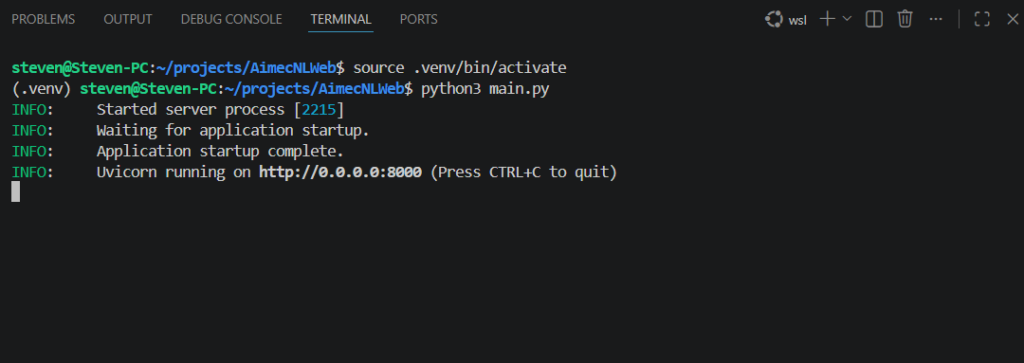
Terminal after starting the script (Source: My PC terminal)
Once I run the script, I then open another terminal and paste this in for testing:
curl -X POST "http://127.0.0.1:8000/ask" \

-H "Content-Type: application/json" \

-d '{"query":"What articles do you have about AI?"}'
Here is the curl command and the AI model’s response:
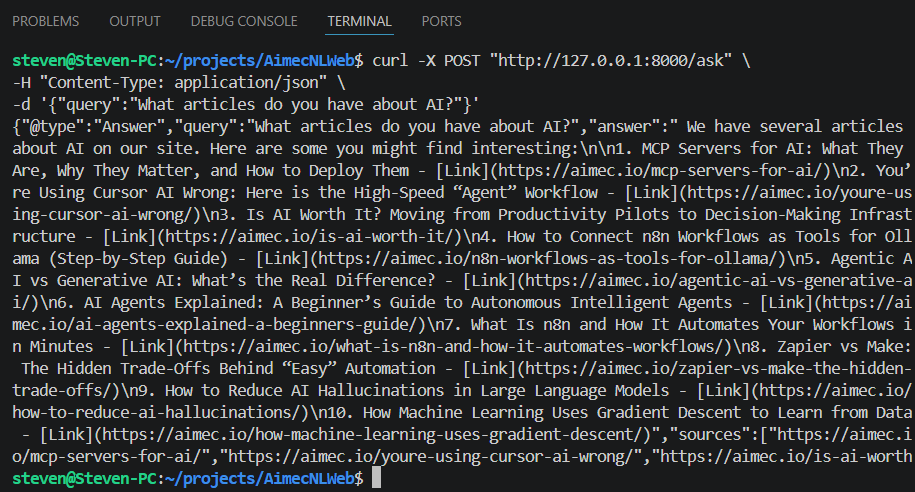
Output of AI (Source: My PC terminal)
Looking at the reply from the AI model, you can see that the titles and links for articles are returned.
The Two Most Important Endpoints: /ask and /mcp
To make a site truly “NLWeb enabled,” you need to serve two distinct audiences:
- /ask (For Humans): A conversational endpoint usually hooked up to a frontend chat UI.
- /mcp (For Agents): This uses the Model Context Protocol. It allows other AI agents (like Claude, ChatGPT, or autonomous n8n workers) to treat your website as a “Tool” they can call.
Why You Should Skip the Vector DB (For Now)
“Over-engineering” is the enemy of deployment. I chose a direct-context approach for three reasons:
- Structure over Search: If your WordPress categories and tags are clean, the LLM can reason through the metadata faster than a vector search can find a “chunk.”
- Real-time Accuracy: Vector indexes can lag. Pulling directly from your API ensures the AI knows about the post you published five minutes ago.
- Lower Latency: For a blog with <5,000 articles, a smart context window is often more efficient than a full RAG (Retrieval-Augmented Generation) pipeline.
The Future of SEO: Becoming an AI Trust Signal
The goal is no longer just “appearing” on page one of Google. It is about becoming the Source of Truth for the AI agents that users trust.
When a user asks their personal AI, “What are the latest trends in AI workflows?”, you want that agent to query your /mcp endpoint because your data is structured, accessible, and authoritative.
My Next Steps
This setup is just the baseline. To scale this into a full agentic backend, I’m looking at:
- Integrating semantic search once the library exceeds 5,000 posts.
- Connecting the output to n8n workflows for automated lead generation.
- Exploring the monetization of /mcp access for high-value proprietary data.
Final Thoughts
If you run a blog, you aren’t just a writer; you are a data provider. NLWeb is the protocol that lets the rest of the AI world know that your data is open for business.
Ready to turn your site into an API? The code is ready. The agents are waiting.
Frequently Asked Questions
How does an AI agent actually “find” my /mcp endpoint?
In 2026, discovery is handled by standardized manifest files. Just as you have a robots.txt for crawlers, you should have an llms.txt or ai-plugin.json in your root directory. This file points the agent to your FastAPI server. When a model like Claude or a specialized n8n worker hits your domain, it looks for these files to see what “tools” (like /ask or /mcp) your site offers.
Is NLWeb different from traditional RAG (Retrieval-Augmented Generation)?
Yes and no. It is a form of RAG, but the distinction is in the Retrieval layer. Traditional RAG relies on semantic similarity (vectors). NLWeb uses a Protocol-First approach. Instead of guessing what’s relevant based on word “embeddings,” it uses structured data (Schema.org) and real-time API calls to give the model precise, verified facts. Think of it as “Grounded RAG.”
Why skip the Vector Database? Isn’t that the industry standard?
Vector DBs are excellent for massive datasets (10,000+ pages), but they introduce “index lag”—the time it takes for a new post to be encoded and searchable. For a blog, the WordPress REST API is your best database. By pulling directly from the API, your AI agent knows about a post the second you hit “Publish.” It’s faster, cheaper, and more accurate for small-to-medium sites.
Does this help my traditional Google ranking?
Indirectly, yes. Google’s Generative Experience (SGE) and other AI-first search engines prioritize sites that are easy to “digest.” By providing structured JSON-LD and a clear hierarchy in your /ask responses, you are making your site the “path of least resistance” for search engines to cite as a source.
What about security? Can an agent “hack” my site through /mcp?
The /mcp endpoint is a “Read-Only” bridge. In the code provided, the agent only has access to the public WordPress API. To stay safe:
- Rate Limit: Prevent agents from spamming your local Ollama instance.
- Sanitize: Always clean the HTML and inputs (as shown in the clean_text function).
- No Write Access: Never give the LLM tool-access to functions that can delete or modify your database.
Can I run this without a local GPU?
Yes. While this tutorial uses Ollama for privacy and cost-savings, you can easily swap the call_ollama function for an OpenAI or Anthropic API call. However, as your traffic grows, running a local model like Mistral or Llama 3.1 on a dedicated VPS is usually the most sustainable way to scale an agentic backend.

Steven Walgenbach is an AI Engineer specializing in AI agents, large language models, retrieval-augmented generation and business process automation. He designs and builds practical AI systems that connect with existing tools, data sources and workflows to help businesses reduce manual work, improve decision-making and scale more efficiently.
His work includes developing multi-agent systems, private and locally hosted AI solutions, custom knowledge assistants, SEO automation pipelines and LLM-powered applications using Python, LangGraph, CrewAI, the OpenAI Agents SDK and other modern AI frameworks.
Through AIMEC, Steven helps businesses move beyond AI experimentation and identify practical opportunities where artificial intelligence can deliver measurable operational and commercial value.