• There’s no single best LLM — each model shines in different tasks.
• GLM-4.6 is the best LLM for coding due to low hallucination and a 200K context window.
• Gemini is currently the best for writing, SEO content, and meta descriptions.
• ChatGPT remains useful for frameworks, quick drafts, and research.
• Perplexity is the best model for factual research with citations.
• Ollama + open-source models keep costs low for agentic workflows.
• Productivity triples when you route tasks to different models instead of relying on just one.
AI is taking the world by storm, which has led to an explosion in the number of large language models (LLMs) available in the market.
With so many models to pick from, the question on a lot of peoples’ minds now is “which model is the best LLM?”
However, the answer to that question is not so simple. Each LLM has its strengths, whether it be in which type of tasks/work they shine in, number of tokens each one can take as context, reasoning capabilities, or just overall cost and speed.
After spending the last few months stress-testing various LLMs through complex, real-world workflows, I’ve gained a granular understanding of their strengths and limitations. In this article, I aim to leverage that direct experience to break down the top models currently on the market, helping you cut through the hype to find the one that truly fits your needs.
From OpenAI’s ChatGPT, to Google’s Gemini and Zhipu AI’s GLM 4.6, I’ll share my experiences with all of the models. In particular, I’ll share my experiences in my work as an agentic AI workflow developer. I’ll also reveal how these models have helped me run and build up my blogs.
Later on in the article, I’ll go on to take a look at Ollama and some of the models available for download, which I’ve leaned on quite a bit in recent months to keep costs low.
What Is an LLM?
Before taking a look at the best LLMs, let’s quickly cover what these models are.
In a nutshell, an LLM is a type of artificial intelligence (AI) that is trained to understand, generate, and manipulate English or other languages.
Think of it as a highly advanced version of “autofill,” but instead of just guessing the next word in a text message, it can predict the next paragraph in an essay, a line of code, or the punchline to a joke.
To be able to do that, the models are trained on massive datasets and consist of billions of parameters, hence the “large” in large language models. This is why it’s mainly the big tech companies with access to vast resources that currently provide some of the top-performing and most popular LLMs in the market. Think Google (Gemini), OpenAI (ChatGPT), and others.
So, What Is the Best LLM?
Now that you have a high-level overview of what an LLM is, let’s get to why you’re actually reading this article.
When it comes to which of the multiple models in the market is indeed the top LLM, it really depends on what type of task/work you plan on using the model for. Since LLMs are powerful tools for any tasks that rely on text, I’ll take a look at the best models for coding and general writing tasks (mainly SEO writing, social media posts, and copy writing), which I do on a daily basis.
Best LLM for Coding
As a full-stack software and agentic workflows developer, LLMs have tripled my output ever since I have started using them.
ChatGPT
When I started out testing LLMs for coding, I initially used ChatGPT 3.5 (the pro version for $20/month). It worked great for most of the tasks and was fairly good at debugging.
ChatGPT excelled when it came to writing single pages of code or functions, and I mainly used it for Python and JS development. Sometimes I would ask it to help with HTML and CSS. It was here that I saw that it was strong at backend software development, but lacked somewhat at frontend development.
ChatGPT was still able to give great frontend code that worked most of the time. However, it had the habit of hallucinating on certain occasions. This led to frustrating loops of debugging.
While ChatGPT performed relatively well when it came to writing simple to somewhat complex scripts, it was a little bit of a pain when working with multiple files at the same time. Although I was able to upload a ZIP folder of a project’s code to ChatGPT at the time, the model would correctly analyze my code but then completely bomb out in suggesting changes that had to be made to more than a single file. In hindsight, this could be due to the model’s context window.
While I use ChatGPT from time to time for simple coding tasks or to help me start out a script, I now use the models below for more than 90% of my coding.
Overall score: 3.5/5
GLM 4.6
Disclosure, I love GLM 4.6! After coding with it in my IDE over the past several weeks, my mind has been absolutely blown!
Released by Zhipu AI in late 2025, GLM-4.6 is a powerhouse 355B-parameter multimodal model that pushes the boundaries of open-weight performance. Engineered for agentic workflows, complex reasoning, and high-tier coding, it offers a massive 200K context window. Notably, it improves token efficiency by 30% over its predecessor, positioning itself as a high-utility, cost-effective alternative to Claude 3.5 Sonnet.
I have a multi-agent team that helps me write and debug code, and the results have been really impressive since I swapped out ChatGPT API calls for GLM API calls. I can now pretty much get the system to write medium-sized codebases with minimal errors, all on auto-pilot. I can even feed through a large codebase and get edit suggestions due to GLM 4.6’s massive context window.
All of that also comes with a price tag of just $3/month with the promotion that the company is currently running. This will return to $6/month once the promotional period ends.
To get the most out of the model, I recommend installing the Claude Code extension in Visual Studio Code and then connecting it to GLM 4.6 with your API key. You can find out how to do this with this guide.
That combination has been a game-changer for me from a productivity perspective. A day in my life now consists of coming up with a project spec for a new app or product, feeding it through to the system I created, and then letting Claude Code and GLM 4.6 do their thing overnight. I then review the code that was written the next morning and make any edits if needed, all while keeping an open communication channel with GLM 4.6, which knows everything about the code already.
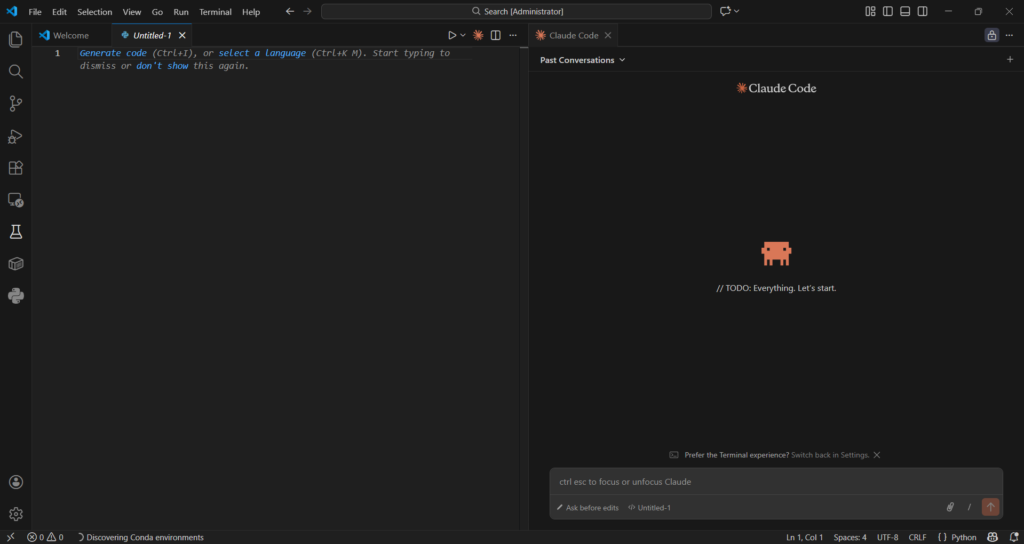
Screenshot of my setup in VSC and Claude Code connected to GLM 4.6
One thing that really stands out for me is that GLM 4.6 is open-source. This gives it a level of transparency that other popular models don’t currently have.
Overall rating: 5/5
Here is a summary table of the comparison:
| Category | ChatGPT (GPT-4.x family) | GLM-4.6 (Zhipu AI) |
| Best For | Simple–moderate coding tasks, backend logic, debugging | Large codebases, agentic workflows, multi-file consistency, autonomous coding |
| Coding Strengths | Good function-level coding, strong backend support, solid debugging | Exceptional multi-file editing, huge context window, low hallucinations, great for IDE integration, excellent for agentic AI workflows |
| Coding Weaknesses | Struggles with multi-file changes, frontend hallucinations, inconsistent long-context behavior | Slightly slower than proprietary frontier models in edge-case reasoning |
| Reasoning Quality | ★★★★☆ | ★★★★★ |
| Multi-File Editing Ability | ★★☆☆☆ | ★★★★★ |
| Hallucination Rate | Medium | Very low |
| Context Window | ~128K (varies by version) | 200K |
| Speed | Fast | Fast–Moderate |
| Local / Open-Source? | No | Yes (open-source) |
| Cost | ~$20/mo (Pro) | $3/mo promo ($6/mo normal) |
| Overall Coding Score | 3.5/5 | 5/5 |
Best LLM For Writing
As a freelance copywriter and SEO content writer, I use LLMs just as frequently as I do when writing code. My output for content, whether it be news articles, SEO articles, or just social media posts, has tripled in recent months. Below, I’ll share which models are best for writing in my opinion, and how I use them every day.
ChatGPT
ChatGPT is a good overall model when it comes to using it for either coding or writing.
With regards to the latter, it does sometimes write in a robotic tone. You can address this by explicitly telling it what tone the text should be written in (informal, conversational, educational, simple).
Even after explicitly stating the required tone, the text still feels robotic. To be fair, this could just be because I know that it was written by ChatGPT. An unaware reader might have a different experience.
One problem is that almost everyone, if not everyone, uses ChatGPT to write their content. So everyone’s content is starting to sound the same. There’s also telltale signs that a piece of content was written by a GPT model. These are the frequent mentions of words such as “underscore” and “highlighting.” Let me not forget to mention the “–” that AI models in general love to throw into text.
Look, ChatGPT is definitely a good writer. But these days, I prefer to use it as a tool to come up with a content framework or article structure and on the very rare occasion, a first draft. Where it really shines, and features that I love to use, are the “Deep Research” and “Research” capabilities.
When I was a journalist, I would need to get stories out quickly. Sometimes I would have to write about a tweet from someone without really having much context. In these cases, I would turn to ChatGPT, toggle on the “Search” tool, and then ask it to give me more context or search for recent related news, etc.
That allowed me to push out a news story in a couple of minutes from when a post was made, because I wouldn’t have to do the research on my own. Instead, I could just verify the output from ChatGPT.
For SEO articles, I frequently turn to ChatGPT’s “Deep Research” tool. I can create a first draft within minutes, which I can then just apply a human overlay to and add/change where needed.
Overall score: 4/5
Gemini
While ChatGPT is a great writing assistant, I am finding myself using Gemini more often these days. Gemini belongs to Google and has so much data to train from. This gives it an edge over OpenAI’s model, which I have seen when it comes to suggesting compelling titles, headings, and even social media posts.
I used to ask ChatGPT to give interesting title suggestions for an article, and they would always follow a boring generic pattern. The same happened when I’d ask for social media posts. After enough failed attempts, I started using Gemini.
Gemini not only gives titles that are actually interesting and make me want to read the article I just wrote, but it also explains the reasoning behind each suggestion and how it abides by Google’s E-E-A-T and Google Discover guidelines.
It also explained its reasoning as to why it thinks certain social media posts would perform well when I asked for suggestions.
To sum up the difference in performance between Gemini and ChatGPT, just ask both models to give a meta description for an article! ChatGPT will likely give you one that is too long and not interesting, while Gemini will deliver the most beautiful meta description that is also under 160 characters long.
Overall score: 5/5
ChatGPT and Gemini are sort of the gold standard for writing from what I’ve seen with my experiences. As such, I don’t think it’s necessary to cover other models.
There are honorable mentions though. Perplexity, for instance, is a great tool for research. I’ve found that it does better research than ChatGPT. However, it does cap the number of requests you can make per day on the free tier, which is something to keep in mind.
Here is a summary table of the comparison:
| Category | ChatGPT (GPT-4.x family) | Gemini (Google) | Perplexity (Honorable Mention) |
| Best For | Drafting, outlining, frameworks, SEO article structures, quick research | High-quality writing, compelling titles, meta descriptions, polished tone, social media posts | Deep, fast research queries with citations |
| Writing Strengths | Good overall writer, flexible, strong for templates, great at generating article structures, “Research” and “Deep Research” tools are powerful | Best-in-class for headlines, meta descriptions (<160 chars), tone accuracy, E-E-A-T-aligned suggestions, excellent reasoning behind wording choices | Superior factual retrieval, great summaries, excellent for context gathering |
| Writing Weaknesses | Often robotic tone, repetitive phrasing (“underscore,” “highlighting”), generic patterns, overuses punctuation like “—” | Can be verbose in reasoning; sometimes over-optimizes for structure | Strict request limits on free tier; not ideal for full article drafting |
| Tone Quality | ★★★☆☆ | ★★★★★ | ★★★★☆ (for factual tone) |
| SEO Writing | Good but predictable; meta descriptions often too long | Excellent — best among all tested models | Good for research → manual optimization needed |
| Headline/Title Quality | Generic, template-like | Outstanding, click-worthy, Google Discover–friendly | Not designed for creativity |
| Consistency | Medium–High | High | High for research, medium for writing |
| Speed | Fast | Fast | Fast |
| Cost | ~$20/mo (Pro) | ~$20/mo (Gemini Advanced) | Free with limits |
How To Keep LLMs Costs Low With Ollama
Most people use LLMs through dedicated web interfaces or apps. However, companies are increasingly building their own agentic systems, which rely on API costs.
While API-based models like Gemini and ChatGPT are incredibly convenient, the costs can spiral when you’re running high-volume tasks or multi-agent workflows that require thousands of calls a day.
To offset this, I’ve moved about 40% of my mundane background tasks, like text summarization, simple data extraction, and basic unit testing, to Ollama.
What is Ollama?
Ollama is an open-source tool that allows you to run powerful LLMs (like Llama 3.2, Mistral, or DeepSeek) locally on your own hardware. Since the model runs on your machine, you pay zero token fees. Your only cost is the electricity to run your computer and the initial investment in a decent GPU (but expensive GPUs are often not necessary).
My “Cost-Optimized” Hybrid Workflow
In my work as an agentic developer, I don’t use the most expensive model for everything. Instead, I use a “Model Routing” strategy:
- Tier 1 (Complex Tasks): I use GLM 4.6 or Claude 3.5 Sonnet for architecture design and difficult debugging.
- Tier 2 (Mundane Tasks): I route repetitive tasks to Ollama running Llama 3.2 (3B) or Phi-3.
Pro Tip: If you have an Apple Silicon Mac (M2/M3/M4) or an NVIDIA RTX card, Ollama is incredibly fast. I often run it in the background as a local API server, allowing my agentic workflows to “think” for free.
I recently used Ollama to build an agentic editorial workflow, and was able to increase the number of articles published per day while slashing time and costs using Ollama. Read more here.
Stop Prompting AI. Start Deploying It
Most businesses use AI as a better search engine. I build it to be your most productive employee. From multi-agent coding teams to autonomous research cycles, I architect agentic workflows that think, plan, and execute while you sleep.
Let’s Automate Your Operations
Frequently Asked Questions
Which LLM is best for coding?
The best LLM for coding in 2026 is GLM-4.6, thanks to its enormous 200K context window, extremely low hallucination rate, and unmatched consistency in multi-file reasoning and autonomous coding workflows. It performs especially well inside IDEs like VS Code when paired with Claude Code.
ChatGPT is still strong for simple to moderately complex scripts, but it struggles with multi-file changes and frontend consistency.
What is the best LLM overall?
There is no single “best” LLM, because each model excels in a different category.
• GLM-4.6 → Best for coding, debugging, and agentic workflows
• Gemini → Best for writing, headlines, meta descriptions, and Discover-optimized content
• Perplexity → Best for deep, fast research with reliable citations
• ChatGPT → Best for frameworks, structuring, and quick drafts
The most productive workflow is usually a hybrid approach that routes tasks to different models based on their strengths.
What is the best LLM for coding?
If you’re focused specifically on coding performance, GLM-4.6 is the top choice. It handles large repositories, multi-file edits, architecture design, and autonomous development far better than GPT-4.x or Gemini.
ChatGPT remains useful for debugging, explaining concepts, or generating small snippets, but GLM-4.6 dominates in complex, real-world coding environments.
Which LLM is the best for writing?
Gemini currently produces the strongest writing output — including headlines, meta descriptions under 160 characters, social posts, and polished SEO-friendly copy. It also outperforms other models in creativity and tone accuracy.
ChatGPT is still reliable for outlining, frameworks, and structured drafting, but Gemini wins on final output quality.
Which LLM security tool is best?
There is no single “best” LLM security tool, but the strongest options fall into three categories:
• Input/Output filtering — Guardrails, Rebuff, LlamaGuard
• Prompt injection defense — PromptShield, Microsoft’s PyRIT
• Agentic workflow security — LangGraph checkpoints, OpenAI’s SecureTooling sandbox
The best tool depends on whether you’re securing prompts, model outputs, or multi-agent systems. For most developers, LlamaGuard + Rebuff provides the best lightweight protection.
Which LLM is best for research?
Perplexity is the best LLM for research because it retrieves factual information quickly, keeps sources transparent, and surfaces citations automatically. It’s ideal for journalists, analysts, and researchers.
However, it’s not designed for full article drafting — pairing Perplexity with Gemini or ChatGPT gives the best results.
Which LLM is best for SEO content and Google Discover?
Gemini is the strongest LLM for SEO writing. It produces natural, engaging titles, perfect-length meta descriptions, and Discover-friendly phrasing that aligns well with Google’s E-E-A-T criteria.
If you care about rankings, click-through rate, and tone quality, Gemini consistently outperforms other models.
How do I keep LLM costs low?
Running open-source models locally with Ollama is the best strategy to reduce API spending. You can route repetitive or background tasks to local models like Llama 3.2 or Phi-3, while reserving GLM-4.6 or ChatGPT for complex reasoning.
This hybrid “model routing” approach can cut costs by 40–70% in agentic workloads.
Why do different LLMs perform better at different tasks?
LLMs vary in training data, architecture, parameter count, reasoning capabilities, and context window size. As a result:
• Some models excel at writing
• Some excel at coding
• Some excel at research
• Some excel at long-context reasoning
No current model dominates all categories, which is why the highest productivity comes from pairing multiple models instead of relying on just one.
Which LLM is best for beginners?
ChatGPT is the most beginner-friendly LLM due to its simple interface, consistent behavior, and strong ability to explain concepts. It’s an ideal starting point for coding, writing, research, or general learning.

Steven Walgenbach is an AI Engineer specializing in AI agents, large language models, retrieval-augmented generation and business process automation. He designs and builds practical AI systems that connect with existing tools, data sources and workflows to help businesses reduce manual work, improve decision-making and scale more efficiently.
His work includes developing multi-agent systems, private and locally hosted AI solutions, custom knowledge assistants, SEO automation pipelines and LLM-powered applications using Python, LangGraph, CrewAI, the OpenAI Agents SDK and other modern AI frameworks.
Through AIMEC, Steven helps businesses move beyond AI experimentation and identify practical opportunities where artificial intelligence can deliver measurable operational and commercial value.