
The cost to build an AI agent can range from a relatively small proof of concept to a much larger investment in software development, infrastructure, integrations, testing, and ongoing maintenance.
In my experience as an AI engineer, I’ve come to realize that there is no reliable flat price for an AI agent, because the term covers a wide range of systems. A simple agent might classify a request and call one external tool. A more advanced agent may need to search company data, retain memory, coordinate with other agents, use multiple APIs, browse websites, write files, request human approval, and run continuously.
After building AI agents for several years, I have found that the biggest cost driver is not necessarily the language model itself. It is the amount of functionality the agent needs to support.
The more an agent is expected to do, the more context, tools, safeguards, infrastructure, and development work it requires.
AI Agent Cost at a Glance
A basic AI agent prototype may cost a few hundred to a few thousand dollars to build, particularly when it uses an existing model API and only performs one narrowly defined task.
A more complete business agent with multiple tools, memory, workflow integrations, authentication, monitoring, and a user interface may cost anywhere from several thousand dollars to tens of thousands of dollars.
Complex enterprise agents can cost considerably more, especially when they must operate on private infrastructure, integrate with legacy systems, meet strict security requirements, or coordinate across multiple business functions.
A practical way to think about AI agent pricing is:
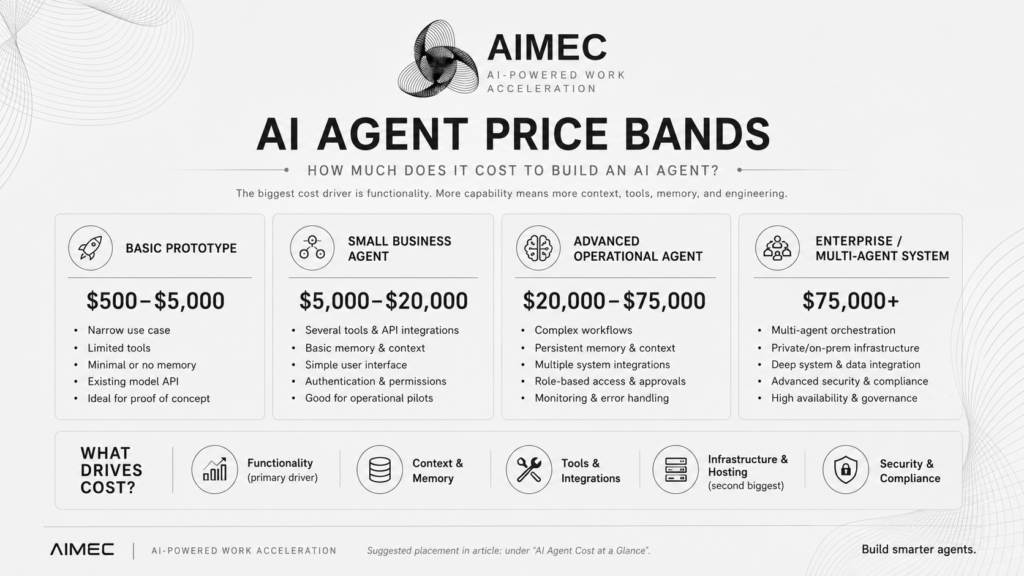
These figures should be treated as broad planning ranges rather than fixed quotes. Two agents that appear similar from the outside can have very different technical requirements.
Is an AI Agent Worth the Cost?
The price of an AI agent only makes sense when it is compared with the cost of the workflow it will replace or improve.
A $20,000 agent may appear expensive in isolation. However, it may generate a strong return if it reduces hundreds of hours of repetitive work, improves response times, prevents missed opportunities, or allows employees to focus on higher-value tasks.
Before approving a project, estimate:
- How many employees currently perform the task
- How many hours are spent on it each week
- The average hourly cost of those employees
- The percentage of the workflow AI can realistically automate
- The expected monthly cost of hosting, models and supporting tools
You can use the AIMEC AI ROI Calculator to compare your current labour costs with the potential savings from automation.
The calculator provides an initial estimate rather than a guaranteed financial outcome. It is most useful for narrowing down which workflows deserve a more detailed AI feasibility assessment.
Will the agent pay for itself?
Enter your team size, labour cost, weekly task hours and estimated automation percentage to calculate the potential return from an AI implementation.
The Main Cost Driver Is Functionality
The first question should not be, “Which AI model will the agent use?” It should be, “What does the agent need to do?”
An agent that summarizes documents is fundamentally different from one that must access a customer database, identify relevant records, call external tools, update business systems, remember previous interactions, and escalate uncertain cases to a human. Each additional capability introduces more development work.
An agent may need to:
- Call APIs and business tools
- Search a knowledge base
- Read and write documents
- Use a browser
- Query databases
- Maintain short-term or long-term memory
- Manage user sessions
- Request human approval
- Recover from failed tool calls
- Coordinate with other agents
- Follow permissions and access rules
- Produce logs for monitoring and auditing
This functionality also increases the amount of context the agent needs.
A simple agent can often operate from the latest user message and a short system prompt. A more capable agent may need access to previous conversations, business rules, user preferences, available tools, recent tool outputs, internal documentation, and the current state of a workflow. That context must be selected, structured, stored, and delivered to the model efficiently.
This is one reason the true cost of an AI agent often sits outside the model API bill. The difficult work is building the surrounding system that gives the model the correct information and allows it to act safely.
Why Context Increases AI Agent Costs
Context is everything the agent needs to understand before making a decision.
This may include:
- The user’s request
- Conversation history
- Available tools
- Instructions for using each tool
- Business policies
- Customer or product information
- Data retrieved from a vector database
- Results from previous agent actions
- Memory from earlier sessions
- The status of other tasks in the workflow
As context grows, the agent can become more expensive to operate because more tokens may be sent to the model on each request. However, the larger expense is often the engineering required to decide which context is relevant.
Sending every available document and previous conversation to a model is rarely a good solution. It increases costs, slows responses, and can make the agent less accurate. A production-ready agent normally needs a context-management layer that retrieves only the information required for the current task.
This may involve retrieval-augmented generation, metadata filtering, conversation summarization, structured memory, tool-result compression, or dedicated context-selection agents. The more functionality the agent has, the more important this layer becomes.
Tool Use Adds Development and Maintenance Costs
Tools are what allow an AI agent to move beyond generating text.
A tool could be an API call, database query, browser action, search function, email integration, CRM update, file operation, or internal business workflow. Giving an agent access to a tool involves more than describing the tool in a prompt. The system must validate the agent’s inputs, handle authentication, manage API failures, prevent duplicate actions, record the result, and return the relevant information to the model.
Actions that affect real business systems may also require approval controls. For example, an agent that drafts an email is relatively simple. An agent that selects the recipient, retrieves account information, sends the email, updates a CRM record, and schedules a follow-up needs substantially more engineering.
Every integration also creates an ongoing maintenance obligation. APIs change, authentication tokens expire, data formats evolve, and third-party services experience outages.
Memory Can Be Simple or Expensive
Memory is frequently discussed as though it were a single AI agent feature. In practice, there are several types of memory, each with different costs.
Short-term memory may only require storing the most recent conversation messages. Long-term memory may involve saving user preferences, previous decisions, task outcomes, business context, and important events across multiple sessions.
An advanced agent may also need to distinguish between:
- Temporary conversation context
- Long-term user information
- Operational task state
- Company knowledge
- Lessons learned from previous failures
- Information that must be deleted or updated
The cost increases when memory needs to be accurate, searchable, permission-aware, and persistent.
Poor memory architecture can also create serious problems. An agent may remember outdated information, retrieve irrelevant records, expose one user’s information to another, or treat an incorrect assumption as a fact. This means that memory requires storage, retrieval logic, access control, testing, and often a process for reviewing or correcting saved information.
Hosting and Infrastructure Are the Next Major Costs
Once the agent’s functionality has been defined, hosting and infrastructure become the next major consideration.
A cloud-based agent that uses a hosted model API can often be launched with relatively modest infrastructure. The application may only need an API server, a database, a queue, monitoring, and a user interface. The costs change when the agent must run on-premises.
On-premise AI agents may be required when an organisation cannot send sensitive information to an external model provider or needs tighter control over its systems.
Running a useful local model generally requires more than a standard consumer laptop, particularly when the agent needs a large context window, multiple concurrent users, or fast responses. This does not mean every business needs a dedicated data centre, industrial cooling system, and redundant power infrastructure. However, hardware capacity must be considered realistically.
Important factors include:
- GPU memory
- System RAM
- Model size and quantisation
- Context-window requirements
- Number of concurrent users
- Required response speed
- Storage capacity
- Power consumption
- Reliability and uptime
- Backup and recovery processes
A small local deployment can run on workstation hardware. A business-critical deployment may require multiple GPUs, dedicated servers, load balancing, monitoring, and failover capacity.
What I Have Learned From Building Local AI Agents
My own work with local agents has shown that impressive systems can be built without enterprise-grade infrastructure, provided the workloads are designed around the available hardware. I have used a gaming PC with two NVIDIA GTX 1060 GPUs, each with 6 GB of VRAM, to experiment with local language models and agent workflows.
By using quantised models, splitting model workloads across the GPUs, limiting context where necessary, and carefully managing which tasks run locally, I have been able to build and test:
- Local coding agents
- Browser automation agents
- Retrieval-augmented generation pipelines
- Multi-agent task-routing systems
- Tool-calling agents
- Local document and knowledge search
- Agent memory and context-management systems
- Agents served through Ollama and llama.cpp
- FastAPI services that route requests between agents
This setup is not comparable to a modern enterprise GPU server. There are clear limits around context size, response speed, model size, and concurrent workloads. However, it has been more than capable of proving architectures, testing agent behaviours, developing tool integrations, and identifying where additional infrastructure would provide meaningful value.
That distinction is important. A company does not always need to purchase expensive hardware before it knows whether an agent will solve the intended problem. A smaller local setup or hosted model can be used to validate the workflow first. Infrastructure should then be expanded based on measured demand rather than assumptions.
Hosted Models Versus Local Models
Using a hosted model is usually the fastest way to build an AI agent. The provider handles model hosting, scaling, updates, and much of the underlying infrastructure. The development team pays based on usage, typically through token or request pricing. This approach lowers the initial infrastructure cost but creates an ongoing variable expense.
Local models require a larger upfront investment in hardware and deployment work. However, they may reduce per-request model costs and provide more control over data. Neither option is automatically cheaper.
A hosted model may be more affordable for an agent that handles a few hundred requests per month. Local infrastructure may become more attractive for high-volume, privacy-sensitive, or predictable workloads. Many systems can also use a hybrid approach. Sensitive tasks can run locally, while complex reasoning tasks are sent to a hosted model when permitted.
Other Factors That Affect the Cost of Building an AI Agent
User Interface
An internal agent accessed through a basic chat interface will cost less than a polished customer-facing product. Interfaces may need authentication, conversation history, file uploads, approval controls, status indicators, analytics, and mobile support.
Data Preparation
An agent is only as useful as the information it can access. Company documents may need to be cleaned, split into useful sections, tagged with metadata, embedded, and stored in a retrieval system. Duplicate, outdated, contradictory, or poorly formatted data can significantly increase implementation time.
Security and Permissions
An agent that can only answer public questions requires fewer controls than one that can access customer records or modify financial data. Security requirements may include role-based permissions, encrypted storage, audit logs, network restrictions, approval gates, and data-retention policies.
Testing and Evaluation
AI agents do not behave like conventional software. A normal function usually produces a predictable result for a given input. An agent may choose different tools, interpret instructions differently, or produce slightly different outputs each time.
Testing therefore needs to cover more than whether the code runs. The team must evaluate tool selection, answer quality, refusal behaviour, error recovery, hallucination risk, and the agent’s ability to complete the entire workflow.
Monitoring and Observability
A production agent should record what it attempted, which tools it called, how long each step took, what failed, and how much the model request cost. Without this information, it is difficult to improve the system or understand why an agent made a poor decision.
Human Oversight
Some workflows require a human to approve an action before the agent continues. Human review reduces risk but also affects operating costs and response times. The system needs a clear process for sending approvals, receiving feedback, and resuming paused tasks.
Ongoing Maintenance
An AI agent is rarely a once-off development project. Prompts need to be refined, tools change, new edge cases appear, models are updated, and business processes evolve. A realistic budget should therefore include ongoing monitoring, evaluation, infrastructure, and development work.
How to Estimate the Cost of Your AI Agent
A useful estimate starts with the workflow rather than the technology.
Define:
- The exact task the agent must complete
- The tools and systems it must access
- The information it needs at each step
- Whether it requires short-term or long-term memory
- Which actions require human approval
- How many users or requests it must support
- Whether data can leave the company’s infrastructure
- The acceptable response time
- The consequences of an incorrect action
- How the agent’s performance will be measured
Once these requirements are clear, the system can be divided into a prototype, production build, and ongoing operating cost.
The prototype should test whether the agent can complete the core task. The production build should add reliability, permissions, logging, security, monitoring, and user experience. The ongoing cost should include model usage, hosting, storage, third-party services, maintenance, and human review.
Can You Build an AI Agent on a Small Budget?
Yes, particularly when the agent has a narrow purpose. A focused agent using an existing model API, a small number of tools, and a simple interface can be built relatively affordably.
Costs rise when the initial idea is described as a single agent but actually represents an entire software platform. For example, “an agent that manages our sales process” may require lead discovery, company research, CRM access, email generation, approval workflows, follow-ups, analytics, memory, and compliance controls.
The best way to control costs is to begin with one measurable workflow. Build the smallest version that can create value, test it with real users, and expand the functionality only when there is evidence that the additional capability is needed.
Is It Cheaper to Build or Buy an AI Agent?
Buying an existing AI product is usually cheaper when the business process is common and the available software already meets most of the requirements.
Building a custom agent becomes more attractive when the workflow is unique, the agent must integrate deeply with internal systems, the company needs ownership of the logic, or privacy requirements prevent the use of standard tools.
The decision should consider more than the initial price. A subscription product may be cheaper to launch but become expensive at scale. A custom system may require a larger upfront investment but offer more control and flexibility.
Final Thoughts
How much it costs to build an AI agent depends primarily on what the agent needs to do. Model pricing matters, but functionality is usually the larger driver. Every tool, memory system, integration, permission, workflow, and additional source of context increases the amount of engineering required to make the agent reliable.
Hosting and infrastructure are the next major considerations, particularly when the agent must run locally or on-premises.
My own experiments with local agents on a gaming PC with two older GPUs have demonstrated that useful agent systems do not always require enterprise infrastructure. I have been able to develop local coding agents, RAG systems, browser agents, tool-calling workflows, and multi-agent architectures on modest hardware.
The limitations become more important when the system needs larger models, longer context, faster responses, more users, or higher reliability.
The most cost-effective approach is therefore not to start with the biggest model or the most expensive hardware. It is to define one valuable workflow, build the simplest agent capable of completing it, measure the outcome, and expand the system as its value becomes clear.
Frequently Asked Questions
How much does a basic AI agent cost?
A basic AI agent prototype can cost between approximately $500 and $5,000, depending on the number of integrations, the user interface, and whether existing APIs and development frameworks are used.
How much does an enterprise AI agent cost?
An enterprise AI agent may cost $75,000 or more when it requires custom integrations, private infrastructure, strict security, persistent memory, monitoring, and support for multiple teams or workflows.
What is the biggest cost when building an AI agent?
The biggest cost is normally the functionality surrounding the model. This includes tools, integrations, memory, context management, testing, permissions, and error handling.
Are local AI agents cheaper?
Local AI agents can reduce ongoing model API costs, but they require hardware, deployment, maintenance, and technical expertise. They are not automatically cheaper for small or low-volume workloads.
Can an AI agent run on a gaming PC?
Yes. A gaming PC with a suitable GPU can run quantised local models and support agent development, RAG, tool calling, and smaller production workloads. Its limits will depend on GPU memory, model size, context length, and the number of concurrent users.
Does an AI agent need a GPU?
An agent using a hosted model API does not need a local GPU. A GPU is usually beneficial when the language model or embedding model is hosted locally.
What ongoing costs should businesses expect?
Ongoing costs may include model usage, hosting, databases, vector storage, monitoring, API subscriptions, maintenance, security updates, evaluation, and human review.

Steven Walgenbach is an AI Engineer specializing in AI agents, large language models, retrieval-augmented generation and business process automation. He designs and builds practical AI systems that connect with existing tools, data sources and workflows to help businesses reduce manual work, improve decision-making and scale more efficiently.
His work includes developing multi-agent systems, private and locally hosted AI solutions, custom knowledge assistants, SEO automation pipelines and LLM-powered applications using Python, LangGraph, CrewAI, the OpenAI Agents SDK and other modern AI frameworks.
Through AIMEC, Steven helps businesses move beyond AI experimentation and identify practical opportunities where artificial intelligence can deliver measurable operational and commercial value.